

Introduction
In today's digital landscape, data protection and information security have become top priorities for organizations. Microsoft Sensitivity Labels, part of the Microsoft Purview Information Protection, provide an effective way to classify, label, and protect data across an organization's environment. Whether you're managing confidential documents, emails, or collaboration spaces like OneDrive or Sharepoint, sensitivity labels help enforce consistent protection policies across Microsoft 365 services.
What are Sensitivity Labels?
Sensitivity labels are a feature of Microsoft 365 that allows you to classify and protect your organization's data based on its sensitivity. By applying these labels, you can control access, encryption, and tracking of data, ensuring it stays secure wherever it resides or travels.
Labels are highly customizable and can include settings such as:
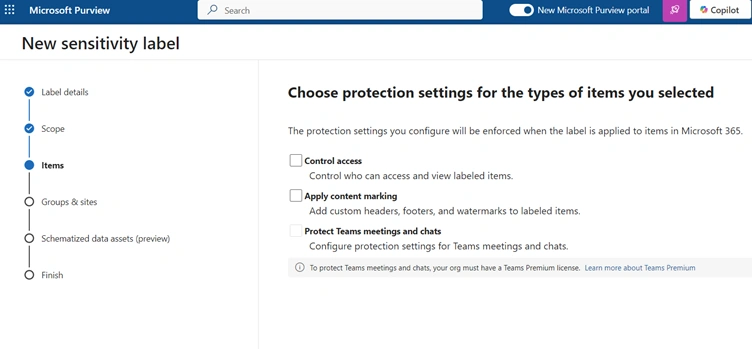
- Encryption: Encrypt content to control who can access it and for how long.
- Watermarking: Add visual indicators like watermarks, headers, or footers.
- Access Control: Prevent sharing outside the organization or restrict editing and printing.
- Automatic Labeling: Automatically apply labels based on content detection rules (e.g., sensitive keywords, patterns, or metadata).
Why Use Sensitivity Labels?
Organizations face numerous challenges when it comes to protecting sensitive data. Sensitivity labels help solve these issues by:
- Enhancing Security: Ensuring that sensitive data is only accessible to authorized individuals.
- Ensuring Compliance: Meeting regulatory requirements (e.g., GDPR, HIPAA, or ISO 27001).
- Streamlining Data Classification: Consistent classification of documents and emails reduces the risk of data leaks.
- Seamless User Experience: Labels integrate seamlessly into Microsoft 365 apps like Outlook, SharePoint, OneDrive, and Teams.
Key Features of Sensitivity Labels
- Protect Content with Encryption and Markings
- Apply encryption to restrict access and actions (e.g., editing or printing).
- Add watermarks, headers, or footers for visual labeling.
- Extend SharePoint Protection
- Configure default labels for SharePoint libraries.
- Apply protection to files when they are downloaded to ensure permissions travel with the file.
- Work Across Office Apps and Devices
- Protect content in Word, Excel, PowerPoint, and Outlook across desktop, web, and mobile platforms (Windows, macOS, iOS, and Android).
- Protect Third-Party Apps and Services
- Use Microsoft Defender for Cloud Apps to detect, classify, and label data in third-party apps like Salesforce, Box, or Dropbox, even if they don’t natively support labels.
- Support eDiscovery Cases
- Use sensitivity labels to identify or exclude labeled content when running eDiscovery searches for files and emails.
- Protect Teams, Groups, and Sites
- Apply labels to Teams, Microsoft 365 Groups, SharePoint sites, and Loop workspaces.
- Control privacy, external sharing, and unmanaged device access.
- Protect Meetings and Chat
- Label meeting invites and chat responses to enforce settings, including optional encryption.
- Extend to Power BI
- Apply and view sensitivity labels in Power BI, and protect data when exporting it.
- Extend to Microsoft Purview Data Map
- Apply sensitivity labels to files and data assets, including SQL, Synapse, Cosmos DB, and AWS RDS (currently in preview).
- Support Third-Party Apps
- Use Microsoft Information Protection SDK to enable third-party apps to read and apply labels.
- Label Content Without Protection
- Apply labels for classification only to visually indicate sensitivity. You can later add protection settings based on usage reports and activity data.
- Protect Data with Microsoft 365 Copilot
- Copilot recognizes sensitivity labels and ensures labeled data remains protected during user interactions.
Where Sensitivity Labels Can Be Applied?
Sensitivity labels work across Microsoft 365 applications and services, including:
- Microsoft Word, Excel, PowerPoint, and Outlook
- SharePoint Online and OneDrive for Business
- Microsoft Teams
- Exchange Online
Most Common Sensitivity Labels to use
- Internal
- Public
- Confidential Internal
- Confidential External
- Strictly Confidential Internal
- Strictly Confidential External
Internal
- Description: Data intended for internal use within the Organization. Not encrypted and cannot be tracked or revoked.
- Examples:
- Internal newsletters or announcements.
- Non-sensitive project updates are shared within the organization.
- Employee training materials.
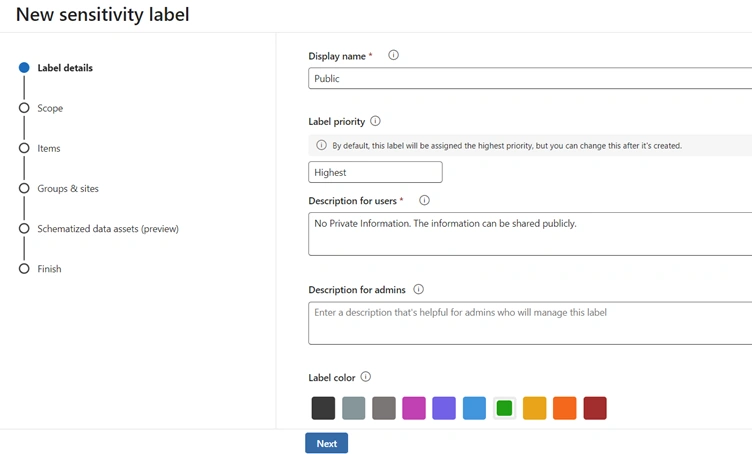
Public
- Description: Business data specifically prepared and approved for public consumption. Data is not encrypted, and owners cannot track or revoke content.
- Examples:
- Responding to customer queries about products or services.
- Sharing links to publicly available marketing materials or job postings.
- Press releases or public announcements.
Confidential Internal
- Description: Sensitive business data intended for internal use only. Data is encrypted, and owners can track and revoke content.
- Examples:
- Internal financial reports or budgets.
- Drafts of strategic plans shared with senior leadership.
- Employee performance reviews.
Confidential External
- Description: Sensitive business data shared with external partners. Data is encrypted, and owners can track and revoke content.
- Examples:
- Sharing project deliverables with external vendors.
- Collaborating with external consultants on business strategies.
- Legal documents shared with external counsel.
Strictly Confidential Internal
- Description: Highly sensitive business data intended for internal use only. Data is encrypted, and owners can track and revoke content. Recipients cannot forward or reply to the content.
- Examples:
- Mergers and acquisitions (M&A) documents.
- Intellectual property (IP) or patent-related information.
- Sensitive HR investigations or legal matters.
Strictly Confidential External
- Description: Highly sensitive business data shared with external partners. Data is encrypted, and owners can track and revoke content. Recipients cannot forward or reply to the content.
- Examples:
- Sharing confidential contracts with external partners.
- Collaborating on highly sensitive R&D projects with external entities.
- Legal settlements or agreements with third parties.
Summary of Key Points
- Internal and Public labels do not encrypt data and cannot be tracked or revoked.
- Confidential Internal, Confidential External, Strictly Confidential Internal, and Strictly Confidential External labels encrypt data and allow owners to track and revoke content.
- Recipient actions (e.g., view, forward, reply, print, save) are restricted based on the label and scope applied.
- Strictly Confidential labels impose stricter restrictions, preventing recipients from forwarding or replying to content.
To create Sensitivity Labels
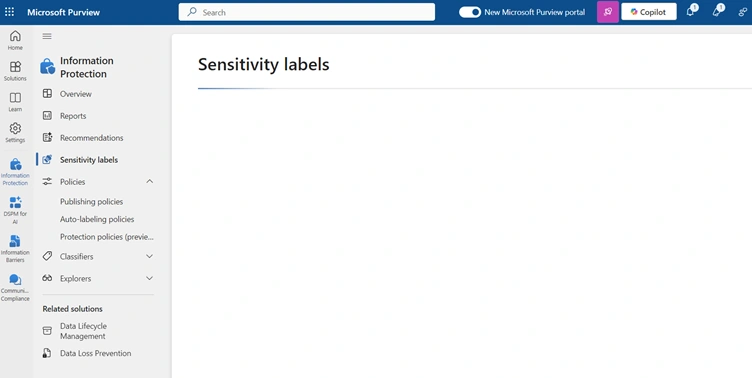
Goto Microsoft Purview Admin Center --> Information Protection --> Sensitivity Labels --> Create a Label
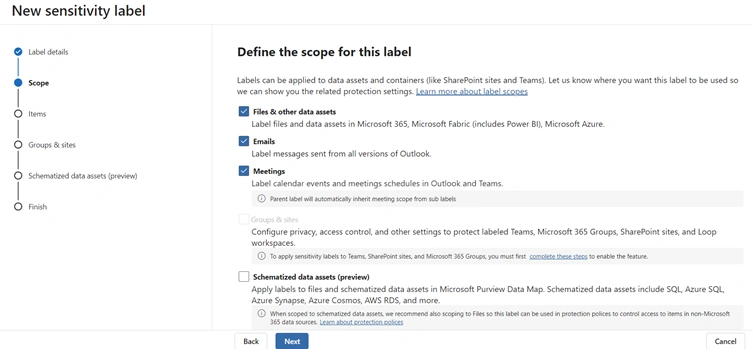
In addition to using sensitivity labels to protect documents and emails, you can also use sensitivity labels to protect content in the following containers: Microsoft Teams sites, Microsoft 365 groups (formerly Office 365 groups), and SharePoint sites.
After creating a Sensitivity Label, it needs to publish to the Organization wide.
Goto Microsoft Purview Admin Center --> Information Protection --> Sensitivity Labels --> Policies --> Label Publishing Policies
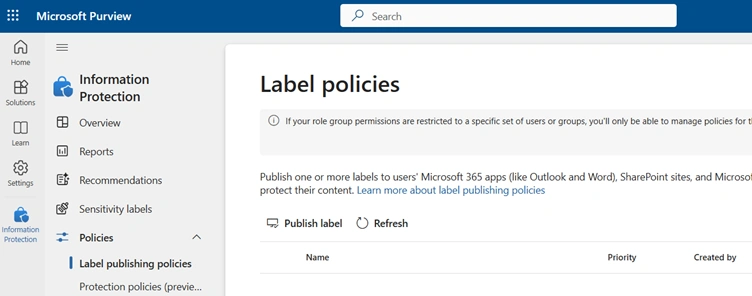
Note. The recommended method is to create all labels first and publish one global policy for the tenant.
Join the conversation! Your thoughts help the community grow.