

Introduction
Hi, I am a SharePoint front-end developer. As such, it is important to understand the client life cycle in terms of DOM, Browser-engine, etc. We will be talking about the Onload process in this post. There are different techniques used to Provide our custom JavaScript code loaded before / in the middle / alter OnLoad events in SharePoint;
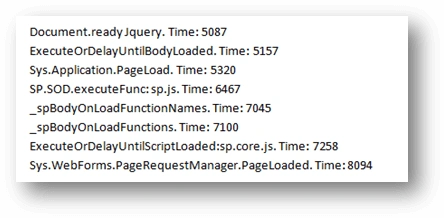
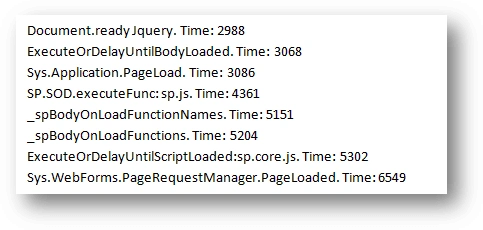
Here we will see 8 different techniques used for the 0nload process. Below are the specified Techniques.
Below are the code snippets for each technique in use.
Sys.Application.PageLoad
- Sys.Application.add load(SPLoad);
- function SPLoad(){
- console.log(“Sys.Application.PageLoad.Time:” + ((Date.now()) – performance.timing.navigationStart))
- }
Sys.WebForms.PageRequestManager.PageLoaded
- Sys.WebForms.PageRequestManager.getInstance().add_pageLoaded(SPPageLoaded);
- function SPPageLoaded(sender,args){
- console.log(“Sys.Webforms.PageRequestManager.PageLoaded.Time:” + ((Date.now()) – performance.timing.navigationStart))
- }
Document.ready Jquery
- jQuery(document).ready(jqueryLoadsSP);
- function jqueryLoadSP(){
- console.log(“Document.ready Jquery.Time:” + ((Date.now()) – performance.timing.navigationStart))
- }
- function ProcessDefaultOnLoad() {
- ProcessPNGImages();
- UpdateAccessibilityUI();
- UpdateAnimationUserControl(false);
- window.setTimeout('ProcessImn()', 10);
- ProcessOnLoadFunctionNames(_spBodyOnLoadFunctionNames); ProcessOnLoadFunctions(_spBodyOnLoadFunctions);
- if (typeof _spUseDefaultFocus != "undefined")
- DefaultFocus();
- }
_spBodyOnLoadFunctionNames
- _spBodyOnLoadFunctionNames.push('OnPageLoad');
- function OnPageLoad(){
- console.log("_spBodyOnLoadFunctionNames. Time: " + ((Date.now()) - performance.timing.navigationStart));
- }
_spBodyOnLoadFunctions
- _spBodyOnLoadFunctions.push(raiseFunc);
- var raiseFunc = function(){
- console.log("_spBodyOnLoadFunction. Time: " + ((Date.now()) - performance.timing.navigationStart));
- };
ExecuteOrDelayUntilScriptLoaded:sp.core.js
- ExecuteOrDelayUntilScriptLoaded(MyFunction, "sp.core.js");
- function MyFunction(){
- console.log("ExecuteOrDelayUntilScriptLoaded:sp.core.js. Time: " + ((Date.now()) - performance.timing.navigationStart));
- }
SP.SOD.executeFunc: sp.js

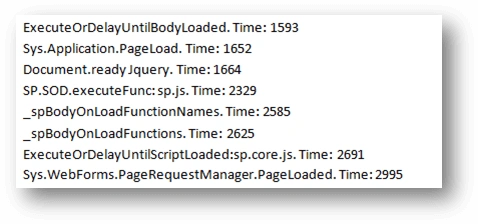
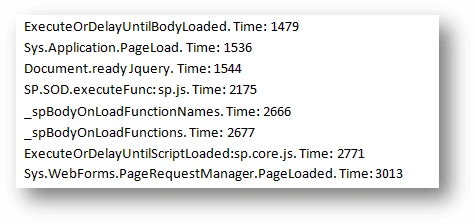
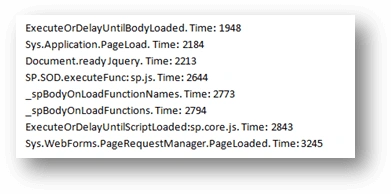

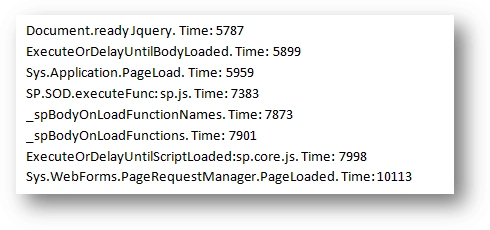
Uma SureshPosted Jun 18, 2020, 1:38 AM
How to implement session timeout in sharepoint.master page