

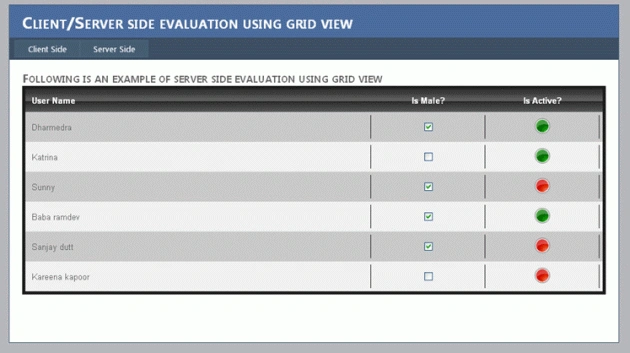
Following is the structure of sample data table with the columns UserName, Ismale and IsActive which are string, Boolean and Boolean data respectively.
//Creation of static datatable
DataTable dt = new DataTable();
dt.Columns.Add("UserName", typeof(string));
dt.Columns.Add("IsMale", typeof(bool));
dt.Columns.Add("IsActive", typeof(Boolean));
Following is the sample data for the above datatable which we will bind to the GridView at server side.
dt.Rows.Add("Dharmedra", "true", "true");
dt.Rows.Add("Katrina", "false", "true");
dt.Rows.Add("Sunny", "true", "false");
dt.Rows.Add("Baba ramdev", "true", "true");
dt.Rows.Add("Sanjay dutt", "true", "false");
dt.Rows.Add("Kareena kapoor", "false", "false");
Following is the way we bind the datatable to the GridView:
//Binding static datatable to the grid view
dgv.DataSource = dt;
dgv.DataBind();
Now the main task we have to do is server side evaluation of the datatable bound to the GridView.
Following is the GridView we created using aspx page. The lines highlighted with yellow color are the controls used in the itemtemplate section GridView control. These three controls will be accessed at the server side and data will be evaluated at the server side.
<asp:GridView ID="dgv" runat="server" AllowPaging="True" AllowSorting="True" AutoGenerateColumns="False"
CssClass="GridViewStyle" GridLines="None" Width="100%" OnRowDataBound="dgv_RowDataBound">
<Columns>
<asp:TemplateField HeaderText="Name">
<HeaderTemplate>
<table width="100%" border="0" cellspacing="0" cellpadding="0">
<tr align="center">
<th align="left" width="60%">
<asp:Label runat="server" ID="Label1" Text='User Name'></asp:Label>
</th>
<th align="center" width="20%">
<asp:Label runat="server" ID="Label2" Text='Is Male?'></asp:Label>
</th>
<th align="center" width="20%">
<asp:Label runat="server" ID="Label3" Text='Is Active?'></asp:Label>
</th>
</tr>
</table>
</HeaderTemplate>
<ItemTemplate>
<table width="100%" border="0" cellspacing="0" cellpadding="0">
<tr>
<td align="left" width="60%">
<asp:Label runat="server" ID="lbluser" ></asp:Label>
</td>
<td align="center" width="20%">
<asp:CheckBox runat="server" ID="chk"></asp:CheckBox>
</td>
<td align="center" width="20%">
<asp:Image runat="server" ID="imgCtrl" />
</td>
</tr>
</table>
</ItemTemplate>
</asp:TemplateField>
</Columns>
<RowStyle CssClass="RowStyle" />
<EmptyDataRowStyle CssClass="EmptyRowStyle" />
<PagerStyle CssClass="PagerStyle" />
<SelectedRowStyle CssClass="SelectedRowStyle" />
<HeaderStyle CssClass="HeaderStyle" />
<EditRowStyle CssClass="EditRowStyle" />
<AlternatingRowStyle CssClass="AltRowStyle" />
</asp:GridView>
Following is the RowDataBound event that evaluates each row of data table and will bind it to the row of the GridView.
protected void dgv_RowDataBound(object sender, GridViewRowEventArgs e)
{
if (e.Row.RowType == DataControlRowType.DataRow)
{
Label lbluser = ((Label)e.Row.FindControl("lbluser"));
CheckBox chk = ((CheckBox)e.Row.FindControl("chk"));
Image imgCtrl = ((Image)e.Row.FindControl("imgCtrl"));
lbluser.Text = Convert.ToString(DataBinder.Eval(e.Row.DataItem, "UserName"));
chk.Checked= Convert.ToBoolean(DataBinder.Eval(e.Row.DataItem, "IsMale"));
imgCtrl.ImageUrl = (Convert.ToBoolean(DataBinder.Eval(e.Row.DataItem, "IsActive")) ? "~/Images/Green.png" : "~/Images/Red.png");
}
}
In the above section e.Row gives the current row of the GridView and the FindControl() method takes control name as parameter and find and return the instance of the control. After this we can use the instance of the control to set the properties. In a similar manner all the controls in the GridView row can be accessed and can be set as desired based on the data of the datatable bound to the GridView.
KayleighPosted Feb 24, 2011, 11:32 PM
That's great, but can you please help me to raise gridview server side event when when row is selected.