

Improper handlings of session variables in an ASP.NET website is considered to be a serious threat and opens various doors to malicious hackers. For instance, a session variable could be manipulated in such a way as to subvert a login authentication mechanism. However, this article illustrates a session fixation bug in a .NET website by providing various live scenarios that usually lead to a website being vulnerable in terms of session hijacking. Moreover, the article circulates detailed information about exploiting vulnerable websites as well as recommended practices for protecting them against session fixation attacks.
Session Fixation Internal
A session fixation attack allows spoofing another valid user and working on behalf of its credentials. It typically fixates on another person's session identifier to breach in the current communication. An ASP.NET based website usually maintains session variables to track a user by creating a cookie called ASP.NET_SessionId in the browser. A Session variable is typically used to record the currently logged-in user and such cookie value is validated on each round-trip to ensure that the data being served is specific to that user. Here the following image describes the process of cookie-based authentication, where the user does the login operation to a vulnerable website and in return, the server issues this specific user a cookie token value for session management.
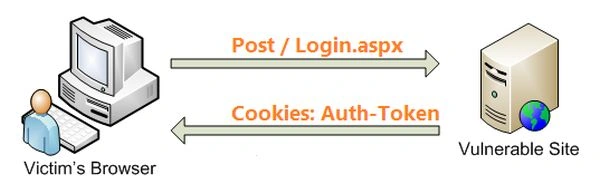
Figure: 1.1
Websites usually, engage session management to construct a user-friendly environment. But this mechanism is vulnerable in some extent because session IDs present an attractive target for attackers that is stored on the server and associated with respective users by a unique session identifier value. There are a couple of approaches applied by the attacker to perform a session fixation attack, depending on the session ID transport mechanism (cookies, hidden fields and URL arguments) and the loopholes identified on the target system.
The mechanics of session management is that the server generates a unique session identifier value during user authentication and sends this session ID back to the client browser and ensure that this same ID will be returned by the browser with each forthcoming request. Hence, such a unique session ID value thereby becomes identification tokens for users and servers can use them to maintain session data.

Figure: 1.2
An ASPNET_SessionID cookie is only configured by the server on behalf of any page request of the website. So when the login page is first accessed, the ASP.NET_SessionID cookie value is set by the client browser and the server uses such a cookie value for all subsequent requests even after authentication is successful and logged out, the ASP.NET_SessionID value does not change. This results in the possibility of session fixation attack, where a hacker can potentially sniff the traffic across the wire or physically access the victim machine in order to get the stored cookies values in the browser and fix a victim's session by accessing the login page, even if not having the actual user name or password. The following image shows the real-time session fixation attack scenario where a potential hacker sits somewhere in the network and intercepts the traffic that happens between the server and client. Here, the hacker employs a packet sniffer to capture a valid token session and then utilizes the valid token session to gain unauthorized access to the Web Server. Finally, the hacker successfully accesses the ASPNET_SessionID value and logs in successfully to the website sensitive zone.
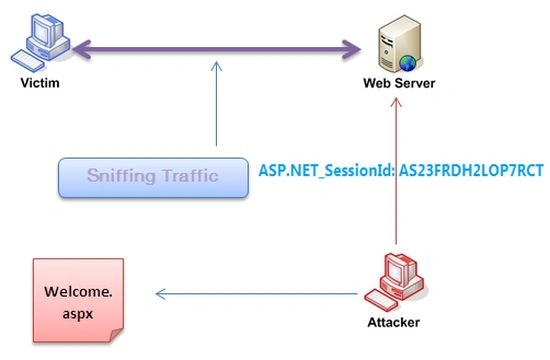
Figure: 1.3
Vulnerable Code Scenario
With session fixation, usually bugs occur on the website that manipulates sensitive data in a transaction or incorporated with a login page to authenticate valid users on behalf of the correct user name and password. This paper illustrates this crucial bug in detail by presenting this vulnerable login authentication code as in the following:
- if (txtUsr.Text.Equals("frank") && txtPwd.Text.Equals("password"))
- {
- Session["LIn"] = txtU.Text.Trim();
- Server.Transfer("Home.aspx");
- }
- else
- {
- lblMessage.Text = "Wrong username or password";
- }
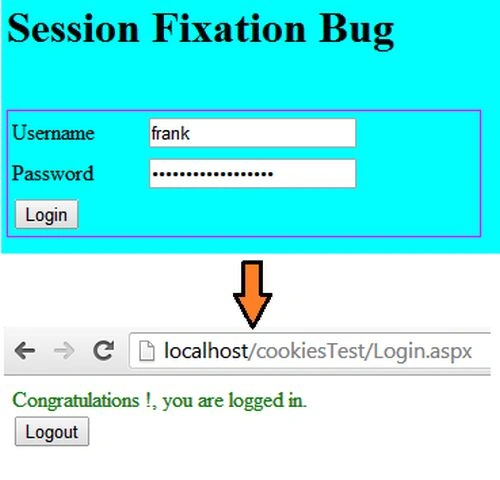
Figure: 1.4
The user typically assumes that his transaction is safe and has less possibility of happening other website related attacks because entering to sensitive zones of web pages could happen after being validated first from the login page that is checking the correct credentials, But still, a couple of serious attacks such as spoofing, replay and session hijacking attacks could be possible even if managing user name and password correctly that we shall see in forthcoming segments of this article series.
Stealing Cookies
Valid session IDs are not only recognized to be identification tokens, but also employed as an authenticators. Users are authenticated based on their credentials (for example: user names and passwords) while login and issued session IDs that will effectively serve as temporary static passwords for accessing their sessions that makes session IDs a very appealing target for attackers. The moment the user enters his credentials on login to authenticate, the data stored in the session and cookies is generated in the client browser. A user is typically over-confident that when he ha logged out all the data is scrubbed automatically and the session is terminated, but unfortunately cookie values are not deleted from the client browser even if the session has ended and such cookies values can be exploited by a hacker to breach into the website sensitive zone without being aware of the user name and password. As the following figure shows, when a user is logged in, the browser shows cookie values that are generated during authentication.
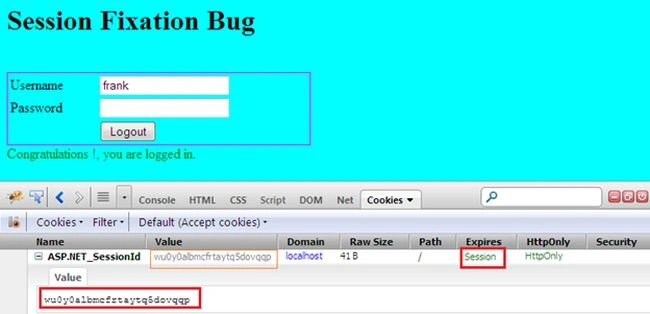
Figure: 1.5
Now, log out and refresh the page. It is generally assumed that cookie values should be wiped out automatically when ending the current session but even after properly signing out from the current session, that is performing Session.Abandon() and Session.Clear() implicitly but the browser still shows the previous session generated cookies values as in the following.
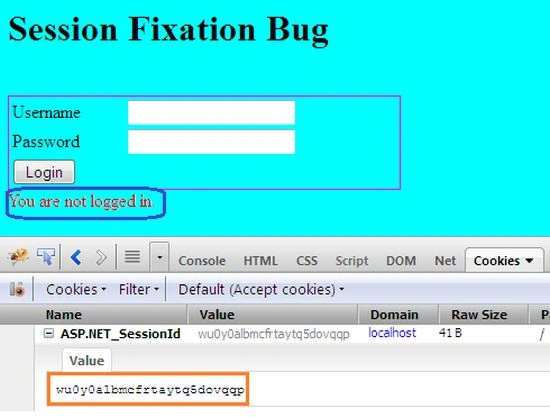
Figure: 1.6
Hence, revealing cookies values even without being logged in could be considered a serious threat and can open the doors of session hijacking attacking. A malicious hacker could directly access the sensitive zone of a website without being logged in by adding such retrieved cookies details manually to the browser. Here, the attacker typically, uses this technique to inject the stolen cookies in the browser to hijack some other current session as in the following:
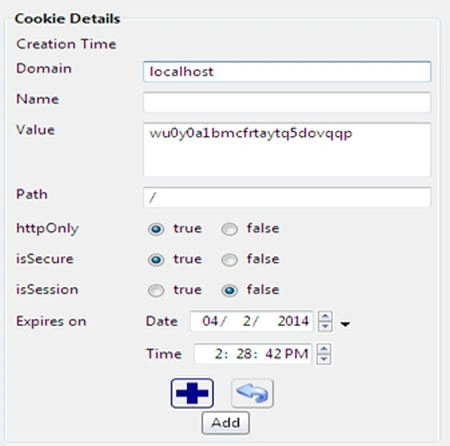
Figure: 1.7
Defense (Securing Cookies)
Countermeasures combine several approaches to overcome such session hijacking kinds of attacks. For instance, making a cookie value bullet-proof by HttpOnly, explicitly removing session cookie values, employing HTTPS/ TLS (via Secure Attribute) and proper configuration. This section fixes the session hijacking vulnerability in the previous code where cookies values are not discarded even after logged-out, by generating another cookies having a unique value that is compared to a session value at each round-trip. Resemblance of both of these values, could allow the user to enter into the website sensitive zone, otherwise redirected toward the login page. This generates a unique value that can never be duplicated and there is a very low chance that the value of the new GUID is all zeroes or equal to any other GUID. Hence, such applied random token ensures protection against CSRF attacks in a website.
- protected void Page_Load(object sender, EventArgs e)
- {
- if (Session["LIn"] != null && Session["AuthToken"] != null
- && Request.Cookies["AuthToken"] != null)
- {
- if (!Session["AuthToken"].ToString().Equals(Request.Cookies["AuthToken"].Value))
- {
- lblMessage.Text = "You are not logged in.";
- }
- else
- {
- ..
- }
- }
- ..
- }
- protected void btnLogin_Click(object sender, EventArgs e)
- {
- if (txtUsr.Text.Equals("frank") && txtPwd.Text.Equals("password"))
- {
- Session["LIn"] = txtU.Text.Trim();
- string guid = Guid.NewGuid().ToString();
- Session["AuthToken"] = guid;
- // now create a new cookie with this guid value
- Response.Cookies.Add(new HttpCookie("AuthToken", guid));
- }
- ..
- }
- protected void btnLogout_Click(object sender, EventArgs e)
- {
- Session.Clear();
- Session.Abandon();
- Session.RemoveAll();
- if (Request.Cookies["ASP.NET_SessionId"] != null)
- {
- Response.Cookies["ASP.NET_SessionId"].Value = string.Empty;
- Response.Cookies["ASP.NET_SessionId"].Expires = DateTime.Now.AddMonths(-20);
- }
- if (Request.Cookies["AuthToken"] != null)
- {
- Response.Cookies["AuthToken"].Value = string.Empty;
- Response.Cookies["AuthToken"].Expires = DateTime.Now.AddMonths(-20);
- }
- }
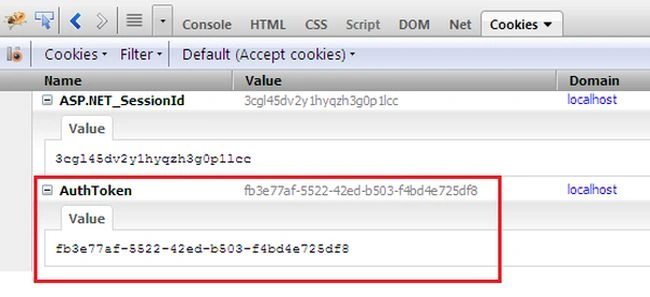
Figure: 1.8
Thereafter, sign-out from the current session like as earlier and refresh the page and notice the cookies section in the firebug again, Bingo! This time the browser doesn't retain any previously stored cookie values. Hence, making cookie values bullet-proof ensures protection against session fixation attacks.
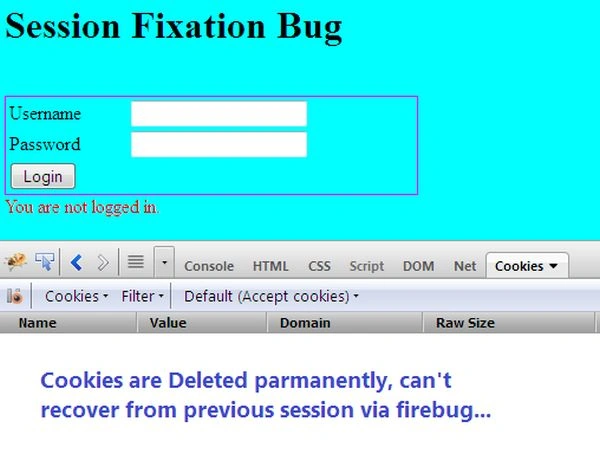
Figure: 1.9
Final Note
This article has explained the session fixation attack on an ASP.NET website in details by providing a realistic code scenario and also pinpoints the common glitches committed by programmers when coding sensitive parts like login pages. We have seen how a potential hacker can access the cookie values stored in the client browser to execute a session hijacking attack and breach into the sensitive zone of a website, even without being aware of or having the real user name and password. Finally, we have come to an understanding of how to secure or make bullet-proof the cookie session values to protect our website from session fixation attacks.
Regis BittencourtPosted Nov 7, 2023, 4:46 PM
Https://stackoverflow.com/questions/1419340/how-to-change-session-id-after-login-in-asp-net/77439946#77439946 For those that are searching now and seeing all those reflection hacks and are struggling with the session fixation issue. The only way to get to asp.net to create a new session id is to fake a `SessionIDManager` that returns null for you login page. That way asp.net thinks the browser never sent a cookie.
Regis BittencourtPosted Nov 7, 2023, 4:45 PM
Https://stackoverflow.com/questions/1419340/how-to-change-session-id-after-login-in-asp-net/77439946#77439946For those that are searching now and seeing all those reflection hacks and are struggling with the session fixation issue. The only way to get to asp.net to create a new session id is to fake a `SessionIDManager` that returns null for you login page. That way asp.net thinks the browser never sent a cookie. Here are the steps: - Create a `CustomSessionIDManager`, pay attention to `YourLoginController/LoginMethod` : ``` public class CustomSessionIDManager : ISessionIDManager { private readonly SessionIDManager _sessionIDManager; public CustomSessionIDManager() { _sessionIDManager = new SessionIDManager(); } public string CreateSessionID(HttpContext context) { return _sessionIDManager.CreateSessionID(context); } public string GetSessionID(HttpContext context) { var path = context.Request.Path.ToString(); if (path.EndsWith("YourLoginController/LoginMethod")) return null; return _sessionIDManager.GetSessionID(context); } public void Initialize() { _sessionIDManager.Initialize(); } public bool InitializeRequest(HttpContext context, bool suppressAutoDetectRedirect, out bool supportSessionIDReissue) { return _sessionIDManager.InitializeRequest(context, suppressAutoDetectRedirect, out supportSessionIDReissue); } public void RemoveSessionID(HttpContext context) { _sessionIDManager.RemoveSessionID(context); } public void SaveSessionID(HttpContext context, string id, out bool redirected, out bool cookieAdded) { _sessionIDManager.SaveSessionID(context, id, out redirected, out cookieAdded); } public bool Validate(string id) { return _sessionIDManager.Validate(id); } }``` - Put it on the `web.config`: <system.web> <sessionState sessionIDManagerType="CustomSessionIDManager" /> </system.web> Now it should return a new session for each login.
Madan ShekarPosted Sep 9, 2019, 2:07 AM
This solution is working for me in locally when i moved to server it is not working .
Philip DarkwaPosted Nov 7, 2016, 7:30 AM
I think the second Cookie(AuthToken) helps if the user logs out . but will not help when the user just leaves the application by closing the browser without logging out. Any ideas on protecting users who dont signout properly will be great.
Michal KPosted Sep 14, 2016, 3:41 AM
Hi, I dont understand how does the 2nd cookie help. I mean, if the attacker is able to steal cookie value of ASP.NET_SessionId, isnt he also able to steal the second one (AuthToken) ? And then use both keys to pretend he owns the session of the logged-in user.
James Vanlalfakawma ChhangtePosted Dec 8, 2015, 12:32 AM
In the page load event of master page or webpage of that master page
James Vanlalfakawma ChhangtePosted Dec 8, 2015, 12:31 AM
protected void Page_Load(object sender, EventArgs e) { if (Session["LIn"] != null && Session["AuthToken"] != null && Request.Cookies["AuthToken"] != null) { if (!Session["AuthToken"].ToString().Equals( Request.Cookies["AuthToken"].Value)) { lblMessage.Text = "You are not logged in."; } else { .. } } .. }
James Vanlalfakawma ChhangtePosted Dec 8, 2015, 12:31 AM
When using master page, where should i put this code :
yash singhPosted Oct 16, 2015, 2:06 AM
Hi Ajay, This artical is very infomative for understanding Session Fixation Bug but i will request you can if you can show us how one can login into someone account by using only session id but not the user name or password . You only mentioned that attacker can inject the stolen cookie into brower and can successfully access the sensitive area of website without being logged in but i want you to kindly explain step by step how attacker can achieve this.
Gaurav Kumar AroraPosted Nov 14, 2014, 3:17 AM
well defined and detailed article
Sanjay TiwariPosted Nov 9, 2014, 12:22 AM
Dear Sir, Very useful article. I just wanted to ask one question .. I have created few sessions with the name Session["Name"] , Session["ID"], and let us assume the session id is 01234567890 2. I have changed the Session ID programtically then the session id is 09876543210(Let us assume). 3. After changing the SessionID programatically the session value which I have created earlier is becoming null.. Could you please let me know "How would I fix this". I want to change session id after login.
Devesh OmarPosted Nov 7, 2014, 6:22 AM
Very nice
Vithal WadjePosted Nov 6, 2014, 12:42 PM
super..no words to express
Jaganathan BantheswaranPosted Nov 6, 2014, 4:56 AM
interesting to know about Session Fixation Vulnerability
Rajeev RanjanPosted Nov 6, 2014, 4:36 AM
awsm article @ajay yadav