

What is Session?
When we work with an application on our computer, we follow some procedures, like open an application, make some changes and then close it. These procedures are much like a Session because there is an interaction between the user and computer so the computer knows who the user is. It knows everythig we do with the application. However, on the internet there is one problem: the web server doesn't know who the user is and what he does, because the web is stateless, which means a new instance of a web page class is recreated each time the page is posted on the server. In other words to say that HTTP is a stateless protocol and it doesn't hold the user/client information in a page.
Session data is stored on a per client basis; in other words for every client, the session data is stored separately. A Session provides the ability to store information in server memory and that information can be retrieved for any page.
Use jQuery
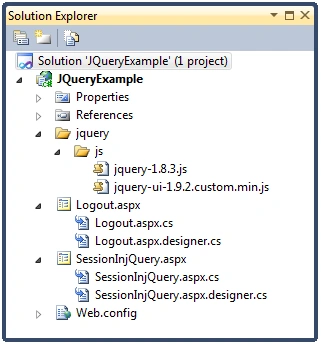
We need to add a JavaScript js file reference on the web page so we can retrieve JavaScript functions on the web page to get a message before session timeout. So we load jQuery first.
<script src="jquery/js/jquery-1.8.3.js" type="text/javascript"></script>
Variable Declaration
We need to declare some global variables; these are used to calculate the user's idle time and session time.
//How frequently to check for session expiration in milliseconds
var sess_pollInterval = 60000;
//How many minutes the session is valid for
var sess_expirationMinutes = 20;
//How many minutes before the warning prompt
var sess_warningMinutes = 5;
var sess_intervalID;
var sess_lastActivity;
Session Initialization
We need to create a JavaScript function that initializes the session time when the page loads. Here we use the sess_lastActivity variable to store the time the page is loaded
and after that we set the session interval.
function initSession()
{
sess_lastActivity = new Date();
sessSetInterval();
$(document).bind('keypress.session', function (ed, e)
{
sessKeyPressed(ed, e);
});
}
Session Interval and Warning Message
We create two functions; one to set session interval and another to calculate session interval and to show a message whenever a session times out.
function sessSetInterval()
{
sess_intervalID = setInterval('sessInterval()', sess_pollInterval);
}
function sessInterval()
{
var now = new Date();
//get milliseconds of differneces
var diff = now - sess_lastActivity;
//get minutes between differences
var diffMins = (diff / 1000 / 60);
if (diffMins >= sess_warningMinutes)
{
//wran before expiring
//stop the timer
sessClearInterval();
//promt for attention
var active = confirm('Your session will expire in ' + (sess_expirationMinutes - sess_warningMinutes) +
' minutes (as of ' + now.toTimeString() + '), press OK to remain logged in ' +
'or press Cancel to log off. \nIf you are logged off any changes will be lost.');
if (active == true)
{
now = new Date();
diff = now - sess_lastActivity;
diffMins = (diff / 1000 / 60);
if (diffMins > sess_expirationMinutes)
{
sessLogOut();
}
else
{
initSession();
sessSetInterval();
sess_lastActivity = new Date();
}
}
else
{
sessLogOut();
}
}
}
Logout
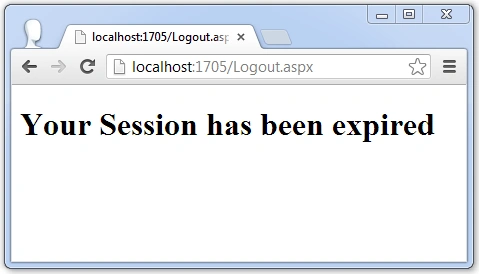
When the user is idle for more than 5 minutes we get an attention message from the system and whenever we click on the cancel button we move to the logout page. After 15
minutes from the time the message window was opened, we click on the OK button and then also move to the logout page. So we create a logout function, which is:

Gourishankar RananayakPosted Jul 21, 2015, 6:05 PM
What exactly does the sessClearInterval method does ?
Ozair KafrayPosted Apr 15, 2015, 1:53 AM
This doesn't work if multiple tabs are open, and user is active in one tab. I think this can be remedied by storing and retrieving sess_lastActivity in localStorage.
AswinKrishnan HPosted Feb 25, 2014, 2:23 AM
Could you please explain what is "Keypress.session" , I know bind to event "Keypress", if you can enlighten "Keypress.Session", that would be great
BrendaPosted Feb 7, 2014, 4:20 PM
I missed something. When I added the code, it displays the message and when I response it works correctly. But if I just leave it like no user is at the desk, it just sits there until I do response.
Sandeep Singh ShekhawatPosted Jan 3, 2014, 11:05 PM
@Javier, write same code on master page and try.
Javier MonteroPosted Jan 3, 2014, 4:36 PM
How can use your example in master pages, thank you for your help
Nitesh KejriwalPosted Sep 2, 2013, 2:31 AM
Kamal, you can code this in Master page and then you wont need to code in all 100 pages!
Kamal RajuPosted Sep 2, 2013, 2:21 AM
Hi Sandeep Singh Shekhawat, Its Really a Great Work...It is really useful one to me. If we need to we use this logic in entire application (For eg:100 pages), do we need to apply this logic in all the 100 forms. Your help is really appreciated. Thanks in Advance.
AnuPosted May 21, 2013, 5:54 PM
Is it possible to run a timer on the confirm message so that it will give a count down when session times out
Sandeep Singh ShekhawateditedPosted May 9, 2013, 12:11 AMEdited May 9, 2013, 12:22 AM
Hi chandu kakani, I have attached solution folder as a zip folder and you can download it. Thanks
chandu kakaniPosted May 8, 2013, 6:45 PM
Hello, can you please provide with a solution folder ? Thanks
srikanth ladiPosted May 2, 2013, 7:00 AM
Welcome my dear friend.
Sandeep Singh ShekhawatPosted May 2, 2013, 6:37 AM
Thanks Srikanth for feedback and comment.
srikanth ladiPosted May 2, 2013, 6:13 AM
Nice explanation, user can understand easily. Thanks
Sandeep Singh ShekhawatPosted Feb 9, 2013, 8:57 AM
Thanks.
Dinesh BeniwalPosted Feb 6, 2013, 6:51 AM
Good work.
Vithal WadjePosted Feb 5, 2013, 11:08 PM
super