

SharePoint has List level and Column level validation to ensure that the right kind of data is inserted into the list. With these kinds of validations we get to do data check out of the box. Validation settings remain unchanged as of SharePoint 2016 as well as in SharePoint online.
There are certain rules that govern list level validations which, if not followed will result in errors.
- The expressions that are used as validation formula should return a Boolean value i.e.: True/False.
- We can use field names within the validation formula. However we have to make sure that if there are some special characters or spaces in the field name they should be enclosed within square brackets.
- List level validations can use multiple columns within the expression. However column validations can only use that particular column.
If both Column level and List level validations are present, Column validations are checked first followed by List validations. If column and list validations are in conflict data is never saved to the list. Before checking out how we can implement List validations using JSOM let’s see how we can do it out of the box.
List validations can be accessed from List settings->Validation Settings.
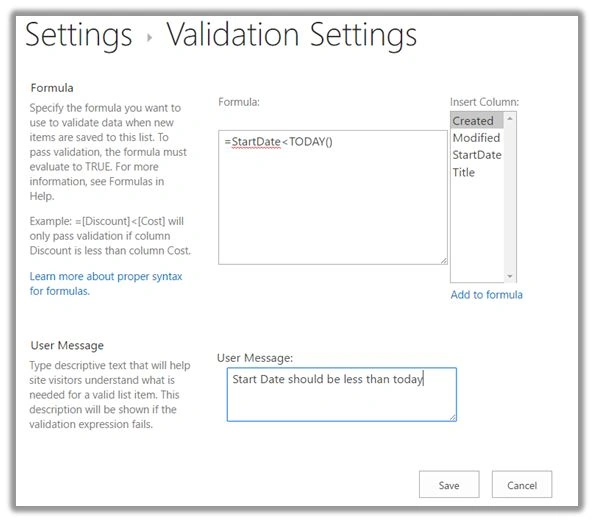
The formula is the expression that would check for the entered data for correctness. If the data does not match the expression we will get the message specified in the user message column.
Let’s see how we can implement this using JavaScript object model.
- Add reference to jQuery file,
- <script language="javascript" type="text/javascript" src="//ajax.googleapis.com/ajax/libs/jquery/1.8.1/jquery.min.js"></script>
- <script language="javascript" type="text/javascript">
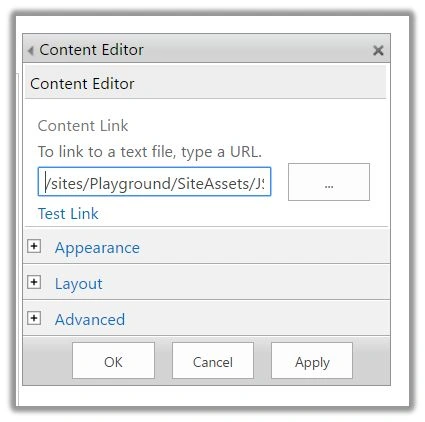
- Within Document ready function call SP.SOD.executeFunc so as to load the on demand script SP.js . Call the main starting point function say: SetValidation.
- SP.SOD.executeFunc('sp.js', 'SP.ClientContext', SetValidation);
- Instantiate client context and get the list instance. Once the list object is retrieved break inheritance of the object.
- varclientContext = new SP.ClientContext.get_current();
- varoList = clientContext.get_web().get_lists().getByTitle('DemoList');
- Load the client context and execute the batch which will send the request to the server and perform the entire javascript object model operations as a batch.
- clientContext.load(oList);
- clientContext.executeQueryAsync(Success,Failure);
- In the success call back method set the validation formula as mentioned below,
- oList.set_validationFormula("[StartDate] < TODAY()");
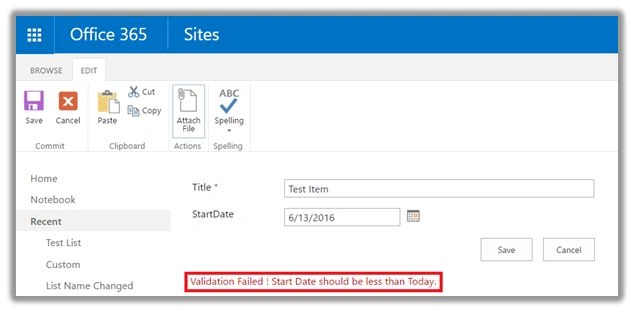
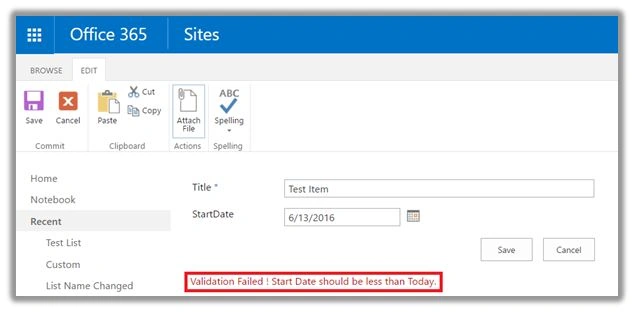
- oList.set_validationMessage('Validation Failed ! Start Date should be less than Today.');
- oList.update();
- Load the client context and execute the batch once again so as to update list validation formula into the list.
- clientContext.load(oList);
- clientContext.executeQueryAsync(OnSuccess,OnFailure);
Santhakumar MunuswamyPosted Jun 30, 2016, 12:55 AM
Thank you for nice article
Kuppurasu NagarajPosted Jun 28, 2016, 2:14 PM
Nice Sharing..