Introduction
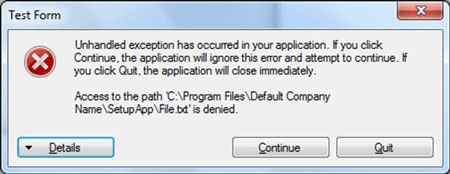
Often, developers receive access rights errors while installing
application in Windows 7 and Vista.
The error message will typically look like "Access to the path is denied".
The same setup executed in a Windows XP machine will work fine, so the
reason behind the above error is probably due to User Access Control changes in the Windows
7 and Vista operating systems. The changes are documented in MSDN.
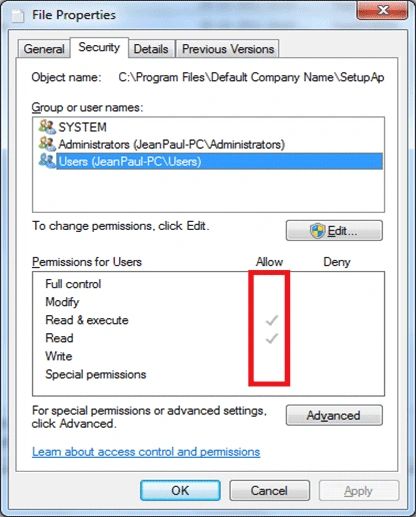
You can view the user access level after installing the application.
You can see that the Full Control, Modify, and Write permissions are unchecked for
the logged-in user. In this case, any attempt to modify the file will throw an exception.
Solution
We can approach the problem by using a customer installer action. After
committing the installation, a custom executable is launched, which will take
care of providing all permissions to the file.
The new executable could be a console application which will perform the
following:
- Find the current execution folder
- Find all files in the folder recursively
- Set Full Access Rights to all the files
The application is named as SetAccessRights.exe.
Modifying the Setup Application
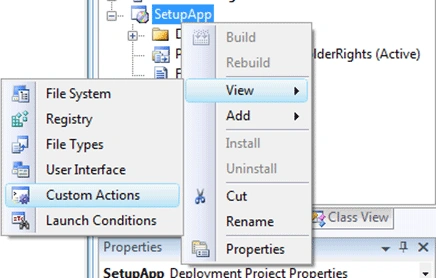
For calling the above SetAccessRights.exe, we need to set custom actions in the
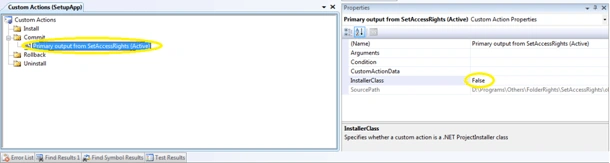
setup application. For this, right-click on the setup and choose Custom Actions.
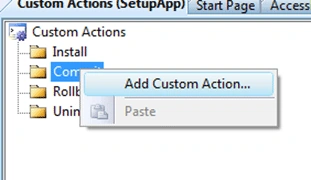
In the following window, choose Add Custom Action from the Commit node.
In the appearing dialog box, select the Primary output from the SetAccessRights
file. Then select the added file and change the property InstallerClass to false
as shown below.
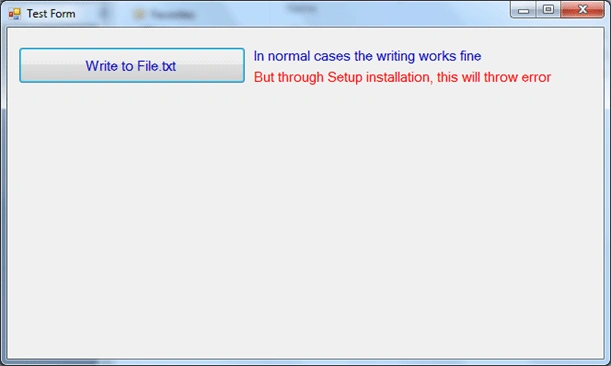
Now build the setup and execute it. After installation, run the FolderRights.exe
from the installed folder in Program Files. Click the Write button on the
executable and this time no error message will be shown.
You can open the File.txt and see the appended data.
Code Attached
The attached source code contains the main application, setup application,
access rights setter application. You can execute the setup and see the results.
The core method providing full access rights is shown below:
- private void SetAccessRights(string file) {
- FileSecurity fileSecurity = File.GetAccessControl(file);
- AuthorizationRuleCollection rules = fileSecurity.GetAccessRules(true, true, typeof(NTAccount));
- foreach(FileSystemAccessRule rule in rules) {
- string name = rule.IdentityReference.Value;
- if (rule.FileSystemRights != FileSystemRights.FullControl) {
- FileSecurity newFileSecurity = File.GetAccessControl(file);
- FileSystemAccessRule newRule = new FileSystemAccessRule(name, FileSystemRights.FullControl, AccessControlType.Allow);
- newFileSecurity.AddAccessRule(newRule);
- File.SetAccessControl(file, newFileSecurity);
- }
- }
- }
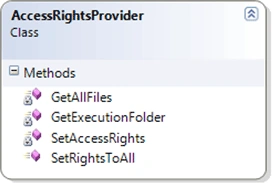
The core class in which the whole functionality included is:
AccessRightsProvider.cs
Summary
In this article, we have seen the user access rights issue associated with setup
installation in Windows 7 and the solution.


Mageshwaran RPosted Nov 25, 2019, 3:05 AM
Nice Article...
Sourav Kumar DasPosted Nov 24, 2019, 11:03 PM
Nice Article Sir.
Anas ZetaPosted Mar 7, 2016, 3:42 PM
Jean - Thanks so much for this great project
Antony JPosted Jan 13, 2016, 9:22 AM
Hi I'm Anto. I used your code which is working fine.. But which is working in all the drives except program files (*86) folder. My setup will install in the program files (*86) folder. I'm using C# with SQLITE DB. I couldnot insert the records or open the database. If i manually give the permission to the folder which is working. But i need to give the rights permission through the coding when installation or after installation. PLs let me know the solution. I'm using Windows 7 and VS2008. Thanking You!..
m zPosted Oct 13, 2014, 3:34 PM
very very thank you
Harshal ThakrePosted Jun 26, 2014, 8:15 AM
thanks sahi me bahut super
Muthu KumarPosted Oct 24, 2013, 9:28 AM
Hi shankar, the same i need u posted if u get solution pls let me know I am working on Auto Updater Where I need Permission to move a file to the installed location. Please help me how we provide rights to the folder so I will be able to move a file to the executable loation.. I you did not get my question I will elaborate
Jean PaulPosted Oct 18, 2013, 12:47 AM
Thank You Shankar! :)
Kalaivanan shanmugamPosted Oct 17, 2013, 8:39 AM
Am getting error i.e Error 1001 Could not find the file 'C:\Program files\SetaccessRight.installState.How to resole this please tell me
Jean PaulPosted Jan 6, 2013, 8:44 AM
Thank You Prasanna!
Prasanna LenadoraPosted Jan 6, 2013, 2:24 AM
Excellent! This is what I have been looking for.
Prasanna LenadoraPosted Jan 6, 2013, 2:24 AM
Excellent! This is what I have been looking for.
Prasanna LenadoraPosted Jan 6, 2013, 2:24 AM
Excellent! This is what I have been looking for.
Jean PaulPosted Dec 3, 2012, 12:16 PM
You are welcome my dear friend!
pccong2002Posted Dec 3, 2012, 10:46 AM
thanks for your sharing.
Jean PaulPosted Nov 29, 2012, 10:04 AM
You are welcome Sumanth! Happy to hear that it helps you.
Sumanth MPosted Nov 29, 2012, 4:43 AM
H, Paul, This is the exact solution which i have been looking for. Thanks for posting such a good article.
Jean PaulPosted Sep 11, 2012, 9:30 AM
You are Welcome my dear Patel!
Paresh PatelPosted Sep 11, 2012, 3:00 AM
Very good. It's very helpful.. Thanks