
Before we start learning UWP we must have IDE (Integrated Development Environment) to develop universal apps. IDE for universal windows apps is Visual Studio, which is Microsoft product so it has very easy and user friendly setup and environment. But for absolute beginners this article could be of help if you stuck somewhere during setting up environment especially on Windows 8 or 8.1.
On Windows 10
On Windows 10
Idea of universal apps came with Windows 10, it’s recommended to build Universal Windows apps. Any version of Visual Studio 2015 could be used to develop UWPs. You can download Visual Studio here. Which version? Well it depends on your need. This article is for Enterprise edition.
Here are the steps,
- Run vs_enterprise.exe you have just downloaded from here.
- Leave all options as it is but if you don’t want to install all features deselect the items you don’t want but make sure:
- “Universal windows app development tools” is checked.
- If you expand this option you may choose to install Emulator or not. Leave it checked if you don’t have Windows 10 phone to test apps,
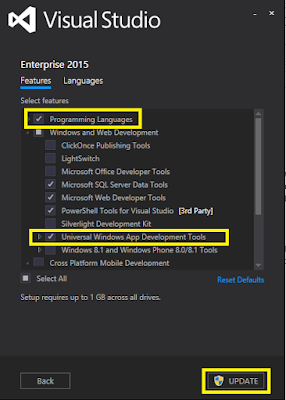
- Click on “Run” button at bottom right. (I have already installed it so mine is “Updated”).
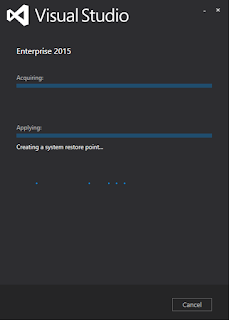
- Visual Studio will start installing. Click finish when done.
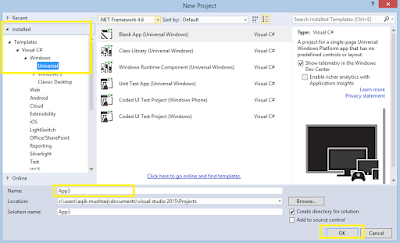
- Open Visual Studio and go to File, then New Project.

- Now go to - Installed, Templates, Your Language (e.g. Visual c#), Windows, then click Universal. Name your project and click OK! You are good to go with Universal Windows apps,


Humayun Kabir MamunPosted Dec 31, 2015, 3:49 AM
Nice...
Sibeesh VenuPosted Dec 31, 2015, 3:20 AM
Nice Share
Santhakumar MunuswamyPosted Dec 30, 2015, 3:06 PM
Thanks for nice share