

Introduction
Microsoft Azure SQL Database (formerly known as SQL Azure) is a managed cloud database i.e. Software as a Service (SaaS) provided by Microsoft Azure. In simple words, Microsoft Azure SQL is a cloud database that runs on a cloud computing platform and access to it is provided as Service.
Managed database services supports backup, HA (high availability), and scalability of the database. Azure SQL uses SQL Server 2016 codebase and is compatible with SQL Server 2014 and most of the features in SQL 2016.
Pricing
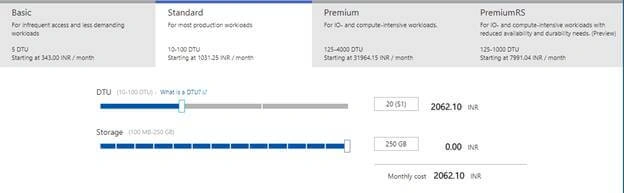
Azure SQL database can be setup as Standalone database or an Elastic database pool (allows multiple databases to share storage and compute the resources). It is priced in three tiers – Basic, Standard, Premium.
- Basic - Can be used for small database. It supports single active operation at a given time. Best suited for development, testing applications
- Standard - More frequently used option. Supports multiple concurrent queries. Mostly used along with web applications
- Premium - Supports many concurrent users at a time. Designed for mission critical applications.
Create Azure SQL (Azure Portal)
Creating Azure SQL from Azure Portal is few simple clicks and helps to setup your Azure SQL in a few minutes.
Please note, the old portal does not support creation of any Data Services now a days.
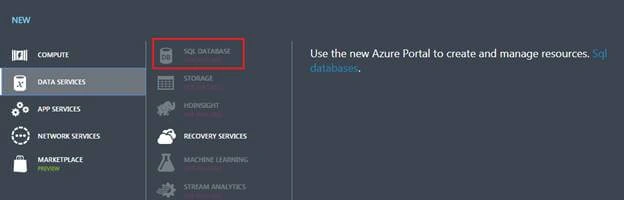
Creating Azure SQL is only supported from New Azure Portal.
- Login to New Azure Portal.
- Click "New" button from top left corner.
- Select "Databases".
- Select "SQL Database".
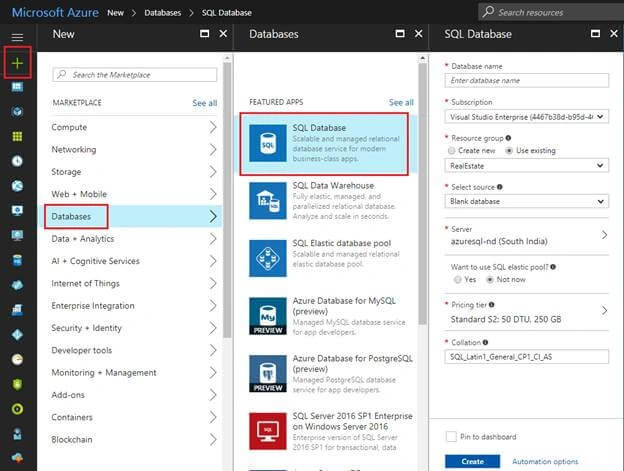
- Fill in the SQL Database details as below,
- Database name - Name of your Azure SQL Database. E.g. sampleSQLDB
- Subscription - Select any of your MSDN subscription
- Resource Group - Create a new resource group or use any of the existing.
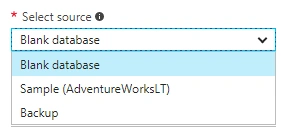
- Source - You may choose to create a blank database of any predefined database (e.g. Adventure Works)
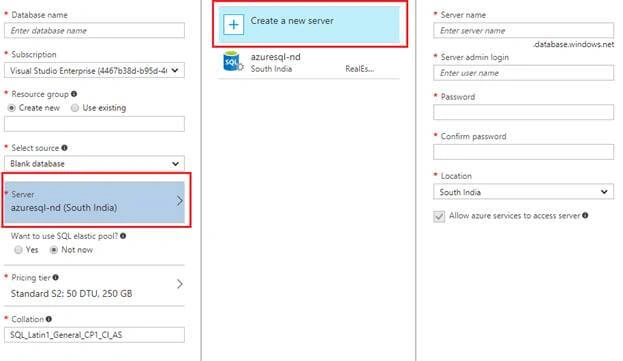
- Click Create a new server
Join the conversation! Your thoughts help the community grow.