What are we going to do?
This is the second article in the series on how to integrate a web application that is built using Angular and ASP.NET core web APIs, with Azure Active Directory. You can see all the parts below:
This is Part 2: Set up Asp.net core web APIs to use Azure AD Authentication. Here I will explain what code is required to integrate Azure AD with your Asp.Net Core Web API project.
- Must have followed what we covered in Part 1: Set up the Azure Active Directory and should have the client and tenant Id created in the previous article.
- Basic knowledge of Asp.Net Core Web APIs.
- Must have an asp-net core web API project setup.
All right, now we are good to go. Let's get started.
Let's make some code change sin the Asp.net Core Web APIs project.
Add the following in your appsettings.json file, and replace the Domain, TenentId, ClientId with the value you copied from Azure AD.
- "AzureAd": {
- "Instance": "https://login.microsoftonline.com/",
- "Domain": "replace with the domain name",
- "TenantId": "put azure ad tenant id",
- "ClientId": "put your api application's tenant id"
- }
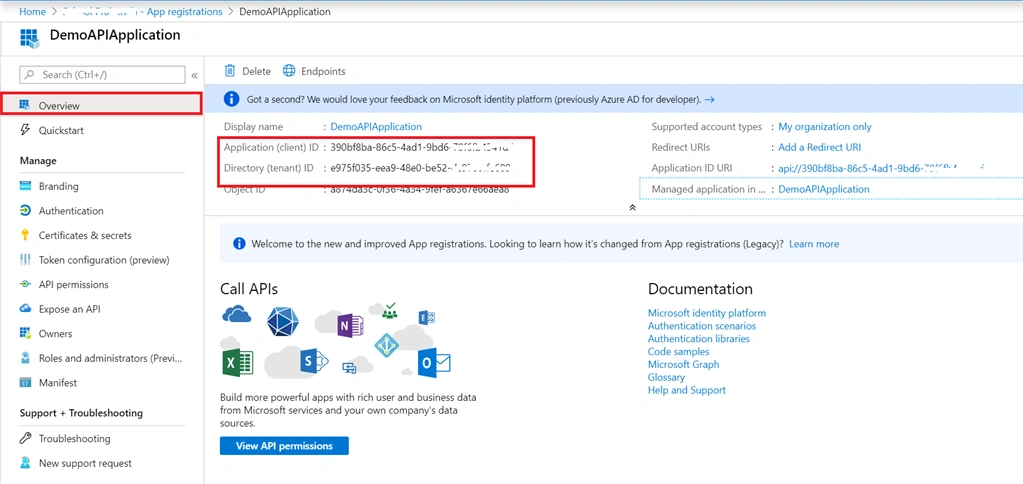
You can easily find these values on the overview screen of the api application we registered in
part 1
Next let's create two class files in the root folder of the application and name it AzureAdOptions, AzureAdServiceCollectionExtensions and then paste the following code respectively.
- public class AzureAdOptions
- {
- public string ClientId { get; set; }
- public string ClientSecret { get; set; }
- public string Instance { get; set; }
- public string Domain { get; set; }
- public string TenantId { get; set; }
- }
- public static class AzureAdServiceCollectionExtensions
- {
- public static AuthenticationBuilder AddAzureAdBearer(this AuthenticationBuilder builder)
- => builder.AddAzureAdBearer(_ => { });
-
- public static AuthenticationBuilder AddAzureAdBearer(this AuthenticationBuilder builder, Action<AzureAdOptions> configureOptions)
- {
- builder.Services.Configure(configureOptions);
- builder.Services.AddSingleton<IConfigureOptions<JwtBearerOptions>, ConfigureAzureOptions>();
- builder.AddJwtBearer();
- return builder;
- }
-
- private class ConfigureAzureOptions : IConfigureNamedOptions<JwtBearerOptions>
- {
- private readonly AzureAdOptions _azureOptions;
-
- public ConfigureAzureOptions(IOptions<AzureAdOptions> azureOptions)
- {
- _azureOptions = azureOptions.Value;
- }
-
- public void Configure(string name, JwtBearerOptions options)
- {
- options.Audience = _azureOptions.ClientId;
- options.Authority = $"{_azureOptions.Instance}{_azureOptions.TenantId}";
- }
-
- public void Configure(JwtBearerOptions options)
- {
- Configure(Options.DefaultName, options);
- }
- }
- }
The last step is to use this code in startup.cs class. Paste the following code in ConfigureServices method.
- services.AddAuthentication(sharedOptions =>
- {
- sharedOptions.DefaultScheme = JwtBearerDefaults.AuthenticationScheme;
- }).AddAzureAdBearer(options => Configuration.Bind("AzureAd", options));
Make sure you import the class namespace before using this method.
That is it, we are done with API integration. Now it's time to make some code changes in our client application which is built on Angular 8. Let's do that
next.
Thanks for reading this article. Please feel free to share feedback or any question you have. You can find the code my public
git hub repo.


Hamid KhanPosted May 6, 2023, 6:21 AM
Nice article
hari nathPosted Jul 12, 2020, 7:37 AM
I resolved the below issue by moving "app.UseAuthorization();" before routing. To test the Web API in Post man. Go to Authroization Tab , Type = OAuth 2.0 , Add authorization data to = Request Header Goto "Get New Access Token", Grant Type: Client Credentials, Access Token : https://login.microsoftonline.com/<Tentand ID>/oauth2/v2.0/token . Fill the rest of value from portal.Azure.com. For Client Authentication "Send Client Credentials in the body"
hari nathPosted Jul 12, 2020, 6:18 AM
Microsoft.AspNetCore.Authorization.DefaultAuthorizationService[2] Authorization failed. info: Microsoft.AspNetCore.Authentication.JwtBearer.JwtBearerHandler[2] Successfully validated the token. info: Microsoft.AspNetCore.Authentication.JwtBearer.JwtBearerHandler[12] AuthenticationScheme: Bearer was challenged. info: Microsoft.AspNetCore.Hosting.Diagnostics[2] Request finished in 2859.3561ms 401
hari nathPosted Jul 12, 2020, 6:01 AM
Hi Naveen, I appreciate for your valuable and unique positing. It could be great if you include sample configuration in comments and provide the way to testing the API in Independently. After following the above step's , I stuck with 401 Unauthorized with no room for troubleshoot.
deepak karmaPosted May 30, 2020, 3:37 PM
I have done all things but still getting 401 unauthorised for methods or controller where i am using Authorization attributes.
deepak karmaPosted May 30, 2020, 2:14 PM
Pls .. also mentioned the steps how we can check using postman. I means like access token creation and then using that token to get this API call.
Vaibhav KulkarniPosted May 15, 2020, 9:11 AM
Hi Naveen, I have web application implementing in angular 8 & core web api. Through my application based on module / functionalty i called / consume the different web api. So do i need to register this multiple api in azure AD. This web api is deployed on openshift cloud platform. Please suggest.
SUDHIR TIBREWALPosted Apr 28, 2020, 7:14 AM
Hi Naveen, Thanks for the post. I have a few questions. 1. Where are you using "Domain"? 2. I am getting below error. I am wondering if you can help me out Microsoft.IdentityModel.Tokens.SecurityTokenSignatureKeyNotFoundException: IDX10501: Signature validation failed. Unable to match key: kid: '<SomeKey>'. Exceptions caught: ''. token: '<Token values>. at System.IdentityModel.Tokens.Jwt.JwtSecurityTokenHandler.ValidateSignature(String token, TokenValidationParameters validationParameters) at System.IdentityModel.Tokens.Jwt.JwtSecurityTokenHandler.ValidateToken(String token, TokenValidationParameters validationParameters, SecurityToken& validatedToken) at Microsoft.AspNetCore.Authentication.JwtBearer.JwtBearerHandler.HandleAuthenticateAsync()