

Here we are using PowerShell commands along with some manual steps to achieve it.
Using PowerShell
The following are the important steps involved:
- Create a new Visual Web Part
- Create a solution file for the Web Part
- Use PowerShell to add and install the solution
- Activate the Web Part
- Insert the Web Part into the site
Create new Visual Web Part
Open Visual Studio 2010 and create a new Visual Web Part template. Name the project and the Web Part as WebPartManualDeployment. 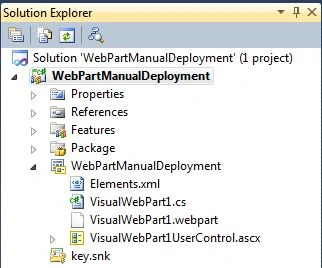
Create Solution file for the Web Part
Now right-click on the Solution Explorer and choose the Package option.
You can find the package file in the BIN\DEBUG folder. (If you are using the Debug Configuration.)
Copy the file path; we need to use this in the next step.
Use PowerShell to Add and Install Solution
Now open the PowerShell window. We need to execute the following Cmdlets:
- Add-SPSolution
- Install-SPSolution
The first command adds the solution into the SharePoint farm.
The second command extracts and installs the solution. It includes activities like deploying assemblies to the GAC.
Enter the command:
Add-SPSolution -LiteralPath "YourPath\WebPartManualDeployment.wsp"
If the command succeededs then please continue with the following command:
Install-SPSolution -Identity "WebPartManualDeployment.wsp" -GACDeployment -WebApplication http://yourservername/
Some of the possible errors you could receive are listed here:
Possible Errors


Mahesh BabuPosted Dec 10, 2012, 1:53 AM
Yes,i have activated...
Jean PaulPosted Dec 9, 2012, 3:05 PM
Hi Mahesh, Have you activated the webpart in site collection features?
Mahesh BabueditedPosted Dec 9, 2012, 2:38 PMEdited Dec 9, 2012, 2:39 PM
Hi Jean Paul..very thankful to you..I tried powershell commands for execution previously but could not..now i followed your step by step procedures and possible errors details..now i succeed..total execution performed and deployed to GAC..then i tried to add this webpart(ImtechContentByQueryWebPart) to my webpage but it gives error like "Operation could not completed because item was removed from the Gallary"..So please let me know how to proceed in this scenario..