In this article we can explore ways of creating a custom content type.
What is a Content Type?
A Content Type is a reusable, shareable metadata. The base type of content type could be an existing content type like:
- Item
- Document
- Folder
- Event
- Task
- Message
- Comment
- Post
Some more information on Content Type:
- Base Type: The base type of the Content Type is System with Id as 0x.
- Example: If you need a common list format or document format across the sites then Content Type is advisable.
- Groups: The content types are organized in groups for eg: List Content Types, Document Content Types and Folder Content Types.
- 3 Important Content Types: They are Item, Document and Folder.
- Feature: A content type can be deployed as a feature.
- Scope: The scope of content type could be specified in the feature as Site, Web etc.
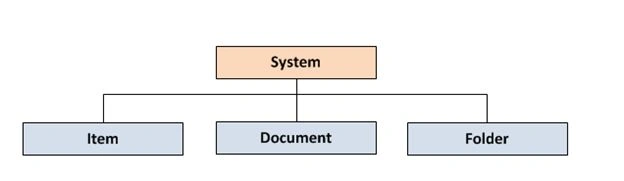
Creating Custom Content Types
We can use the following tools for creating Content Types:
- SharePoint UI
- Visual Studio 2010
- SharePoint Designer 2010
The content type is in XML format so a notepad can also do the job but in a different way.
Creating Content Type using Visual Studio 2010
Now we can try creating a content type using Visual Studio 2010. The SharePoint Developer Tools already contains the template for Content Type creation. Here we are trying to create an Item Content Type with the following fields:
Open Visual Studio and create a new project from SharePoint > Content Type.
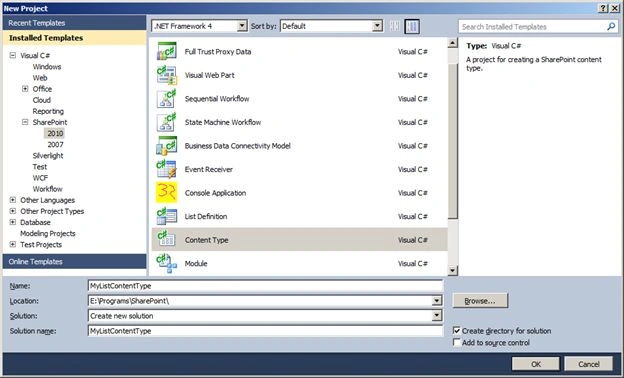
Enter the name of your content type and click the OK button.
In the next page you will be prompted with the solution type:
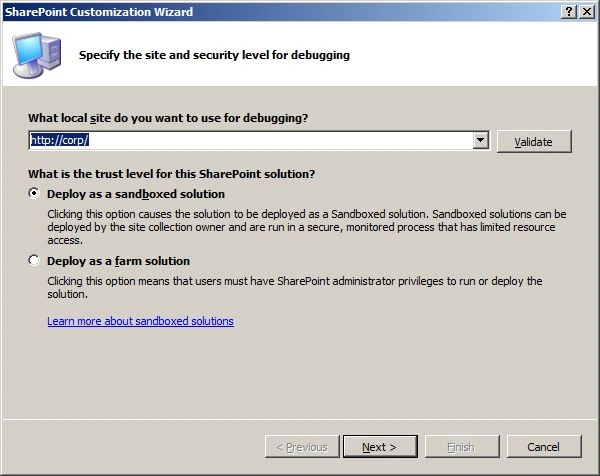
Select the option as Sandboxed solution and click the Next button.
In the next page select the base type. You will see a large list of base types possible.
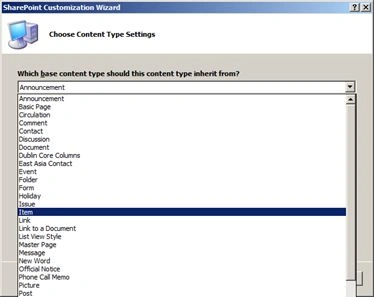
Select the base type as Item and click the Finish button. Expand the Content Type1 and enter the following code in Elements.xml.
<?xml version="1.0" encoding="utf-8"?>
<Elements xmlns="http://schemas.microsoft.com/sharepoint/">
<Field ID="{B7410A27-4E0C-42FB-BC6E-07928C43108D}" Name="ContactType" DisplayName="Contact Type" Type ="Choice" >
<CHOICES>
<CHOICE>Personal Contact</CHOICE>
<CHOICE>Official Contact</CHOICE>
<CHOICE>Other Contact</CHOICE>
</CHOICES>
</Field>
<!-- Parent ContentType: Item (0x01) -->
<ContentType ID="0x01009aa1f989a2604c99af0f57d80fe0b16d"
Name="Contact Type"
Group="Custom Content Types"
Description="Contact Type"
Inherits="TRUE"
Version="0">
<FieldRefs>
<FieldRef ID="{B7410A27-4E0C-42FB-BC6E-07928C43108D}"/>
</FieldRefs>
</ContentType>
</Elements>
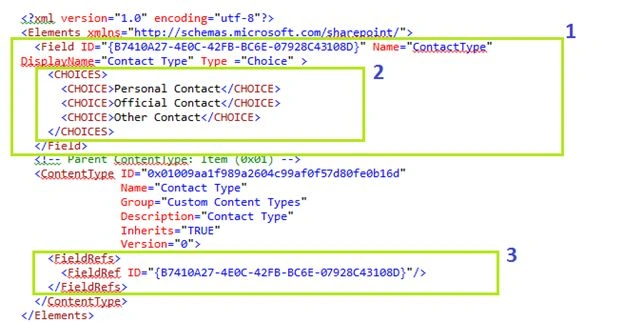
The above code performs the following:
-
Create a new Choice field named ContactType
-
Add the 3 Choices for the field
-
The new field is referred inside the Content Type
Deploying the Content Type
The content type is deployed as a feature. Right-click on the project and use the menu command Deploy.
Possible Error
If you get the following error:
Error occurred in deployment step 'Activate Features': Cannot start service SPUserCodeV4 on computer
It means that the Sandboxed Solution Service is not running in your computer.
Solution: Go to Central Administration and open the following link:
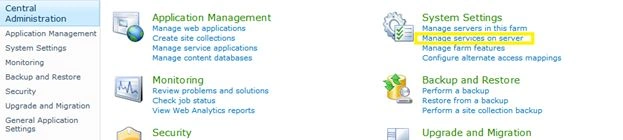
Click the Start link of the following service:

Wait for a while until the service is started and now you can try deployment. After the deployment is succesful go to the SharePoint site.
Testing the Content Type
Now we can try testing the new Content Type. Our Content Type will prompt with following properties:
Create a new list from template Contacts and go to the List Settings > Advanced Settings.

Modify the Allow Management property to true and save the changes.
Back to the List Settings; now you will see the following option:
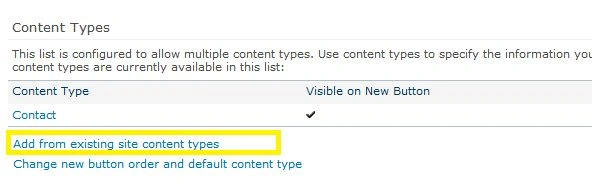
Click on the Add from existing site content types and in the dialog that appears choose the new deployed Contact Type and click the OK button.

Now go back to the List Settings and choose Change new button... link
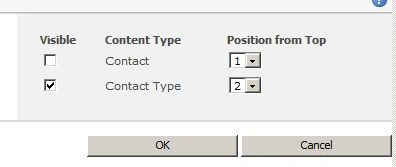
In the above page choose our Contact Type as the default option and save the changes.
Now go back to the My Contacts list and try to enter a new contact.
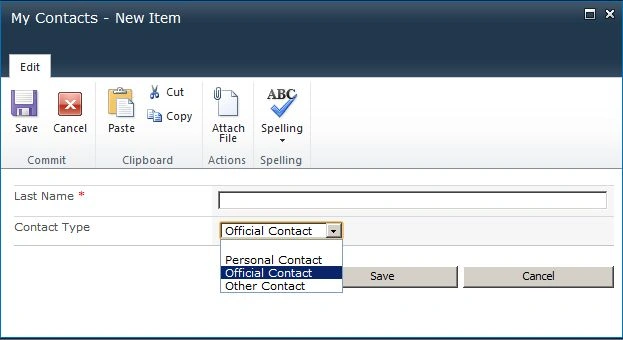
You will get the new modified properties dialog. Here our Contact Type is being used.
Note: The Last Name column is the default one with original name as Title.
So this concludes our Content Type creation using Visual Studio. In real-world scenarios packing the Content Type into one Solution would be advantageous for deployment purposes.
References
Summary
In this article we have explored the creation of custom content type using Visual Studio. The source code attached contains the Content Type we discussed.


Join the conversation! Your thoughts help the community grow.