

The expected result of clicking the above button is to create a new document in the Microsoft Office client in the local machine. The template of the particular document is fetched from the configured one for Document Library.
We are using the following environment:
- SharePoint 2010
- Windows 7 64 bit
- Office 2010
- Internet Explorer 8
While using the command some of you might have encountered the problem with this dialog box: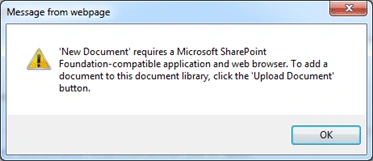
The error message says: 'New Document' requires a Microsoft SharePoint Foundation-compatible application and web browser.
Now let us go some levels deep to see what is happening under the hood. The following are the infrastructure elements required to make it work as expected.
Element 1: Compatible Browser Version
You have to ensure that the right version and bit (32-bit or 64-bit) of the Browser is being used. The 32-bit version of Internet Explorer is compatible with this feature.
You can check the version from Browser > Help Button > About Internet Explorer menu item; see: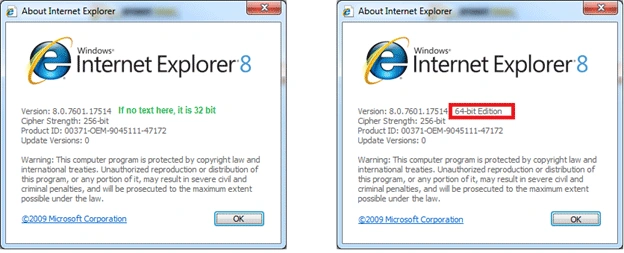
Note: The default iexplore command executed from the Run window opens the IE 32-bit version.
Element 2: Compatible Office Version
- SharePoint 2010 is best compatible with Office 2010
- SharePoint 2007 is best compatible with Office 2007
Ensure that the client machine has a compatible Microsoft Office version installed.
Element 3: Microsoft SharePoint Foundation Support in Office
You have to ensure the Microsoft Office installed has the following feature:
Microsoft Office > Office Tools > Microsoft SharePoint Foundation Support
If the preceding feature is not installed (Run from My Computer) you need to fix this.
The following are the steps to fix this:
- Go to Control Panel
- Choose Programs and Features
- Select Microsoft Office 2010
- Choose Change option and Add / Remove features
- Ensure the preceding option is selected as Run from My computer
- Execute the installation
Element 4: Internet Explorer ActiveX Control
Additionally the 'New Document' feature inside Internet Explorer works by launching a 64-bit Active X control. You can verify this control is enabled from within Internet Explorer. Please use the following to verify it.
Open Internet Explorer and choose the Tools > Internet Options window. Go to the tab Programs and click on the Manage add-ons button as shown below:
In the window that appears choose All add-ons as shown below:
Once the list on the right hand side is refreshed, sort the list based on the Publisher column and locate the item named SharePoint OpenDocuments Class as shown below:
Ensure the version is 14.0 and it is enabled. (If you see the Disable button then that indicates it is enabled.)
Testing the New Document feature
Now that everything is ensured we can test the preceding feature. Open the SharePoint site, go to a library, select the Documents tab and click on the New Document button.
You will be getting a dialog similar to this:
The warning occurs because the template.dotx will be opened by Microsoft Word application locally. This may induce security threats if the source of the document is not valid.
Click the OK button to continue.
You will see that the new document has been created in Microsoft Word as shown below:
This concludes our research with the New Document feature enabling and usage with compatible browser and Office applications. The same aspects are to be ensured while working with the Edit document feature from the client side.
Advanced Settings
Inside the Library Settings you can change the following:
- Default Template
- Add multiple content type templates
- Change the document open behaviour in client side
References
Fiddler and User Agent
Summary
In this article we have explored the underlying aspects to make the New Document feature work in the client side.
Join the conversation! Your thoughts help the community grow.