Introduction
It is often a point of discussion when many users ask how SharePoint saves list data. One straight answer we can provide is "in a content DB". But, most developers do not know the internals, except we all know the basic point that we should not play with a content DB.
Knowing the internals will help us to understand performance and articulate better code while requesting data from the list.
Main Points Covered
The main points covered in this article are:
- What happens in a content DB when a SharePoint List is created
- What happens in a content DB when a SharePoint List item is created
- What happens in a content DB when a SharePoint List item is deleted
AllLists
An AllLists table in a content DB stores the information when a list is created. It might be very complex to describe every column, but if we get to know some important columns then we will certainly understand what is happening.
Columns
- tp_ID [uniqueidentifier]
To unquely identify the list
- tp_WebId [uniqueidentifier]
To identify the web the list belongs to. It is the value taken from the "AllWebs" table that has the Web Id in the "Id" column (tp_ID and tp_WebId together form a primary key for the "AllLists" table).
- tp_Title [nvarchar]
To store title of the list
- tp_BaseType [int]
To store the base type of the list
(Generic List: 0, Document Library: 1, Discussion Board:3, Survey:4,Issue:5)
- tp_ServerTemplate[int]
To store the type of the list(list type id)
(ex:100-Generic list,101-Document library,102-Survey,103-Links list,104-Announcements list,
105-Contacts list,106-Events list, 107-Tasks list,108-Discussion board,109-Picture library)
- tp_Fields [varbinary]
To store fields of list in encoded format
- tp_ContentTypes [varbinary]
To store content type of list in encoded format
A new custom list "SalesInfo" is created. Now we will see the values of the "AllLists" table
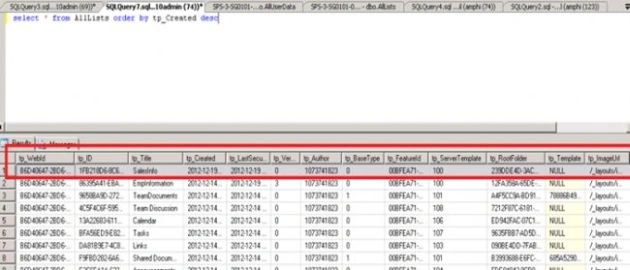
- tp_ID "1FB218D6-8C61-45A5-B30D-32EF4F8087AC" is the identifier of the "SalesInfo" list, any item in this list will be saved in the "AllUserData" table along with the list id (tp_ID) value
AllUserData
The AllUserData table in the content db is the single table to store items of any list. This table has 192 columns and all the list items including their history is saved in this table. Documents uploaded to an item or documents in the document library are also saved in this table.
The primary key (non clustered) of this table consists of 7 columns.
Columns
- tp_ID[int]
To identify the list item
- tp_GUID[uniqueidentifier]
To uniquely identify the list tiem
- tp_ListId [uniqueidentifier]
To identify which list the item belongs to; it is the value of "tp_ID" in the "AllLists" table
- tp_SiteId [uniqueidentifier]
To identify which site the item belongs to; it is the value of "Id" in the "AllSites" table
- tp_RowOrdinal [tinyint]
zero based ordinal index in the set of rows representing the list item
- tp_Author [int]
user identifier who created the list item
- tp_Editor [int]
user identifier who last edited the list item
- tp_Modified [datetime]
The date and time (in UTC format) when this list item was last modified
- tp_Created [datetime]
The date and time (in UTC format) when this list item was created
- tp_DeleteTransactionId [varbinary]
An identifier for the implementation specific deleted items in the recycle bin. This will be equal to 0x if the list item is not deleted.
- tp_IsCurrentVersion [bit]
bit representing if a row belongs to a current version or an historical version of the list item. This value must be 1 if this row contains a current version else it will be 0
- nvarchar1..64 [nvarchar]
Columns navarchar1, navarchar2….navarchar64 stores values of application fields of type nvarchar. The 64 columns are named nvarchar1 to nvarchar64. If the column does not contain data then this value will be NULL.
- ntext1..32 [ntext]
Columns that store values of application fields of type ntext. The 32 columns are named ntext1 to ntext32. If the column does not contain data then this value will be NULL.
- bit1..16[bit]
Columns that store values of application fields of type bit. The 16 columns are named bit1 to bit16. If the column does not contain data then this value will be NULL.
- datetime1..8 [datetime]
Columns that saves values of application fields of type datetime. The 8 columns are named datetime1 to datetime8. If the column does not contain data then this value will be NULL.
- float1..12 [float]
Columns that save values of application fields of type float. The 12 columns are named float1 to float12. If the column does not contain data then this value will be NULL.
- int1..16 [int]
Columns that save values of application fields of type int. The 16 columns are named int1 to int16. If the column does not contain data then this value will be NULL.
- sql_variant1..8 [sql_variant]
Columns that save values of application fields of type sql_variant. The eight columns are named sql_variant1 to sql_variant8. If the column does not contain data then this value will be NULL.
A custom list SalesInfo is created.
Its tp_ID value from the AllItems table is 1FB218D6-8C61-45A5-B30D-32EF4F8087AC
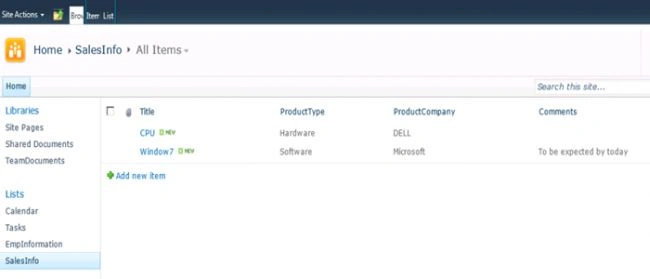
Schema of the custom list "SalesInfo"
"Title" field - single lie of text
"ProductType" field - Choice type (values Hardware,Software)
"ProductCompany" field - single line of text
"Comments" field - single line of text
I have created 2 values in the list. The following is the list image:
Now we will check the AllUserData table.
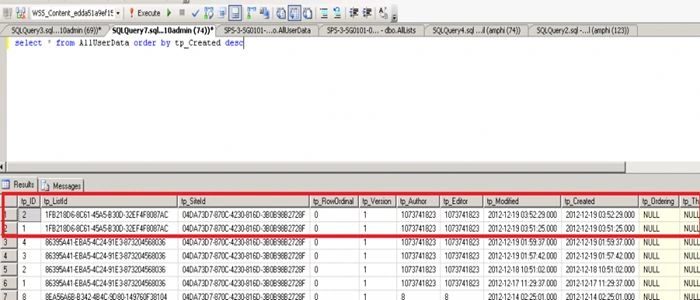
It has two rows inserted with tp_ListId which is 1FB218D6-8C61-45A5-B30D-32EF4F8087AC, the value from the AllItems table.
Now we will see the values in the same rows in various columns.
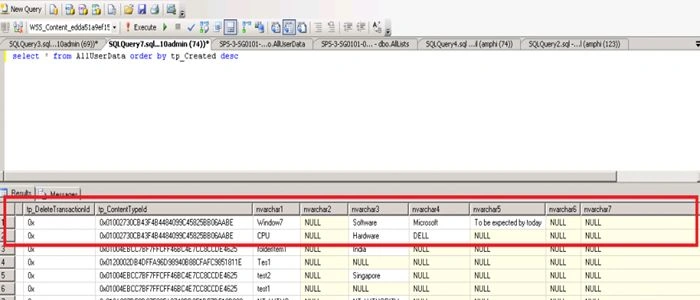
The title value is saved in the "nvarchar1′ column.
The choice values are saved in the "navarchar3′ column.
Another sigle line of text (ProductCompany) value is saved in "nvarchar4′ column.
The Comments field value is saved in the "nvarchar5′ column for one item and for another item value is null.
Every time we create a column in a SharePoint list, internally it will check the available free columns in AllUserdDatatable and map to them. Once mapped, SharePoint will save information in that column. It is more complex to discuss what if all the columns are full and how SharePoint is handling this.
Check the tp_DeleteTransactionId, it is "0x"; that means that it is not deleted.
Now I have deleted an item, it looks like the following image:
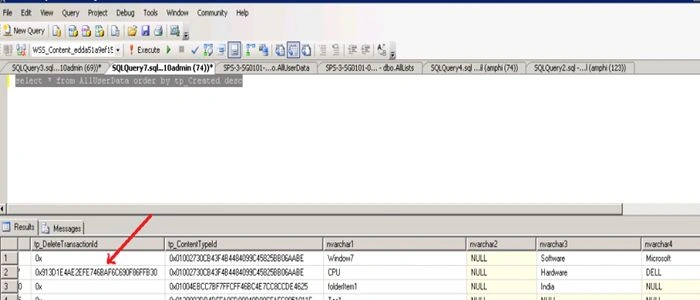
When any user restores from the recycle bin, its tp_DeleteTransactionId will be back to "0x".
Conclusion
We can also write your own SQL queries on this table to get specific list data, but remember any changes to the content DB are not supported by Microsoft. We have to respect the fact that we should not modify a content DB. When you write a CAML query on any list, internally it will execute a SQL query on this table with conditions.
If you have planned to write custom queries on this table, you should be well aware of the where conditions as there is no specific document explaining the internals of the content DB.
Hope you enjoyed the article to understand what is happening when a list and item are created, though the intention is not to modify the content DB.


Riyaz KalvaPosted Mar 25, 2014, 12:22 AM
Hi.! I want to get the titles of fields which are fetched from AllUSerData, for examlple, I want to get the title of field nvarchar1. Which table stores the title of field?
Adiseshu DasariPosted Jan 19, 2013, 2:55 AM
Certainly Destin, I will try to attend one of the summit by CSH in India to grab opportunity to meet great professionals or if I am fortunate enough any summit in Singapore I will be first person to send you invite request :) (may be I am not hasty on the fortune :P )
Destin JoyPosted Jan 19, 2013, 2:38 AM
Great Adishesu:)...Write more articles like this.Learn more.Happy to see you writing more articles in C# corner.One day we meet.
Adiseshu DasariPosted Jan 19, 2013, 1:47 AM
Hello Destin, I feel very good to see comment from you. You are one among the great professionals of CSH and I am really looking forward to have good time with you all going further. Thanks, Adi
Destin JoyPosted Jan 18, 2013, 7:10 AM
Good article Adishesu:)
Adiseshu DasariPosted Jan 17, 2013, 10:46 PM
Thanks Mahesh
Mahesh ChandPosted Jan 17, 2013, 10:35 PM
Welcome to C# Corner Adishesu. You discuss real problems in your articles with a real solution.