

For programming against SharePoint items, we need to retrieve the properties and the methods to operate on them. The SharePoint Object Model provides various classes to accomplish this. In this article we can discuss the Object Model with the core classes involved with a little amount of coding.
Please note that there are 2 Object Models in SharePoint 2010:
- Server Object Model
- Client Object Model
Here we are discussing only the Server Object Model. The Server Object Model classes are used for server-side programming and will be executed on the SharePoint Server Farm.
Namespace
The Server Object Model classes reside in the Microsoft.SharePoint assembly. The general classes are available in the Microsoft.SharePoint namespace and the administration classes inside the Microsoft.SharePoint.Administration namespace.
Core Classes
The following are the important classes and their corresponding SharePoint items:
|
Class |
SharePoint Item |
|
SPFarm |
Farm |
|
SPServer |
Server |
|
SPSite |
Site Collection |
|
SPWeb |
Web site |
|
SPControl |
Control |
|
SPList |
List |
|
SPDocumentLibrary |
Document Library |
|
SPContentType |
Content Type |
|
SPUser |
User |
|
SPException |
SharePoint Exception |
Programming
Now we can start experimenting with some of the classes above. To begin, we can create a SharePoint Console Application. Use the "New Project" > "SharePoint" > "Console Application" project item.

Accessing the List Items in a List
To proceede with this example, create a list derived from the Contacts template and name it "My Contacts".
Add some items inside it with the First Name and Last Name set.
Use the following code inside the Console application and execute it.
using (SPSite site = new SPSite("http://appes-pc/my/personal/dotnet")) // Site Collection
{
using (SPWeb web = site.OpenWeb()) // Site
{
SPList list = web.Lists["My Contacts"]; // List
int i = 1;
foreach (SPListItem item in list.Items)
{
Console.WriteLine("Item: " + (i++).ToString());
Console.WriteLine(item.Name);
Console.WriteLine(item.Title);
Console.WriteLine(item.GetFormattedValue("First Name"));
Console.WriteLine(item.GetFormattedValue("Last Name"));
Console.WriteLine(string.Empty);
}
}
}
Console.ReadKey(false);
If you receive any build errors regarding a namespace then change the "Project Properties" > "Target" to ".Net Framework 3.5".
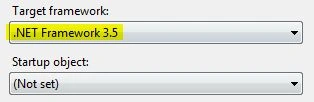
Now try building the application and it should work fine. You will see the following output:
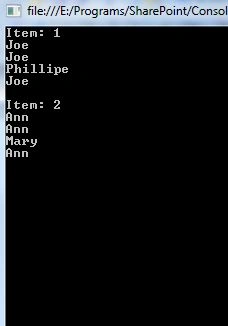
Please note the use of Title and Name properties and the GetFormattedValue() method.
Accessing the items in a library
Now we can proceed with accessing the document library items programmatically. For proceeding you need to create a document library inheriting from the Document Library template and name it "My Docs". Upload one or two documents into it. We are proceeding to get the file name and length in this example.
Enter the following code in the console application.
using (SPSite site = new SPSite("http://appes-pc/my/personal/dotnet")) // Site Collection
{
using (SPWeb web = site.OpenWeb()) // Site
{
SPDocumentLibrary library = web.Lists["My Docs"] as SPDocumentLibrary; // Library
int i = 1;
foreach (SPListItem item in library.Items)
{
Console.WriteLine("Item: " + (i++).ToString());
Console.WriteLine(item.File.Name);
Console.WriteLine(item.File.Length);
Console.WriteLine(string.Empty);
}
}
}
Executing the application, you will see the following results.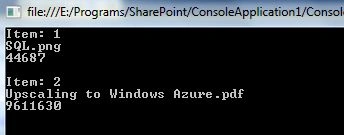
SPControl
The SPControl class acts as the base class for developing server controls. It reseides in the namespace Microsoft.SharePoint.WebControls.
SPControl provides static methods that returns a reference to the current site, web, web application, module. The methods are:
SPControl.GetContextSite()
SPControl.GetContextWeb()
SPControl.GetContextWebApplication()
SPControl.GetContextModule()
SPException
The SPException class can be used to handle an exception in a try/catch block. It represents the exceptions thrown by the server object model.
try
{
// Code here
}
catch (SPException ex)
{
// Handle Exception
}
SPUser
The SPUser class can be used to access user information for a SharePoint site. Enter the following code to get the number of users and their names.
using (SPSite site = new SPSite("http://appes-pc/my/personal/dotnet"))
{
using (SPWeb web = site.OpenWeb())
{
foreach (SPUser user in web.AllUsers)
Console.WriteLine("User: " + user.Name);
}
}
On running the code you will see the results based on your machine users.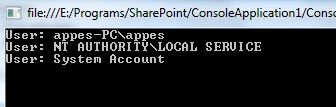
Note
You can add a new list item or library item using the Items.Add() method. For updating and deleting use the item.Update() and item.Delete() methods respectively. More code coverage on these areas will be provided later.
References
http://msdn.microsoft.com/en-us/library/ms473633.aspx
http://msdn.microsoft.com/en-us/library/microsoft.sharepoint.webcontrols.spcontrol.aspx
http://msdn.microsoft.com/en-us/library/microsoft.sharepoint.spuser.aspx
Summary
In this article we have explored the SharePoint Object Model and some basic coding examples with List and Library. The advanced coding examples will be provided later.
Ganesh SanapPosted Sep 6, 2017, 3:16 AM
I have deleted some SP 2013 list items using SPWeb. but it is not showing in Recycle Bin. Why? please help me.
Sr KarthigaPosted Feb 14, 2016, 12:28 AM
Good one
Kiran Kumar TalikotiPosted May 8, 2015, 5:03 AM
Thanks for sharing :)