

During various SharePoint 2013 projects, I came across requirements which involve some bulk operations on existing SharePoint site. Here are some examples:
- Creating many (100s) SharePoint Groups on a specific pattern.
- Creating many lists and managing permissions on lists.
- Managing list and/or item level permissions (breaking inheritance, assign permissions) in bulk.
- Bulk add/edit operations in lists.
In these requirements, the major challenges are – (1) ‘No Access to Farm servers’; so we cannot write all logic in PowerShell script. (2) Long running bulk operations; so we cannot completely rely on client side java script.
The best approach is to create a hybrid solution and use PowerShell to connect to the site and then write logic using CSOM in script.
To use CSOM, we need to refer SharePoint client DLLs. So if we are running this script from a SharePoint 2013 machine, we can just refer from ISAPI folder. If running from a non-SharePoint machine, you need to copy these DLLs to machine and refer it in script.
In this example, script only covers connecting to a SharePoint site and reading list items. You can further add functions based on your requirement. The following are the steps to create this PowerShell Solution:
- Open Visual Studio and create a PowerShell project (refer my previous article for creating PowerShell projects in Visual Studio). Alternatively, you can use other PS editors like Power GUI.
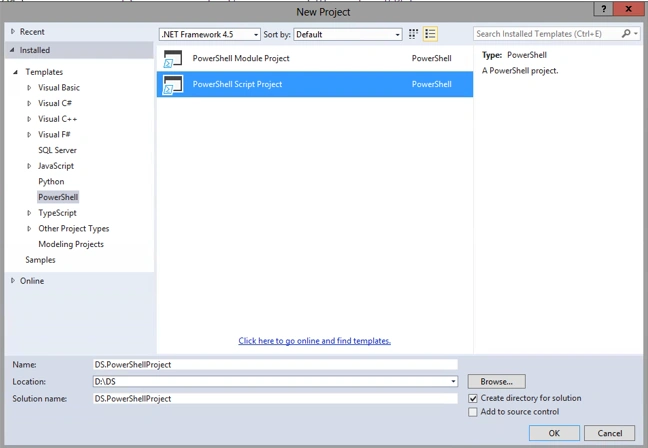
- Rename the default script file to “ScriptMain.ps1”. Add a new script file “ConnectHelper.ps1”.
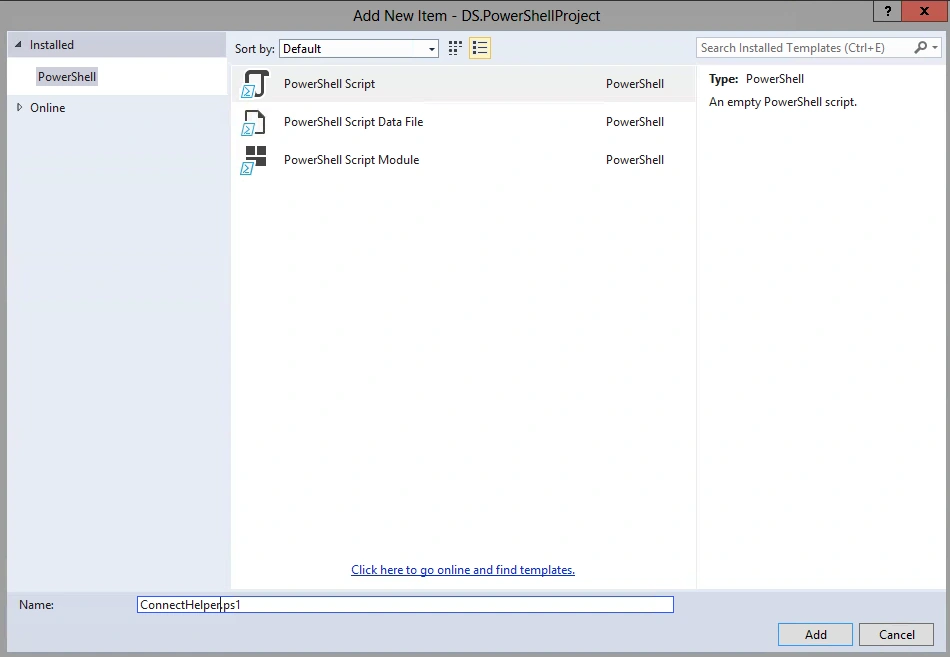
- Open “ConnectHelper.ps1” and copy the following code. There are generic methods to allow connection for both SharePoint 2013 on premises site and Online.
- ##Name: ConnectHelper.ps1#
- function Connect - SPClient { < #.This creates a Microsoft.SharePoint.Client.ClientContext object
- for a SharePoint site using the given credentials..Parameters - site, isSPOnline, user, password, requestTimeOutSec, formsBased, outputs.Example
- To create a ClientContext
- for an on - premises SharePoint using username and password
- $context = Connect - SPClient - site $site - user "domain\user" - password(ConvertTo - SecureString "password"–AsPlainText–Force) - isSPOnline: $false# > [CmdletBinding()]
- Param(
- [Parameter(Mandatory = $true)][ValidateNotNullOrEmpty()][String] $site, [Parameter(Mandatory = $false)][Boolean] $isSPOnline = $true, [Parameter(Mandatory = $false)][String] $user, [Parameter(Mandatory = $false)][SecureString] $password, [Parameter(Mandatory = $false)][int] $requestTimeoutSec = 180, [Parameter(Mandatory = $false)][Boolean] $formsBased = $false)
- Write - Host "$($MyInvocation.MyCommand.Name): Begin"
- Write - Verbose "$($MyInvocation.MyCommand.Name): Getting client connection to "
- "$site"
- " - $((Get-Date).toString())"
- #Ensure required combination of user / password or sssSite / sssTargetAppId.
- if ([string]::IsNullOrEmpty($user) - or $password - eq $null) {
- throw "Invalid parameters. Provide both User and Password parameters. " + $user + " Password " + $password
- }
- [System.Net.ServicePointManager]::ServerCertificateValidationCallback = {
- $true
- }
- $context = New - Object Microsoft.SharePoint.Client.ClientContext($site) - Verbose: $false
- if ($isSPOnline) {
- Write - Verbose "$($MyInvocation.MyCommand.Name): Generating SharePoint Online client credential"
- Write - Verbose "$($MyInvocation.MyCommand.Name): Creating credential from login/password"
- $context.Credentials = New - Object Microsoft.SharePoint.Client.SharePointOnlineCredentials($user, $password) - Verbose: $false
- } else {
- Write - Verbose "$($MyInvocation.MyCommand.Name): Generating Windows client credential"
- if ($formsBased) {
- Write - Verbose "$($MyInvocation.MyCommand.Name): Creating credential from login/password for forms based authentication"
- $context.AuthenticationMode = [Microsoft.SharePoint.Client.ClientAuthenticationMode]::FormsAuthentication
- $context.FormsAuthenticationLoginInfo = New - Object Microsoft.SharePoint.Client.NetworkCredential FormsAuthenticationLoginInfo($user, $password) - Verbose: $false
- } else {
- Write - Verbose "$($MyInvocation.MyCommand.Name): Creating credential from login/password for default authentication"
- $context.AuthenticationMode = [Microsoft.SharePoint.Client.ClientAuthenticationMode]::Default
- $context.Credentials = New - Object System.Net.NetworkCredential($user, $password) - Verbose: $false
- $context.add_ExecutingWebRequest($ {
- function: ExecutingWebRequestEventHandler_NoFormsAuth
- })
- }
- }
- #Set the timeout
- $context.RequestTimeout = ($requestTimeoutSec * 1000)
- Write - Verbose "$($MyInvocation.MyCommand.Name): Done"
- Write - Verbose "$($MyInvocation.MyCommand.Name): End"
- return $context
- }
- function ExecutingWebRequestEventHandler_NoFormsAuth { < #.Synopsis
- This EventHandler must be used
- if authenticating against an on premise environment with mixed authentication(forms based + something differnt) to ensure that not forms based authentication is used.# > [CmdletBinding()]
- Param(#object sender, WebRequestEventArgs e[Parameter(Mandatory = $true)][object] $sender, [Parameter(Mandatory = $true)][Microsoft.SharePoint.Client.WebRequestEventArgs] $e)#Write - Host "$($MyInvocation.MyCommand.Name): ExecutingWebRequestEventHandler_NoFormsAuth"
- Write - Verbose "$($MyInvocation.MyCommand.Name): ExecutingWebRequestEventHandler_NoFormsAuth"
- $e.WebRequestExecutor.WebRequest.Headers.Add("X-FORMS_BASED_AUTH_ACCEPTED", "f")
- }
- Open “ScriptMain.js” and copy this code. This define calling the connect methods with parameters and using CSOM, reading from list.
- < #.Synopsis
- All main functions.Notes
- Name: ScriptMain.ps1# >
- #Add references to SharePoint client assemblies - this is required
- for CSOM
- Add - Type - Path "C:\Program Files\Common Files\Microsoft Shared\Web Server Extensions\15\ISAPI\Microsoft.SharePoint.Client.Taxonomy.dll"
- Add - Type - Path "C:\Program Files\Common Files\Microsoft Shared\Web Server Extensions\15\ISAPI\Microsoft.SharePoint.Client.dll"
- Add - Type - Path "C:\Program Files\Common Files\Microsoft Shared\Web Server Extensions\15\ISAPI\Microsoft.SharePoint.Client.Runtime.dll"
- #Load connecthelper.
- "$PSScriptRoot\ConnectHelper.ps1"
- #Global variables
- $global: siteUrl = $null
- $global: user = $null
- $global: pass = $null
- $global: isOnline = $null
- function SetCredentials() {
- $global: siteUrl = read - host "Enter Url"
- $global: user = read - host "Enter Username"
- $global: pass = read - host "Enter Password" - AsSecureString
- $global: isOnline = read - host "Is SPOnline(True/False)"
- }
- #
- function used to connect to SP Site
- function GetClientContext {
- [CmdletBinding()]
- Param(
- [Parameter(Mandatory = $true)][ValidateNotNullOrEmpty()][String] $siteUrl, [Parameter(Mandatory = $true)][String] $user, [Parameter(Mandatory = $true)][SecureString] $pass, [Parameter(Mandatory = $true)][String] $isOnline)
- if ($isOnline - eq 'False') {
- $clientContext = Connect - SPClient - site $siteUrl - isSPOnline $false - user $user - password $pass
- } else {
- $clientContext = Connect - SPClient - site $siteUrl - isSPOnline $true - user $user - password $pass
- }
- Try {
- $clientContext.Load($clientContext.Web);
- $clientContext.ExecuteQuery();
- Write - Host 'Connect to site:'
- $siteUrl - foregroundcolor green
- return $clientContext;
- } Catch[System.Exception] {
- Write - Host 'Unable to connect. Either invalid url or user and pass combination'
- return $null
- }
- }
- function Main() {
- Write - Host 'Main Starts'
- $context = GetClientContext - siteUrl $global: siteUrl - isOnline $global: isOnline - user $global: user - pass $global: pass
- if ($context - eq $null) {
- return
- }
- Write - Host 'Load Shared Documets library';
- $list = $context.Web.Lists.GetByTitle('Documents')
- $context.Load($list)
- $context.ExecuteQuery()
- if ($list.ItemCount - le 0) {
- Write - Host 'There are no items inside Documents' - foregroundcolor red
- return
- } else {
- Write - Host 'Total Documents = '
- $list.ItemCount - foregroundcolor green
- return
- }
- }
- ###Script Execution starts here#####Call Functions##
- SetCredentials
- Main
- All the functions in both the scripts are self-explanatory. Please feel free to contact me if you have any doubts.
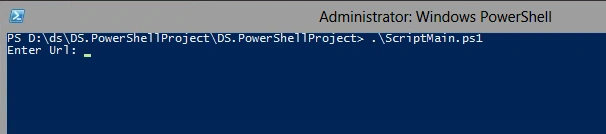
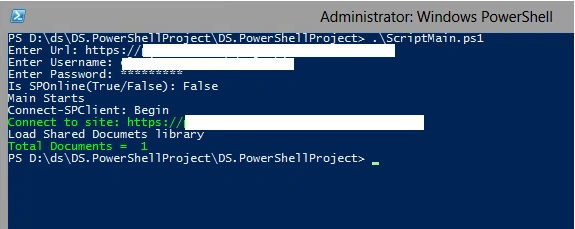
- Now, open the PowerShell console and change to the script directory. Call “ScriptMain.ps1” and hit Enter. It will ask for various parameters.
- Provide parameters: Site Url, User Name (domain\user), Password and IsSPOnline (True/False). Hit Enter.
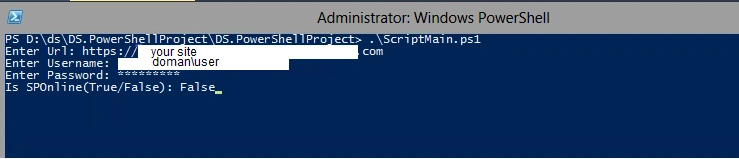
- It will take few seconds to load SharePoint DLLs, and then will connect to the given site, read “Shared Documents” library item count and display.
I hope this will help.
Thanks!
Santhakumar MunuswamyPosted Oct 18, 2015, 2:36 AM
Good one
RakeshPosted Oct 16, 2015, 12:32 AM
Good share
Priyaranjan K SPosted Oct 15, 2015, 2:31 PM
Thanks for the share
Rahul SuryawanshiPosted Oct 15, 2015, 12:34 PM
Good article..Let me try!
Nilesh JadavPosted Oct 15, 2015, 7:50 AM
Nice one sir !!
Harshad PansuriyaPosted Oct 15, 2015, 6:47 AM
Nice one
Mukesh KumarPosted Oct 15, 2015, 6:43 AM
Good One