

Introduction
In this article we will explore SharePoint 2013. Microsoft has introduced a new Framework to reate CallOuts that is somewhat similar to the Dialog Framework introduced in SharePoint 2010. The SharePoint 2013 Callouts provide a rich but lightweight details experience for the users. Callouts are used, for example, in document libraries. A callout displays a limited, but important amount of the information about an item. In the document library case, the callout houses some contextual information to allow users to get a preview of the details as well as a set of frequently used commands for users to act on. Many SharePoint 2013 features make use of callouts .
Known limitations of the callout behavior are:
- SharePoint does not display callouts for external content sources.
- SharePoint does not generate callouts when rendering in UI Version 14 mode.
- SharePoint only displays callouts for specific lists, depending on the list's template.
Important to know
- SP Callout is only for SP Server 2013.
- Callout can be displayed for the following SP Lists:
- Assert Library.
- Document Library.
- Task Lists.
- Pages Library.
- Images Library.
- Callout cannot be displayed for the following SP Lists:
- Custom Lists.
- Announcements Lists.
- Calendar List.
- Discussions List.
- SP.SOD.executFunc must contain all the SP Callout implementation code.
- JavaScript and JQuery skills must be expert in order to deliver a professional SP Callout.
Step 1: Navigate to your SharePoint 2013 site.
Step 2: From this page select the Site Actions | Edit Page.
Edit the page, go to the "Insert" tab in the Ribbon and click the "Web Part" option. In the "Web Parts" picker area, go to the "Media and Content" category, select the "Script Editor" Web Part and press the "Add button".
Step 3: Once the Web Part is inserted into the page, you will see an "EDIT SNIPPET" link; click it. You can insert the HTML and/or JavaScript as in the following:
- <script type="text/javascript">
- SP.SOD.executeFunc("callout.js", "Callout", function()
- {
- var _link = document.getElementById("AboutusLink");
- var listCallout = CalloutManager.createNew(
- {
- launchPoint: _link,
- beakOrientation: "leftRight",
- ID: "CallOut ID",
- title: "Callouts About Us",
- content: "<div class=\"ms-soften\" style=\"margin-top:2px; \"><hr/></div>" + "<div id='confirmationBLOCK' style=\"margin-top:13px;visibility:hidden;\">Thank you for Contacting Us!</div>" + "<div class=\"callout-section\" style=\"margin-top:2px;width:95%;Height:200px; \"><span id='CommentsArea' style=\"width:100%;height: 100%; -webkit-box-sizing: border-box; -moz-box-sizing: border-box; box-sizing: border-box;\">Callout pop up is one more UI change in SharePoint 2013. Metro UI was introduced in share point 2013 and one of the new concept is Callouts ...</span ></div>",
- });
- });
- </script>
- <div id="AboutusLink" style="width:38%;"><u><span class=\"ms-commandLink\" style=\"text-align: left;font-size: 14px;\">Callouts About Us</span></u></div>
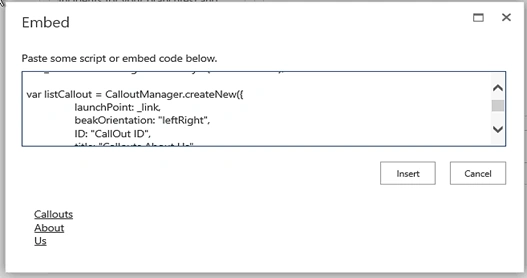
Finally the result will look like the following,

Michael FloPosted Sep 30, 2018, 5:48 AM
Hi Sagar, looks really nice. Is ist possible to show .jpg files via a callout?
Harshad PansuriyaPosted Dec 1, 2015, 11:32 PM
Nice one
Rupali ShindePosted Dec 1, 2015, 11:22 PM
nice one :)
Santhakumar MunuswamyPosted Dec 1, 2015, 11:04 AM
Good one
Mukesh KumarPosted Dec 1, 2015, 8:41 AM
Good One