

Introduction
In this article, we will explore how we can attach multiple attachments to the new item on list using JSOM and REST API.
There are dozens of blog posts and articles out there about uploading files to SharePoint, and some of them even mention attachments. But I found that not a single one of the articles provide a step by step guide to create new item and attachments to itself.
So far, I have seen everyone blogging and posting articles, where they follow the approach of hardcoding the item ID and passing it to REST API and Uploading.
But I have come up with another way of implementing the same. Check the step by step guide below.
Steps
The below code snippet will show the Personal Details HTML that has been created for the user to insert data into the list. In HTML, one tag is highlighted to facilitate multi -ile upload control, I am leveraging "jquery.multifile.js" plugin. If we don't use that plugin, the user will select only one input file for upload.
- <script type="text/javascript" src="/Script/jquery-1.10.2.js"></script>
- <script type="text/javascript" src="/Script/jquery-ui.js"></script>
- <script type="text/javascript" src="/_layouts/15/sp.js"></script>
- <script type="text/javascript" src="/_layouts/15/sp.runtime.js"></script>
- <script type="text/javascript" src="/Script/jquery.multifile.js"></script>
- <span style="font-size: 22.0pt;padding-left:20px">Personal Details<o:p></o:p></span>
- <table align="left" border="1" cellpadding="0" cellspacing="0" class="MsoTableGrid" width="0" id="mytable">
- <tbody>
- <tr>
- <td >
- <table align="left" border="1" cellpadding="0" cellspacing="0" class="MsoTableGrid" style=""><tbody><tr><td style="" valign="top" class="auto-style16"><h3> Name</h3></td>
- <td valign="top" style="padding:9px;" class="auto-style17">
- <input type="text" value="" maxlength="255" id="Name" title="Name" style="width: 96%;" class="ms-long ms-spellcheck-true">
- </td></tr><tr >
- <td class="auto-style16"><h3> Address</h3> </td><td class="auto-style17">
- <input type="text" value="" maxlength="255" id=" Address" title="Address" style="ime-mode :;width: 96%;" class="ms-long ms-spellcheck-true"></td></tr><tr><td class="auto-style15"><h3 >City</h3></td>
- <td class="auto-style4"><input type="text" value="" maxlength="255" id=" City " title=" City " style=";width: 96%;" class="ms-long ms-spellcheck-true"></td></tr><tr><td class="auto-style15"><h3 >
- Contact Number </h3></td>
- <td class="auto-style5"><input type="text" value="" maxlength="255" id=" ContactNumber " title="ContactNumber" style="ime-mode :;width: 96%;" class="ms-long ms-spellcheck-true"></td></tr></tbody></table><table ><tbody>
- <tr ><td ><span style="font-family: " segoe ui" ,sans-serif; color: #444444">Click here to attach file</span> <div class="files" id="attachFilesHolder ">
- <input id="file_input" type="file" name="files[]">
- </div>
- </td><td></td></tr></tbody></table>
- <div style="TEXT-ALIGN: -webkit-center; padding-bottom: 20px; padding-top: 20px; padding-left:190px"><input name="SaveItem" style=" height: 40px; font-size: 15px;" class="ms-ButtonHeightWidth" id=" NewSaveItem " accesskey="O" onclick="" type="button" value="Click here to submit " target="_self"></div>
- </tbody></table>
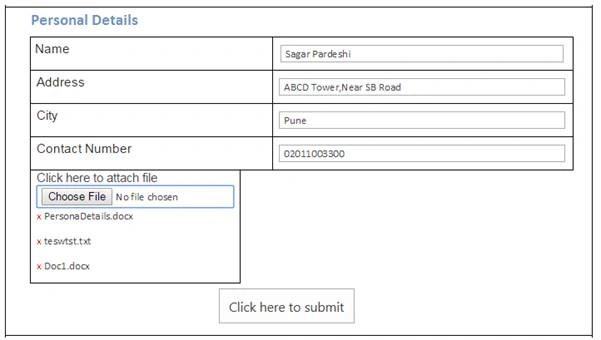
Step 1
Navigate to your SharePoint 2013 site.
Step 2
From this page, select Site Actions | Edit Page.
Edit the page. Go to the Insert tab in the ribbon and click Web Part option.
Step 3
Once the Web part is inserted into the page, you will see an "EDIT SNIPPET" link; click it. You can insert HTML and/or JavaScript, as shown below.
- <script type="text/javascript">
- var oLoader;
- var attcount = 0;
- var arraycount = 0;
- $(document).ready(function ($) {
- $('#file_input').multifile();//For facilitate multi file upload
- $("#NewSaveItem").click(function () { formSave() });
- });
- function formSave() {
- oLoader = SP.UI.ModalDialog.showWaitScreenWithNoClose("Working on it", "Creating New Bank Account...");
- var data = [];
- var fileArray = [];
- $("#attachFilesHolder input:file").each(function () {
- if ($(this)[0].files[0]) {
- fileArray.push({ "Attachment": $(this)[0].files[0] });
- }
- });
- arraycount += fileArray.length;
- data.push({
- "Name": $("input[title='Name']").val(),
- " Address ": $("input[title='Address']").val(),
- "City": $("input[title= City]").val(),
- "ContactNumber": $("input[title='ContactNumber']").val(),
- "Files": fileArray
- });
- createNewItemWithAttachments("BankDetails", data).then(
- function () {
- if (oLoader.close) setTimeout(function () { oLoader.close(); window.location.replace(_spPageContextInfo.siteAbsoluteUrl + "/Lists/BankDetails/AllItems.aspx"); }, 3000);
- },
- function (sender, args) {
- console.log('Error occured' + args.get_message());
- }
- )
- }
- var createNewItemWithAttachments = function (listName, listValues) {
- var fileCountCheck = 0;
- var fileNames;
- var context = new SP.ClientContext.get_current();
- var dfd = $.Deferred();
- var targetList = context.get_web().get_lists().getByTitle(listName);
- context.load(targetList);
- var itemCreateInfo = new SP.ListItemCreationInformation();
- var listItem = targetList.addItem(itemCreateInfo);
- listItem.set_item("Name", listValues[0].Name);
- listItem.set_item("Address", listValues[0]. Address);
- listItem.set_item("City", listValues[0].City);
- listItem.set_item("ContactNumber", listValues[0].ContactNumber);
- listItem.update();
- context.executeQueryAsync(
- function () {
- var id = listItem.get_id();
- if (listValues[0].Files.length != 0) {
- if (fileCountCheck <= listValues[0].Files.length - 1) {
- loopFileUpload(listName, id, listValues, fileCountCheck).then(
- function () {
- },
- function (sender, args) {
- console.log("Error uploading");
- dfd.reject(sender, args);
- }
- );
- }
- }
- else {
- dfd.resolve(fileCountCheck);
- }
- },
- function (sender, args) {
- console.log('Error occured' + args.get_message());
- }
- );
- return dfd.promise();
- }
- function loopFileUpload(listName, id, listValues, fileCountCheck) {
- var dfd = $.Deferred();
- uploadFileHolder(listName, id, listValues[0].Files[fileCountCheck].Attachment).then(
- function (data) {
- var objcontext = new SP.ClientContext();
- var targetList = objcontext.get_web().get_lists().getByTitle(listName);
- var listItem = targetList.getItemById(id);
- objcontext.load(listItem);
- objcontext.executeQueryAsync(function () {
- console.log("Reload List Item- Success");
- fileCountCheck++;
- if (fileCountCheck <= listValues[0].Files.length - 1) {
- loopFileUpload(listName, id, listValues, fileCountCheck);
- } else {
- console.log(fileCountCheck + ": Files uploaded");
- attcount += fileCountCheck;
- if (arraycount == attcount) {
- if (oLoader.close) setTimeout(function () { oLoader.close(); window.location.replace(_spPageContextInfo.siteAbsoluteUrl + "/Lists/BankDetails/AllItems.aspx"); }, 3000);
- }
- }
- },
- function (sender, args) {
- console.log("Reload List Item- Fail" + args.get_message());
- });
- },
- function (sender, args) {
- console.log("Not uploaded");
- dfd.reject(sender, args);
- }
- );
- return dfd.promise();
- }
- function uploadFileHolder(listName, id, file) {
- var deferred = $.Deferred();
- var fileName = file.name;
- getFileBuffer(file).then(
- function (buffer) {
- var bytes = new Uint8Array(buffer);
- var binary = '';
- for (var b = 0; b < bytes.length; b++) {
- binary += String.fromCharCode(bytes[b]);
- }
- var scriptbase = _spPageContextInfo.webServerRelativeUrl + "/_layouts/15/";
- console.log(' File size:' + bytes.length);
- $.getScript(scriptbase + "SP.RequestExecutor.js", function () {
- var createitem = new SP.RequestExecutor(_spPageContextInfo.webServerRelativeUrl);
- createitem.executeAsync({
- url: _spPageContextInfo.webServerRelativeUrl + "/_api/web/lists/GetByTitle('" + listName + "')/items(" + id + ")/AttachmentFiles/add(FileName='" + file.name + "')",
- method: "POST",
- binaryStringRequestBody: true,
- body: binary,
- success: fsucc,
- error: ferr,
- state: "Update"
- });
- function fsucc(data) {
- console.log(data + ' uploaded successfully');
- deferred.resolve(data);
- }
- function ferr(data) {
- console.log(fileName + "not uploaded error");
- deferred.reject(data);
- }
- });
- },
- function (err) {
- deferred.reject(err);
- }
- );
- return deferred.promise();
- }
- function getFileBuffer(file) {
- var deferred = $.Deferred();
- var reader = new FileReader();
- reader.onload = function (e) {
- deferred.resolve(e.target.result);
- }
- reader.onerror = function (e) {
- deferred.reject(e.target.error);
- }
- reader.readAsArrayBuffer(file);
- return deferred.promise();
- }
- </script>
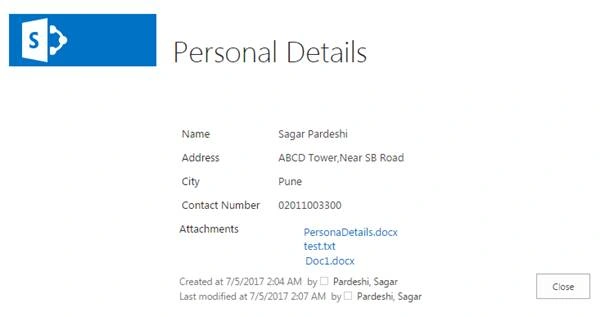
Final O/P
Saleh AshrafiPosted Feb 12, 2024, 7:40 AM
Hi, this solution work with Infopath form?
rahaman baigPosted Dec 29, 2020, 1:11 PM
Your script is not working ..can u pls upload working script
Bhargava ChPosted Sep 18, 2020, 10:49 AM
Hi Sagar FileReader is not supported in few of the browser.. can you please share the alternate code for that?
asheefh mohammadPosted Oct 28, 2019, 1:23 AM
Hi Sagar, i have tried your code unfortunately i am able to upload only one file. in second iteration $.getScript(scriptbase + "SP.RequestExecutor.js", function () doent respond. kindly help me out
Raj KotianPosted Sep 17, 2019, 4:26 PM
Hi Sagar, Can you please share the updated code? How does the Submit happen? There is no Submit button
Saulo OliveiraPosted Jun 6, 2019, 8:31 AM
Excellent article, thanks for share Sagar.
marut mahajanPosted May 19, 2019, 9:40 PM
Thank you, Sagar, for sharing the code, But I am not able to select multiple files. It is working fine for one file. Can you please help with this.
Akash KumharPosted Jun 12, 2018, 6:37 AM
Nice Article Sagar.. Your articles are a lifesaver
Hari DarukumalliPosted Apr 10, 2018, 1:22 AM
Thank u Sagar ... U done great job
Shalini SinghPosted Apr 3, 2018, 1:33 AM
Hi....I am getting the following error:Sys.InvalidOperationException: Type SP.PostMessageRequestInfo has already been registered. The type may be defined multiple times or the script file that defines it may have already been loaded. A possible cause is a change of settings during a partial update at ScriptResource.axd (785,42)
Rakesh PatelPosted Dec 26, 2017, 12:11 AM
I am facing issue at upload at function loopFileUpload(listName, id, listValues, fileCountCheck) { var dfd = $.Deferred();..... every time it skip from here and do not attach file in list.. when I debug it stop at "var dfd = Deferred();" and did not move further.. I have click Stop button in the address bar and suddenly it moved further... and uploaded all the files... i don't understand why it is stopping at var dfd = Deferred(); can you please help in this.
Rakesh PatelPosted Dec 12, 2017, 6:49 AM
Can you pl. share "jquery.multifile.js" you used, or download link.
Hari DarukumalliPosted Nov 16, 2017, 1:52 AM
Where you declare i values in code
Hari DarukumalliPosted Nov 16, 2017, 1:46 AM
Getting Error message, for(i=0; i<count;i++), count is undefined.
Swapnil PhatalePosted Sep 26, 2017, 12:14 PM
Thanks. Its really saved my time.
Rajkiran SwainPosted Jul 6, 2017, 1:07 PM
Nice one ........................
Vinodh NarayananPosted Jul 6, 2017, 12:06 PM
Good one thanks for sharing this