

When you click on the "Check granular backup job status" link, you will land on the"Granular Backup Job Status" page. This page updates you about the status of Site Collection Backup or Content export.
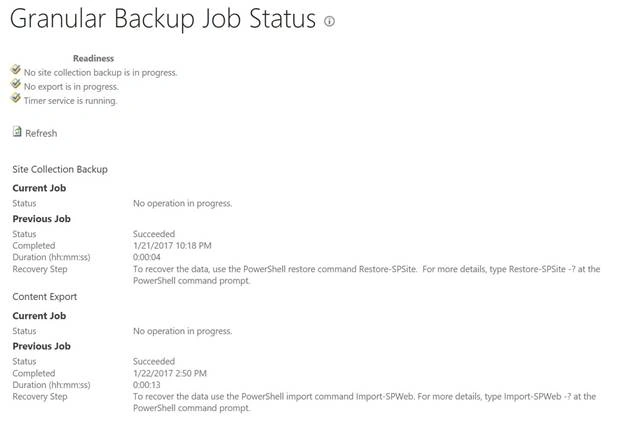
The direct link for "Granular Backup Job Status" page is /_admin/SiteBackupOrExportStatus.aspx
If you want to view the granular backup job status from Central Admin, then this page will display the information about both the Site Collection Backup and the Content Export job. The beauty of this page is that it is auto refreshed after every 30 seconds.
Readiness
On the top section of this page, you see the "Readiness" section. This section gives the overall status.
- No site collection backup is in progress. it will display no if no backup job is running; otherwise, it will show something like “A Site collection backup job is currently in progress”.
- No export is in progress. It will display no if no export is in progress; otherwise it will say something like “A export job is currently in progress”.
- Timer service is running. If the SharePoint timer service is not running, then this will show the stopped error.
There are two more sections on the same page, Site collection backup and Content Export.
Site Collection Backup
In the Site collection backup section, we are seeing two sections - Current Job and Previous job. Let’s see what we will see in each of these sections.
Current Job
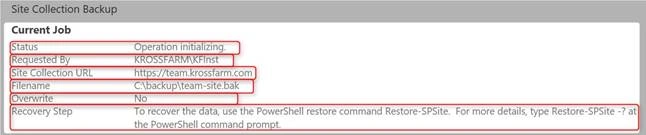
If a site collection backup is running, then you will see a status under the Current Job section of the Site Collation Backup. Here is the information you will get.
- Status - This will tell in which state the job is; i.e., Operation initializing, or backup running etc.
- Requested by - It will display the name of the user who is performing this step. I.e KROSSFARM\KFInst.
- Site collection URL - It is the URL of the Site Collection for which backup is being processed. i.e https//team.krossfarm.com.
- File Name - The name of the file with complete path. i.e C\backup\team-site.bak.
- Overwrite - If the overwrite checkbox is selected or not. i.e. "No" in our case.
- Recovery step - To recover the data, use the PowerShell restore command - Restore-SPSite
Previous Job
Once the job is completed, the current job’s area will display no operations in progress but under the Previous Job label, we will see the status of the last job (irrespective of its success or failure).
- Status - This row will tell the status of the last backup job. In our case, it is Succeeded.
- Completed - This will display the date and time of the backup job. In our case, it is - 1/21/2017 1018 PM
- Duration - The total duration of the backup time job will display here. i.e. (hh:mm:ss) 0:00:04
- Recovery step - To recover the data, use the PowerShell restore command Restore-SPSite

Content Export
In the content export section, we see two sections - Current Job and Previous job, similar to the Site Collection Backup section. Let’s see what we will see in each section.
Current Job
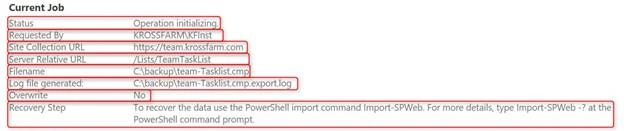
If an export job is running, then you will see a status under the Current Job section of the Content Export. Here is the information you will get.
- Status - This will tell which state the job is in i.e. Operation initializing, or Operation in Progress.
- Requested by - It will display the name of the user who has performed this step. I.e KROSSFARM\KFInst
- Site collection URL - This is the URL of the Site Collection for which list/or library is being processed. i.e https//team.krossfarm.com
- Server Relative URL - This is the relative URL of the list / library /site. In our case, it is list /lists/TeamTaskList.
- File Name - The name of the file with complete path. i.e C\backup\team-tasklist.cmp
- Log file generated - It is the location of the export log file. In our case, C\backup\team-tasklist.cmp.export.log.
- Overwrite - This tells if the overwrite checkbox is selected or not. (No - In our case).
- Recovery step - To recover the data, use the PowerShell import command - Import-SPWeb
Previous Job
Once the job is completed, the Current Job’s area will display no operations in progress but under the Previous Job label, we will see the status of the last job (irrespective of its success or failure).
- Status - This row will tell the status of the last backup job. In our case, it is Succeeded
- Completed - This will display the date and time of the export job. In our case, it is - 1/22/2017 250 PM
- Duration - The total duration of the Content Export job will display here. I.e. (hh:mm:ss) 0:00:13
- Recovery step - To recover the data, use the PowerShell import command Import-SPWeb

Note - If there is any failure in Content Export of Site Collection Backup job, then you will see the failure reason over here. But, for complete details, you have to either look for ULS logs for backup job or export the log file for Content Export.
Applies to: Same page available in SharePoint 2010, 2013 and 2016.
Join the conversation! Your thoughts help the community grow.