

When you click on the 'Launch the Farm Configuration Wizard Link', you will land on the Configuration wizard page. This page will allow you to configure SharePoint Farm (Including Service Applications and basic content Web Application).

SharePoint Designer Settings page’s direct link - /_admin/adminconfigintro.aspx?scenarioid=adminconfig&welcomestringid=farmconfigurationwizard_welcome
If you install SharePoint, then at the end of the SharePoint products configuration wizard, you will get this option to configure the SharePoint Services. SharePoint Farm configuration wizard allows you to create all the Service applications without giving you too many options. It is easy for newcomers to configure the basic settings of the Service application. I personally would not recommend running the Farm configuration wizard because once you configure the Services, using this option, then for the rest of your life, you will busy fixing the messes caused by this option. There are many reasons not to use this option.
- It won't give you as much flexibility as manual process gives you.
- It will create all the Service Applications if you configured the default option, which are overhead on the Server, as you are not going to use all the Service Applications.
- It configures all the Service Application under a single Service account, which is against best practices.
- It uses the basic settings to configure the Service Application, which requires extra work from the SharePoint administrator to fix it.
- If the user profile is configured via this option, then it will use the basic content Web Application as MySite host, which is against best practices.
- It creates a weird content database name (include the GUID in it).
- It creates a basic content Web application, which is again not properly optimized. You have to manually fix it.
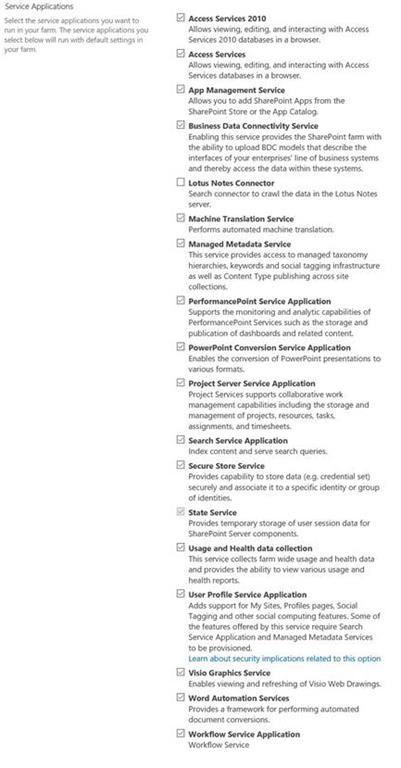
Even if you want to use this option to configure the Services, I would highly recommend you uncheck all the unwanted Services applications. Personally, I use this option after SharePoint Farm installation for the State Service Application.
Run the Configuration Wizard
I will walk through the steps of how to run the configuration wizard.
- Login to central admin with the account member of Farm administrator group and also local admin on the Server.
- On the Welcome Page, click on Start the Wizard. You can cancel it, if you want to manually configure everything. The 1st place you will land after running the SharePoint product and Configuration wizard is in the screenshot given below.

- On this Page,
- You can use the existing managed account or register a new account by providing the user name and the password.
- In the Service Application section, select the Service Application which you want to create, using this farm config wizard.
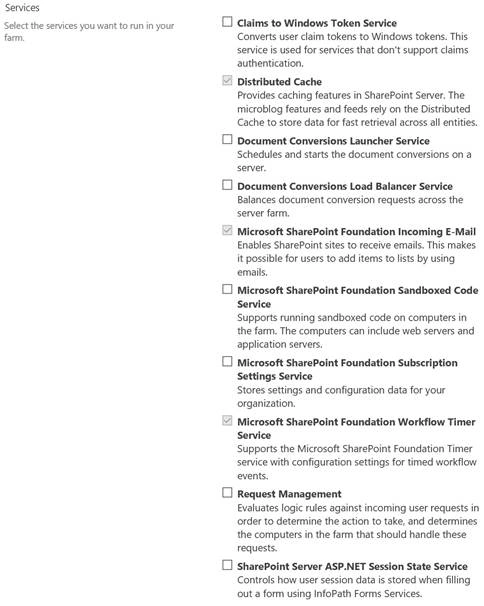
- In the Service section, select the Service you want to start.
- Click Next.

- Now, wait for a couple of minutes (it depends upon the Services you selected.).
- Once completed, it will ask for the 'Create a site collection', as it creates a Web Application on the port 80.
As I mentioned earlier, there are several drawbacksof using this option but it is good, if you want to use the Farm for POC purposes.
Join the conversation! Your thoughts help the community grow.