

When you click on the confirm site use and deletion link, you will land on Site Use Confirmation and Deletion. This page will let you configure the automatic deletion of the site collections with the permission of the site owners.
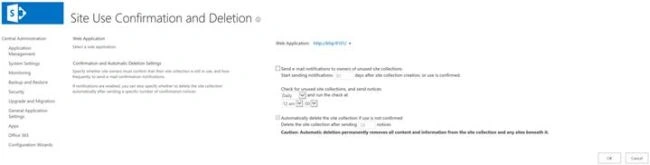
On this page, we will configure the site usage confirmation and deletion settings for a Web app.
You have to be careful when you configure site user confirmation and deletion settings. If you properly plan this feature, then a big advantage is that your farm is cleaned (no inactive site collection) and you free the resources in the farm (i.e. storage, resources a site collection use). This feature requires proper planning before enabling it because you can lose the data (site collections). Without proper planning, it will cause major issue as this feature will delete the site collection along with all the information permanently and cause the data loss.
In order to use this feature, an outgoing email must be configured in the Farm, because SharePoint will send the email notification to the owner of the site collection for user confirmation.
A couple of things to make sure
- A backup procedure must be in place and periodically confirm your backups.
- A secondary site collection administrator (to avoid any mess-up), SharePoint sends the email notification to both primary and secondary site collection administrator, if one of them is on vacation then other can respond.
- How many notification do you want to send before the site deletion?
- Employees' updated vacations calendars or leave management systems should be in place.
To configure
- Login to central admin with Farm admin account.
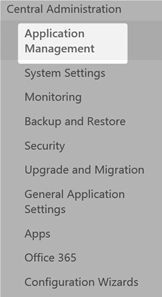
- On SharePoint Central Administration, click Application Management.
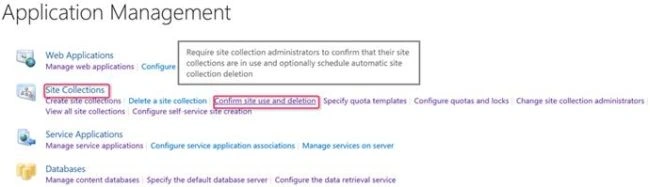
- On this page, click site use confirmation and deletion, under the site collection.
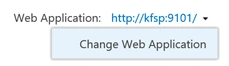
- On the site use confirmation and deletion page, in the Web Application section, click the down arrow, which is next to Web Application and then click change Web Application.
- Select the TeamWeb Web Application.
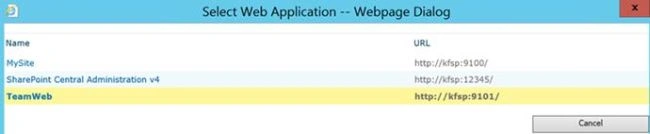
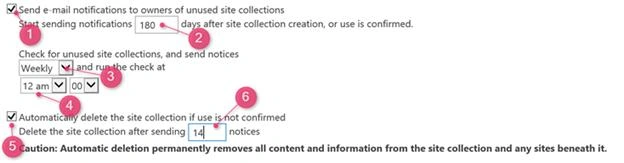
- In the Confirmation and Automatic Deletion Settings section, please enter the information given below.
- Select the Send email notification to owners of unused site collections check box.
- Enter 180 days, after the site creation or site usage is confirmed.
- Now, select it.
- Run the check at 12 a.m.
- Select the automatically delete the site collection.
- Enter the 14 notices, after which a site collection will be removed.
- Click OK.
Parameters
- Check the box. This will enable site usage and deletion confirmation.
- Number of days (default value is 90), after which number of days site collection starts receiving the notification for confirmation of the site usage. Minimum value is 30 days and maximum value is 365 days.
- Select when the timer job will check and send the Notification. You can select from daily, weekly or monthly.
- Time of Day when the timer job will run.
- Check the box, if we want to delete the site automatically, if usage is not confirmed. This one is risky, so be careful before enabling it.
- Enter the number of notices, after which a site collection is permanently removed.
Site Use Confirmation and Deletion (direct Link).
Join the conversation! Your thoughts help the community grow.