

When you click on the "Enable Enterprise Features" link, you are redirected to the following page. This page lets you enable the Enterprise features in SharePoint farm. There are 2 possible views for this page, if you are using SharePoint standard edition, then you will get the following page.

And, if you are on the Enterprise edition of SharePoint, then you will get this page.
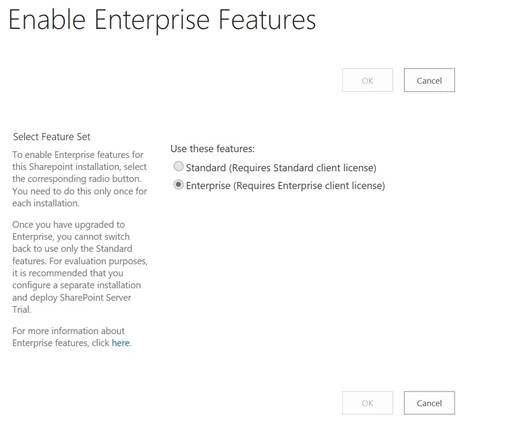
Enable Enterprise Features page’s direct link - / _admin/SkuUpgrade.aspx
Use Case
- You need a valid 25-character long Enterprise product key.
- Make sure, your environment is properly licensed for enterprise (Cals for user and server).
- Lastly you have to plan it because it can cause a short outage for the farm.
Important: Once you upgrade SharePoint to Enterprise edition, you cannot go back (downgrade the SharePoint to Standard). The only supported way is to uninstall the SharePoint and reinstall it with Standard product key. If Enterprise features are enabled on a site collection, then you cannot restore it to Standard edition farm. You have to use third party tools (safest way) or try to disable the Enterprise edition on site collection, take the backup, and restore into Standard farm.
Another important thing is that if you have a multi-Server farm or a single Server farm, you only need to perform this sku-upgrade step one time via Central Admin. This process will run the configuration wizard on the backend on all the Servers in the farm. Configuration wizard will be enabled and will activate all the Enterprise level services and features.
Once you enable the Enterprise features in the farm, all the new site collections which will provision after this will have Enterprise features set in. But for all existing site collections, you have to enable it manually. In Central Admin, there is another option called “Enable Features on existing sites”.
Enable Enterprise Features
In order to upgrade and enable the Enterprise features on a farm, please follow the steps below.
- Login to Central Admin with account member of farm administrator group and also the local Admin on the Server.
- Go to the Upgrade and Migration -> Click on Enable Enterprise Features.
- On this page, provide the following information.
- Click on Enterprise (Required Enterprise Client License) radio button.
- Enter the 25-character long Enterprise Product key.
- Click OK.

- Now, wait for a couple of minutes as this will upgrade the SKU on all Servers in the farm.
- Once it successfully upgrades, you will see this screen.
- Now, you have to reset the IIS on all Servers in the farm.
- If you come back on this page, you will get the following screen.


This concludes this article. We we learned how to enable the Enterprise features on existing SharePoint Server Standard installation.
Keep reading and enjoy SharePoint.
Join the conversation! Your thoughts help the community grow.