

Central Administration in SharePoint Server 2016 is where you go to perform administration tasks from a central location. SharePoint 2016 brings another improvement in this category as well. Now, Central admin will not be provisioned on all Servers in a farm by default. CA will be installed on the first Server in the farm on which you run the SharePoint Products Configuration Wizard.
Moreover, Central Administration site does not depend on the MiniRole. Now, you can provision Central Admin on any Server irrespective of their role in the farm (MiniRole). MiniRole Health will not try to provision or un-provision it.
There are 4 different ways to provision / Un-provision Central Admin to a Local Server.
- The Services on Server page on Central Administration > System Settings
- Windows PowerShell cmdlets (new-spcentraladmininstration)
- The psconfig.exe -cmd adminvs operation
- The SharePoint Products Configuration wizard
Using the Central Administration
To configure the Central Admin on a local Server, please follow these steps.
Provisioning
- Please, log into Central Admin using a domain account which is a member of the farm administrators group.
- Click on System Settings > Manage Services on Server
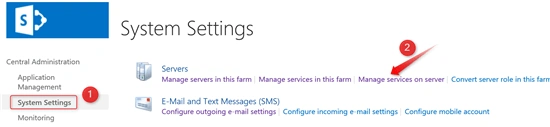
- On this Page at top right DropDown, select the Server (on which we want to provision it). Now, click on the Start link in front of Central Administration.

- Wait for couple of minutes (as it is provisioning the IIS site on the Server). Then, refresh the page and you will see that the status has become Started.
Un-Provision
To un-provision central administration web application from a local server, please follow the instructions below.
- Log into Central Admin using a domain account which is a member of the farm administrators group.
- Click on System Settings > Manage Services on Server.
- On this Page at top right Dropdown, select the Server on which we want to provision it. Now, click on the Stop link in front of Central Administration.

- Wait for a couple of minutes (as it is removing the IIS site on the Server), then refresh the page to see the Stopped status.
Using Windows PowerShell
SharePoint 2016 brings a new command (remove-spcentraladmininstration) for Central Administration site. To configure the Central Admin on a local Server, please follow the instructions below.
Provision
Please follow the instructions below to provision Central Administration web site on additional Server
- Log into the Server where you want to provision Central Administration web application.
- Please, login with Domain account which is having Farm admin rights.
- On the Start menu, click All Programs >> Microsoft SharePoint 2016 Products >> SharePoint 2016 Management Shell.
- Type the following command:
- Port(Optional) - Please specify the Port number on which Central Admin will be provisioned. If this is an additional Server, then use the same port number that you used on first Server. If no port number is specified, then a non-conflicting port will be auto generated or it will use the same port as on the other Servers.
- SecureSocketLayer(Option) - If you want to enable the SSL for Central Admin, then use this. By default, the value for this is False.
- WindowsAuthProvider(Optional) - Specify the authorization provider for the CA web application. By default, value is NTLM.
- Wait for some time and you will see a new IIS site and app pool.
Un-Provision
Please follow the instructions below.
- Make sure, you are logging on the Server where you want to un-provision the Central Administration web application.
- Please, login with Domain account which is having Farm Admin rights.
- On the Start menu, click All Programs >> Microsoft SharePoint 2016 Products >> SharePoint 2016 Management Shell.
- Please type the following commands -
Remove-SPCentralAdministration
- Please wait for some time. It will remove the site from IIS and stop the Central Admin services on the Server.
Using PSCONFig.exe tool
If you still love the old-school tools, then use the PSCONFIG.exe. In order to provision/un-provision the Central Admin on a local Server, please follow the instructions below.
Provisioning
Please use the below-mentioned instructions to provision the Central Admin on a local server.
- Make sure you are logged on the Server where you want to un-provision the Central Administration web application.
- Please, login with the Domain account that is having Farm admin rights.
- On the Start menu, click All Programs >> Microsoft SharePoint 2016 Products >> SharePoint 2016 Management Shell.(PSCONFIG tool is compatible with SharePoint Management Shell)
- Please type the following command -
psconfig.exe -cmd adminvs -provision -port 8080 -windowsauthprovider onlyusentlm - Provision - Provisions the SharePoint Central Administration web application on a local server. Provisioning creates a new SharePoint Central Administration web application.
- Port(Optional) - Specify the port number on which Central Admin is to be provisioned. If this is additional Server, then use the same port number that you used on first server. If no port number is specified, a non-conflicting port will be auto generated or it will use the same port as on other servers.
- WindowsAuthProvider(Optional) - Specified the authorization provider for the CA web application. By default, the value is NTLM.
- Enablekerberos
- onlyusentlm
- Wait until the process completes.
Un-provisioning
Please follow the instructions below to un-provision the Central admin from a local server.
- Make sure you are logged on the Server where you want to un-provision the Central Administration web application.
- Please, login with the Domain account which is having Farm admin rights.
- On the Start menu, click All Programs >> Microsoft SharePoint 2016 Products >> SharePoint 2016 Management Shell.(PSCONFIG tool is compatible with SharePoint Management Shell)
- Type the following command-
psconfig.exe -cmd adminvs -unprovision
- Wait for the task completion.
Using SharePoint Products Configuration Wizard
Please follow the instructions below to provision the Central Admin on local Server.
- Open SharePoint Products Configuration Wizard.
- To find the product configuration Wizard, press Windows+S. Type SharePoint Products Configuration Wizard and click OK.
- On Welcome to SharePoint Products page, click Next.
- On Modify Server farm settings page, select "Do not disconnect from this server farm" and click Next.
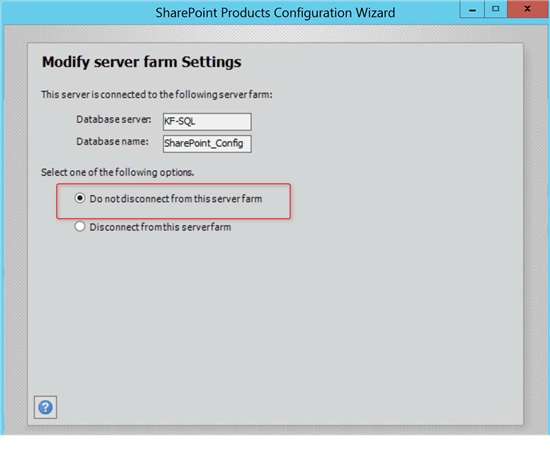
- On completing the SharePoint Products Configuration Wizard, click on the Advanced Settings.
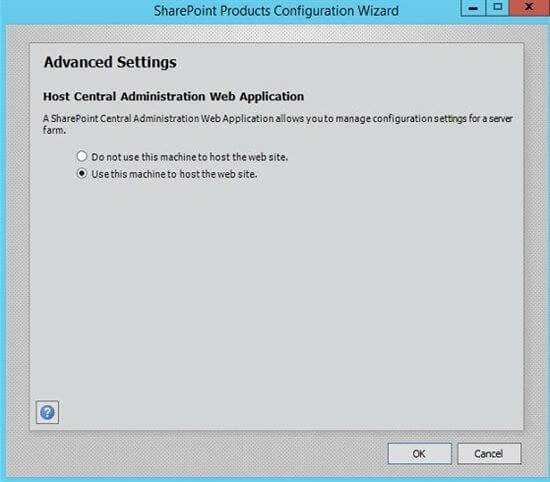
- On Advanced Settings page, select "Use this machine to host the web site" and click OK.
- Click Next.
Un-Provisioning
Please follow the instructions below.
- Open SharePoint Products Configuration Wizard.
- To find product configuration Wizard, press Windows+S. Type SharePoint Products Configuration Wizard and click OK.
- On Welcome to SharePoint Products page, click Next.
- On Modify Server farm settings page, select "Do not disconnect from this server farm" and click Next.
- Select "Yes, I want to remove the web site from this machine".
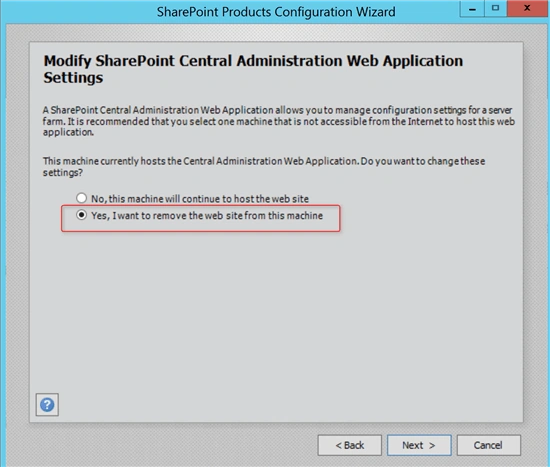
- Click Next on the "Completing SharePoint Products Configuration Wizard" window.
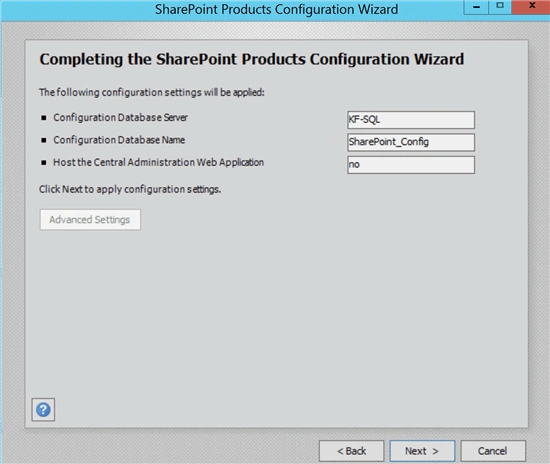
- Wait for successful completion.
Join the conversation! Your thoughts help the community grow.