

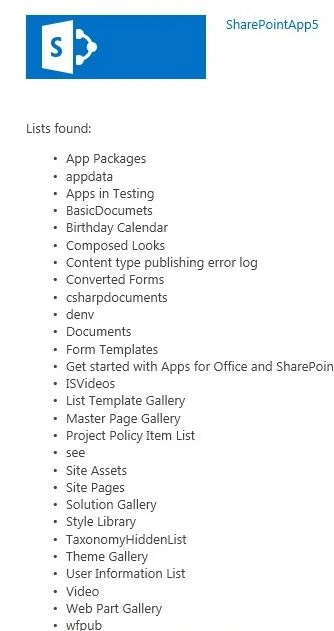
In this article we will see a demonstration of a SharePoint hosted app for reading all the list items from the host web. Here I am showing you how we can use cross domain calls also. By following this article you can learn how to create a simple app for SharePoint using Visual Studio 2012. The app that you'll create includes controls and code for managing lists and list items, but most apps for SharePoint are far more powerful. For example, you can create an app for SharePoint that helps users track expenses and plan events. By using "Napa" Office 365 Development Tools, you can create your apps for SharePoint inside your browser instead of in Visual Studio. You can download your project and open it in Visual Studio for more advanced scenarios.
Prerequisites
You need the following components to complete this walkthrough:
- In house SharePoint 2013 Environment or an Office 365 account
- Visual Studio 2012 or the "Napa" Office 365 Development Tools app
In this procedure, you'll create a project for the app for SharePoint.
How to create an app for SharePoint
- Choose the Add New Project button.
- Choose the App for SharePoint tile, name the project Test app for SharePoint, and then choose the Create button.
The code editor opens and shows the default webpage, which already contains some sample code that you can run without doing anything else. In the app for SharePoint, add controls to the default home page for creating and deleting a generic SharePoint list and getting the current number of lists in the web of the app for SharePoint. You'll add code for the controls later.
To add controls to the home page:
- On the left side of the page under the Pages folder, choose the Default.aspx page if it isn't already selected.
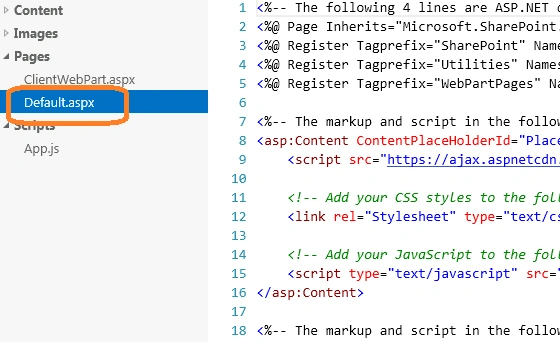
Default.aspx page node
The Default.aspx webpage appears in the code editor.
Add code for getting all lists from the parent site
In this procedure, you'll add some JavaScript code so that users can create and delete lists in the app for SharePoint.
To add code for creating and deleting lists:
- Choose the Scripts folder, and then choose the App.js link.
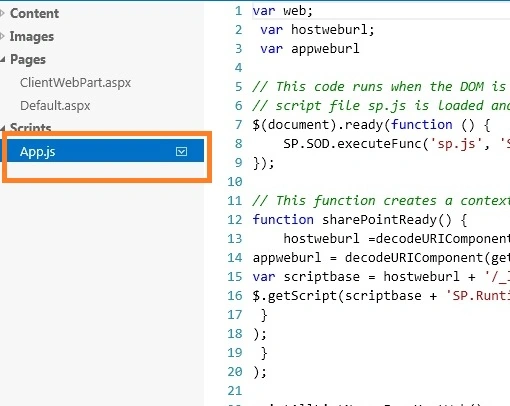
The default JavaScript code file from the project template opens for editing. This file contains the code that's used in your app for SharePoint. You could add another .js file and add code to it instead of to the existing file. But, for this example, add it to the App.js file that's provided.
In the next step, you'll define the functions for the controls that you created in the previous procedure.
Code for Default.aspx
<%-- The following 4 lines are ASP.NET directives needed when using SharePoint components --%>
<%@ Page Inherits="Microsoft.SharePoint.WebPartPages.WebPartPage, Microsoft.SharePoint, Version=15.0.0.0, Culture=neutral, PublicKeyToken=71e9bce111e9429c"
MasterPageFile="~masterurl/default.master" Language="C#" %>
<%@ Register TagPrefix="SharePoint" Namespace="Microsoft.SharePoint.WebControls"
Assembly="Microsoft.SharePoint, Version=15.0.0.0, Culture=neutral, PublicKeyToken=71e9bce111e9429c" %>
<%@ Register TagPrefix="Utilities" Namespace="Microsoft.SharePoint.Utilities" Assembly="Microsoft.SharePoint, Version=15.0.0.0, Culture=neutral, PublicKeyToken=71e9bce111e9429c" %>
<%@ Register TagPrefix="WebPartPages" Namespace="Microsoft.SharePoint.WebPartPages"
Assembly="Microsoft.SharePoint, Version=15.0.0.0, Culture=neutral, PublicKeyToken=71e9bce111e9429c" %>
<%-- The markup and script in the following Content element will be placed in the <head> of the page --%>
<asp:Content ID="Content1" ContentPlaceHolderID="PlaceHolderAdditionalPageHead" runat="server">
<script src="https://ajax.aspnetcdn.com/ajax/jQuery/jquery-1.6.2.min.js" type="text/javascript"></script>
<!-- Add your CSS styles to the following file -->
<link rel="Stylesheet" type="text/css" href="../Content/App.css" />
<!-- Add your JavaScript to the following file here we are referring the app.js file -->
<script type="text/javascript" src="../Scripts/App.js"></script>
</asp:Content>
<%-- The markup and script in the following Content element will be placed in the <body> of the page --%>
<asp:Content ID="Content2" ContentPlaceHolderID="PlaceHolderMain" runat="server">
<div>
tola dyPosted Feb 13, 2014, 3:52 AM
Have to grand permission list to read on AppManifest.xml. but I all way get this mess error: (0x800a01bd - JavaScript runtime error: Object doesn't support this action) with this line of code, factory = new SP.ProxyWebRequestExecutorFactory(appweburl); any ideas pleas share me..
RollePosted Jan 29, 2013, 3:28 AM
I get: Could not complete cross-domain call: Access denied. You do not have permission to perform this action or access this resource. And Im logged as an administrator and have access to all sites in the farm. Any ideas whats wrong?