

The office 365 team is rolling out a new modern UI to Office 365 & SharePoint sites, for all Office 365 users, and those new and fresh updates will be available for first release users. Click “Get Early Updates Before Public Release In Office 365” to learn how to become a first release user in Office 365 environment.
So far, Microsoft has rolled out a new UI page in,
- SharePoint home page,
- Site Contents Page and
- Document Libraries.
In this article, we will go through some new changes from Site Hub Content section in Site Contents page. Check the structure on new Site Content page from SharePoint Site Contents in Modern Look.
Site Content Page
The site Content page is built using Office UI fabric for look & feel, and to fetch and render the contents, it is using React JS & Knockout JS frameworks. So, these frameworks enable the responsive page the load smoothly and faster.
Site Hub Content Section
From the Site Hub Content section, we can view two types of information which are, contents and sub sites. A tab is used, in this section, to switch from Contents to Sites, and vice versa.
Even though we can access through tabs, there are some changes that happened in URL also.
| TAB | URL |
| Contents | https://<SharePointSiteURL>/_layouts/15/viewlsts.aspx?view=14 |
| SubSites | https://<SharePointSiteURL>/_layouts/15/viewlsts.aspx?view=15 |
Contents
The Contents area shows the lists of current websites lists and libraries visible to the user with some basic information (List Name, description, Items count and Modified date).
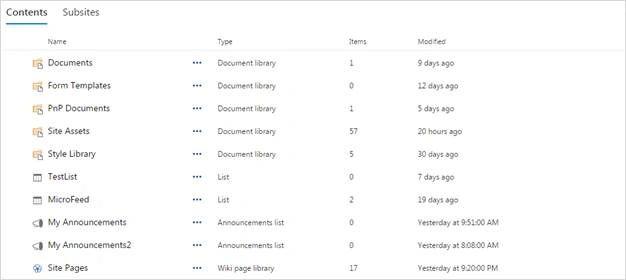
From this table of contents (lists & libraries), we can perform the following clickable events,
- Clicking on Content Name opens that particular List or Library, in new window
- Clicking on ellipsis in each row or right clicking on each item in the row, opens a context menu and allows the user to perform three operations, as following:
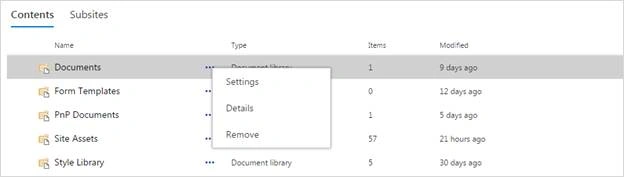
- Settings - Navigate to respective List or Library settings page
- Details - Redirects to Add App page and enables user to create a list, based on the selected template.
- Remove - Delete the respective List or Library
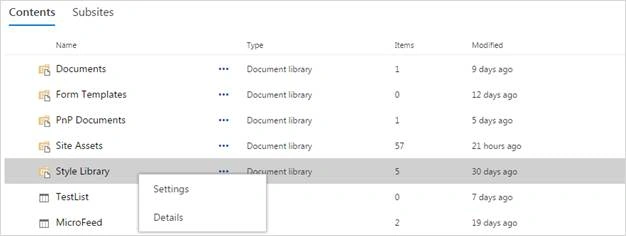
Depending on the site and its configuration, some libraries are not allowed for deletion, such as- Style Library, Form Templates, etc. The context menu won’t get Remove option from those libraries.
SubSites
This section shows the lists of sub sites under current SharePoint web site, with some details, like Site Name, Description, Views, Created and Modified.
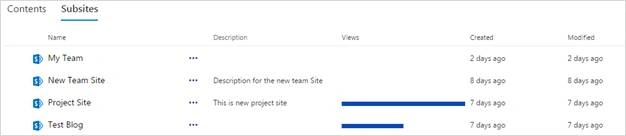
Note: There is a service running in the back-end, that’ll update the view count.
- Clicking on Site Name opens a site in new browser window or tab.
- Clicking on ellipsis or right clicking on each site item row opens a context menu that enables the users to navigate to that respective website’s site content page.
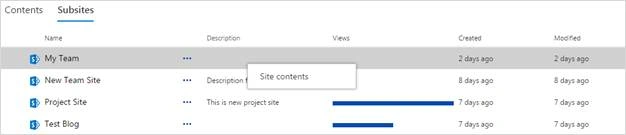
- Site Contents: Redirects the user to the respective Site’s Site Content page.
Conclusion
By the help of Site Hub Contents section, we can view the full list of Lists and Libraries, and sub sites in a table format from the current SharePoint website. We can also navigate to each item in a new window and it enables some basic operations for create, navigate and delete the Lists and Libraries.
kalu singh raoPosted Jul 15, 2016, 1:48 AM
Nice...