
Scenario
We have our SharePoint online site. We are using TermSets in one of the our projecs. We have one TermSet called “Department” having around 40-50 terms (each term is one department). There are sudden changes in the department names, so our customer wants to go through each term and wants to correct those.
Here, one option is to give the rights to the customer so that they can go to the “Term Store Management” page (_layouts/15/termstoremanager.aspx) and change the default label for the terms which they want to change. But this is not the best approach. This approach may be confusing for non technical customers.
So the best alternative we thought is that we will provide TermSet in .CSV file (excel) and give it to the customer, they will do the respective changes and send them back to us so that we can directly import those.
But again, OOB there is no option to Export the given TermSet as shown in Figure 1 and copying each term manually is not the best possible solution again.
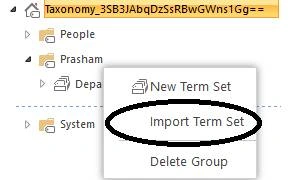
Figure 1: No “Export Term Set” option
So one of the best possible approaches is to write our own PowerShell script and export the termms of the TermSet in the .CSV file.
PowerShell script Step By Step
Step 1: Load the Taxonomy library as,
#Load the Taxonomy library
Add-Type -Path "c:\Program Files\Common Files\microsoft shared\Web Server Extensions\16\ISAPI\Microsoft.SharePoint.Client.Taxonomy.dll" # Path to Taxonomy library (where client SDK is installed)
Step 2:
Set the required variables like SiteCollection URL from where we need to export the TermSet, UserName and Password of your site to connect as,
#Site collection URL from where we need to export the TermSet,
$siteurl = "" # Your site collection URL
#User name and Passwords
$userName ="" # Your user name
$password ="" # Password
Step 3: Get the Microsoft.SharePoint.Client.ClientContext instance and set the credentials as,
#client context object and setting the credentials
[Microsoft.SharePoint.Client.ClientContext]$clientContext = New-Object Microsoft.SharePoint.Client.ClientContext($siteurl)
# convert password into secured string
$securedpw = ConvertTo-SecureString $password -AsPlainText -Force
$clientContext.Credentials = New-Object Microsoft.SharePoint.Client.SharePointOnlineCredentials($userName, $securedpw)
Step 4: Get / Load the required web object as ,
# Retrieving the taxonomy session

SharePoint Online / Office 365 : Exporting All The Terms From Particular TermSet In .csv file Using CSOM & PowerShell
Join the conversation! Your thoughts help the community grow.
Sign in to leave a comment
It is the same account you read, post and publish with — and you will come straight back to this page.
Nanddeep NachanPosted Jan 18, 2019, 7:52 AM
Thanks for sharing. Also, looking for Synonyms during import/export. Any views?
sarath kumarPosted Aug 3, 2017, 4:59 AM
I am using 0-365. I need to export to csv. I dont have shaepoint installed. So how do I do that?
Prasham SabadraPosted Mar 17, 2016, 3:19 PM
Thanks!
Sibeesh VenuPosted Mar 17, 2016, 11:12 AM
Nice Share
Prasham SabadraPosted Mar 15, 2016, 8:58 PM
Thanks all :)
Debasis SahaPosted Mar 15, 2016, 1:49 PM
Good One..
Sagar PardeshiPosted Mar 15, 2016, 3:21 AM
gud one
Humayun Kabir MamunPosted Mar 15, 2016, 2:32 AM
Nice...
Prasham SabadraPosted Mar 15, 2016, 12:05 AM
Thank you Vignesh :)
Vignesh ManiPosted Mar 14, 2016, 5:41 PM
Good