

In this article, we will discuss the Permission Modes in Project Server 2016 by answering the below questions,
- What are the types of Permission Mode in Project Server 2016?
- What are the Global Permission and Category Permission?
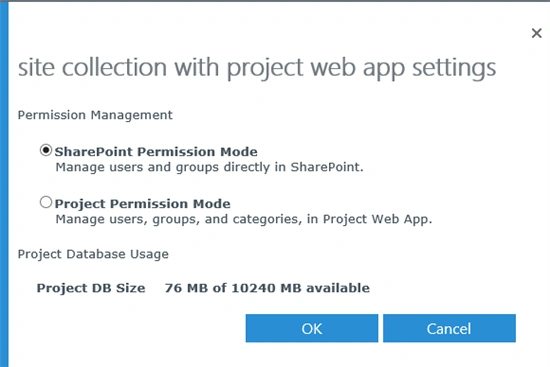
- What’s the difference between Project Permission Mode and SharePoint Permission Mode?
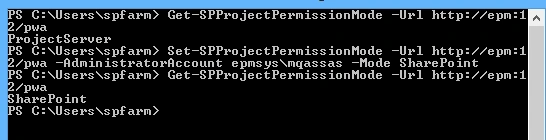
- How do we switch between Project Permission Mode and SharePoint Permission Mode in Project Server On-Premises?
- How do we switch between Project Permission Mode and SharePoint Permission Mode in Project Online?
- What’s the effect of switching to specific Permission Mode?
Project Server 2016 has two security modes for controlling the user's access to sites and projects
- SharePoint Permission Mode (Default).
- Project Permission Mode.
Each PWA Instance can use a different Permission Mode.
What are the Global permission and Category permission?
Project Server 2016 users have two different types of permissions,
- Global permissions
Allow users to use and access sites and features in Project Server 2016.
- Category permissions
Allows users to do tasks with project, resources, and views in Project Server 2016.
Note
- The Project Server 2016 environment must be in Project Permission Mode in order for you to view global permissions and other security settings.
- In SharePoint Permission Mode, SharePoint groups have the same global and category permissions that are assigned to them in Project Server permission mode.
SharePoint Permission Mode
It is a special set of SharePoint security groups that used to provide users different levels of access to Projects, Project Sites and Project Server functionality.
- It is the default permission mode for Project Server.
- It was not available in Project Server 2010 and introduced in Project Server 2013 and still used with Project Server 2016 and Project Online.
- It is simple but not flexible to match the most business requirement.
- It creates 7 default SharePoint groups that directly correspond to the default security groups found in Project Permission Mode. These default security groups include the following,
- Administrator
Users have all global permissions as well as category permissions through the My Organization category. This allows them complete access to everything in Project Web App. - Portfolio Managers
Users have permissions to create and manage projects. This group is intended for project owners who assign tasks to resources. - Portfolio Viewers
Users have permissions to view Project and Project Web App data. This group is intended for high-level users who need visibility into projects but are not themselves assigned project tasks. - Project Managers
Users have permissions to create and manage projects. This group is intended for project owners who assign tasks to resources. - Resource Managers
Users have most global and category-level resource permissions. This group is intended for users who manage and assign resources and edit resource data. - Team Leads
Users have limited permissions around task creation and status reports. This group is intended for persons in a lead capacity that do not have regular assignments on a project. - Team Members
Users have general permissions for using Project Web App, but limited project-level permissions. This group is intended to give everyone basic access to Project Web App.
- Administrator

- Permissions to projects sites and resources are granted by associating the user to one of the 3 predefined groups, which are created automatically per project site,
- Visitors - reflects read only privileges.
- Members - reflects Team Member privileges.
- Owners - reflects Project Manager privileges.
In SharePoint Permission Mode,
- You cannot edit the default permissions assigned to any of these SharePoint groups.
- You cannot create additional custom groups.
- You cannot create additional custom categories.
- There is no (Resource Breakdown Structure) RBS filtering.
- The user delegation feature is not available.
- The Impersonation is not available.
Project Permission Mode


It enables you to set permissions of users to Project Server objects by managing users, groups, and categories.
Nedhir Ben RajebPosted Dec 27, 2018, 1:07 AM
Hello mohamed, could you please recommand me a book about microsoft ppm full course
Sergey KuznetsovPosted Mar 23, 2018, 4:43 AM
Hello, Mohamed! After installing Mode ProjectServer I didn't see the "Project Web App Permissions" section in the Security group and the "View OLAP data" option did not appear in global permissions. Is it correct situation in Project Server 2016? If it isn't correct how can I fix it?