

The SharePoint SQL Server performance depends heavily on physical memory available. SQL Server constantly brings database pages in and out of the buffer pool. This causes significant I/O traffic. The log records need to be flushed to the disk before a transaction can be declared to be committed. SQL Server uses TempDB to store intermediate results, to sort these results, to keep row versions and so on. Hence a good I/O subsystem is critical to the performance of SQL Server.
The sys.dm_io_virtual_file_stats DMV gives you details at the IO for both reads and writes as shown in the figure below. The sys.dm_io_virtual_file_stats DMV will show an IO stall when any wait occurs to access a physical data file. Run this on the WSS_Content database:
SELECT *
FROM sys.dm_io_virtual_file_stats (NULL,NULL)
ORDER BY io_stall_read_ms, io_stall_write_ms
IO stalls are recorded at the file level and you can also obtain the IO Stalls at the database level directly out of the DMV. These values are reset when the server restarts.
Figure: Result of sys.dm_io_virtual_file_stats
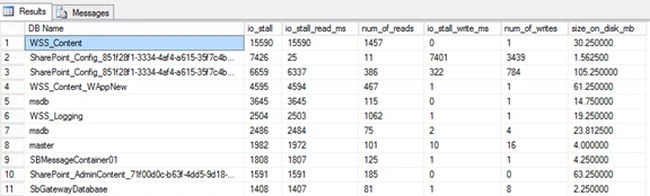
You can get the database name instead of the ids as above by using the following query and get the result as shown in the figure below.
select db_name(a.database_id) AS [DB Name],
a.io_stall, a.io_stall_read_ms, a.num_of_reads, a.io_stall_write_ms,
a.num_of_writes,
Join the conversation! Your thoughts help the community grow.