

I hope you all are doing well and have read my previous tutorials. My previous article is about Binding with Angular 4 and above Binding with Angular v4 And Above in which I explained the types of binding that we are using in Angular 4. Today I am here with one more article about sharing data between components which is very important for Angular.
It’s a basic need for any application to send the data play with data and perform the required operations which are necessary according to our requirements.
In Angular mainly we have 4 methods by which we can pass the value from one component to another, either parent-child or any component to any component.
- @Input
- @Output
- @ViewChild
- Through Service
Here, I will explain only three, the fourth one is about service which I will explain in my later tutorial.
One thing you need to know above is the decorator that we are using within the Angular application. The first thing that comes to your mind is, what is Decorator?
What is Decorator?
Simply you can say the Decorators are functions that receive the decorated object and can make any changes to it as in @Component({ selector: 'child-comp', templateUrl: 'app.child.component.html', styleUrls:[], }).
Types of Decorators
In Angular, we have the below types of Decorators
- Class decorators: @Component and @NgModule
These are the top-level decorators that Angular supports. They allow us to tell Angular that a particular class is a component or module. - Property decorators: We are using these types of decorators for properties inside classes such as @Input and @Output
They allow us to decorate specific properties within our classes. - Method decorators: We are using these types of decorators for methods inside classes, as @HostListener
Method decorators are the same as property decorators but we are using them for methods instead. This decorates specific methods within our class with functionality. - Parameter decorators: We are using these types of decorators for parameters inside class constructors as @Inject.
We can use Parameter decorators when I inject a particular component etc into the constructor. The details about it, I will explain my later tutorial.
Now, I am going to explain the number of ways by which we can pass the value within the component. In my application I am using the app. component as parent and app.child.component as child component as.
@Input
As I told you it’s a decorator which is the type of Property decorator. We can use the @Input decorator as.
app.child.component.ts
// Input decorator for sending value from child to parent
@Input('parentcount')
count: number;
Here we are using @input decorator for sending the parent value to the child so we will use @Input decorator as parent counts in the child component and within the parent component we will set the parent count value as.
app.component.html
<child-comp [parentcount]="pcount"></child-comp>
@Output
It’s a decorator which is also the type of Property decorator and we are using it for sending the child value to the parent component using event emitter as in the below I am using @Output decorator change with event emitter number.
// Output decorator for sending value from parent to child
@Output()
change: EventEmitter<number> = new EventEmitter<number>();
In the parent component HTML file as app.component.html we will use the method for updating the value by one method updateFromChild($event) which we will add in the parent component HTML file as.
app.component.html
// Output decorator for sending value from parent to child
@Output()
change: EventEmitter<number> = new EventEmitter<number>();
app.component.ts
// Initial value of pcount. I have added p only for parent.
pcount: number = 0;
// for event emitter
updateFromChild($event) {
    debugger;
    this.pcount++;
}
I have also added the reset button in the parent component for resetting the parent value as initial 0 as below.
app.component.html
<button (click)="reset()">Reset count</button>
app.component.ts
// for reset the value from parent component
reset() {
    this.pcount = 0;
}
In the child component, I have added a button.
Child component
app.child.component.html
<div class='child-app'>
    <h2>Child component</h2>
    <button (click)="updateCount()">Add To Parent</button>
</div>
app.child.component.ts
// Output decorator for sending value from parent to child
@Output()
change: EventEmitter<number> = new EventEmitter<number>();
updateCount() {
    debugger;
    this.count++;
    this.change.emit(this.count);
}
Parent component
app.component.html
<child-comp
    [parentcount]="pcount"
    (change)="updateFromChild($event)">
</child-comp>
app.component.ts
// for event emitter
updateFromChild($event) {
    debugger;
    this.pcount++;
}
So, according to the above if we click on the button the updatecount method is called and it runs the this.change.emit(this.count) which calls the updateFromChild method which is the method of the parent component for increasing the count value.
@ViewChild
When we have the requirement, I need child value for the parent component so in this case I have one option to use @ViewChild. As in below, I am using the Child and Parent component.
Child component
app.child.component.ts
// added for view child property
childMsg: string = "Hi I am from child";
Parent component
app.component.html
<div>{{ Message }}</div>
app.component.ts
// Here we can see the Message value this.Message='I am from Parent' which I have added
// in this parent component
ngOnInit() {
    debugger;
    this.Message = 'I am from Parent';
}
// Updating value using view child when child view loaded
ngAfterViewInit() {
    //  this.Message = this.child.childMsg;
}
Now, with the message we will see the message which I have added in the parent component. You can notice here I have commented on the code within ngAfterViewInit.
In the above case, the output will be
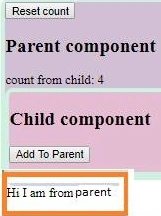
As I already told you, ngAfterViewInit is the hook where all the child components are completely loaded and here you can set the value of the child property which I have added in the child component using View child.
Now I am using @ViewChild for getting the child property in the parent component.
app.child.component.ts
// added for view child property
childMsg: string = "Hi I am from child";
app.component.ts
// ViewChild for getting value from child
@ViewChild(ChildComponent) child;
// Updating value using view child when child view loaded
ngAfterViewInit() {
    this.Message = this.child.childMsg;
}
As you can see now I have added the code this. Message = this.child.childMsg which I am using for getting the value of child property “childMsg” and setting the “Message” property of the parent component in the ngAfterViewInit because here I can get the child value in the parent component. Now the output will be.
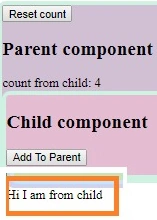
The complete code that I have added for the application.
- app.component.html
<div class="parent-app">
    <button (click)="reset()">Reset count</button>
    <div>
        <h2>Parent component</h2>
        <div>
            count from child: {{ pcount }}
        </div>
        <child-comp
            [parentcount]="pcount"
            (change)="updateFromChild($event)">
        </child-comp>
    </div>
</div>
<div>{{ Message }}</div>
- app.component.ts
// our root app component
import { Component, VERSION, OnInit, ViewChild, AfterViewInit } from '@angular/core';
import { BrowserModule } from '@angular/platform-browser';
import { ChildComponent } from './app.child.component';
@Component({
  selector: 'app-root',
  templateUrl: 'app.component.html',
})
export class AppComponent implements OnInit, AfterViewInit {
  constructor() {}
  // Initial value of pcount. I have added p only for parent.
  pcount: number = 0;
  Message: string = '';
  // Here we can see the Message value this.Message='I am from Parent' which I have added
  // in this parent component
  ngOnInit() {
    this.Message = 'I am from Parent';
  }
  // for event emitter
  updateFromChild($event) {
    this.pcount++;
  }
  // for reset the value from parent component
  reset() {
    this.pcount = 0;
  }
  // ViewChild for getting value from child
  @ViewChild(ChildComponent) child;
  // Updating value using view child when child view loaded
  ngAfterViewInit() {
    this.Message = this.child.childMsg;
  }
}
export class AppModule {}
- app.child.component.html
<div class='child-app'>
    <h2>Child component</h2>
    <button (click)="updateCount()">Add To Parent</button>
</div>
- app.child.component.ts
import { Component, Input, Output, EventEmitter } from '@angular/core';
@Component({
  selector: 'child-comp',
  templateUrl: 'app.child.component.html',
})
export class ChildComponent {
  // Input decorator for sending value from child to parent
  @Input('parentcount')
  count: number;
  // Output decorator for sending value from parent to child
  @Output()
  change: EventEmitter<number> = new EventEmitter<number>();
  // added for view child property
  childMsg: string = "Hi I am from child";
  updateCount() {
    debugger;
    this.count++;
    this.change.emit(this.count);
  }
}
- style.css for global CSS
/* You can add global styles to this file, and also import other style files */
.parent-app {
    border: 5px solid #CFF1E1;
    border-radius: 10px;
    background-color: #D1BFD4;
}
.child-app {
    border: 5px solid #CFF1E1;
    border-radius: 10px;
    background-color: #E4BDD2;
    height: 100px;
}
Now one thing is very important to know when you add the child component or any component you must add a declaration within the app.module.ts file which is the main module file in my application. If you don't, the below error will show.
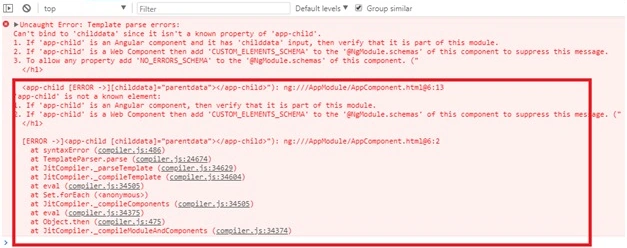
To resolve the above problem you will add the component name as.
app.module.ts
import { BrowserModule } from '@angular/platform-browser';
import { NgModule } from '@angular/core';
import { HttpModule } from '@angular/http';
import { AppComponent } from './app.component';
// added child component
import { ChildComponent } from './app.child.component';
@NgModule({
  declarations: [
    AppComponent,
    ChildComponent
  ],
  imports: [
    BrowserModule,
    HttpModule
  ],
  bootstrap: [AppComponent]
})
export class AppModule { }
If everything is completed above then you can simply follow the below steps for running the application.
- Step 1. Open the node js command window and move to the location where you have added the application.
- Step 2. Excute ng serve command.
If the application runs successfully, the output should be
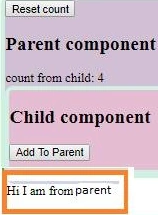
I hope you liked this -- please share it if you did. I will define the Angular service and send value from one component to another with the help of service in my later tutorial which is one of the main features in Angular applications.
Shivendra ShuklaPosted Jun 21, 2018, 5:25 AM
I appreciate your hard work.
Komal SharmaPosted Jun 20, 2018, 6:35 AM
Nice article........
Reena LakraPosted Jun 19, 2018, 1:36 AM
Nice explanation sir.........
Deepak VermaPosted Jun 13, 2018, 12:32 AM
Nice article sir.... great job :)
Mahesh VermaPosted Jun 12, 2018, 10:01 AM
Very informative.......
Khumana RamPosted Jun 12, 2018, 9:57 AM
Great post on sharing Data Between Component Using Angular V4 And Above