

Introduction
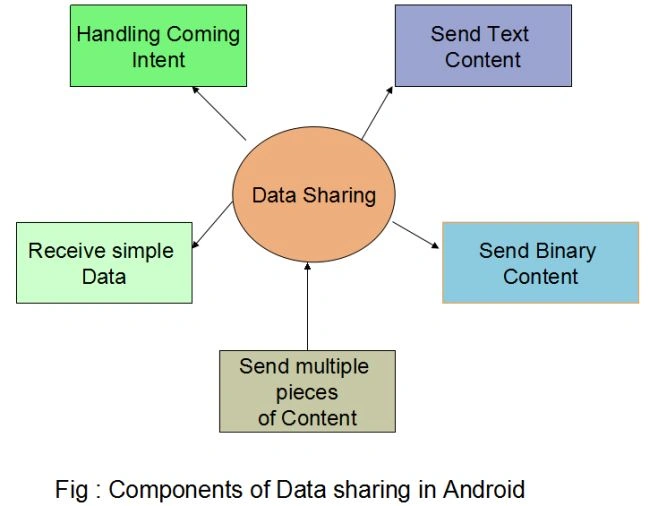
Send Text Content
- Intent sendIntent = new Intent();
- sendIntent.setAction(Intent.ACTION_SEND);
- sendIntent.putExtra(Intent.EXTRA_TEXT, "This is my text to send.");
- sendIntent.setType("text/plain");
- startActivity(sendIntent);
- Even if the user has previously selected a default action for this intent, the chooser will still be displayed.
- If no applications match, Android displays a system message.
- You can specify a title for the chooser dialog.
Let us analyze some code as given below:
- Intent sendIntent = new Intent();
- sendIntent.setAction(Intent.ACTION_SEND);
- sendIntent.putExtra(Intent.EXTRA_TEXT, "This is my text to send.");
- sendIntent.setType("text/plain");
- startActivity(Intent.createChooser(sendIntent, getResources().getText(R.string.send_to)));
Intents have the standards EXTRA_EMAIL, EXTRA_CC, EXTRA_BCC and EXTRA_SUBJECT. If the receiving application is not designed to use them, it simply ignores them.
Send Binary Content
- You can use a MIME type of "*/*", but this will only match activities that are able to handle generic data streams.
- The receiving application needs permission to access the data the Uri points to. The recommended ways to do this is described in the following.
Send Multiple Pieces of Content
- ArrayList<Uri> imageUris = new ArrayList<Uri>();
- imageUris.add(imageUri1); // Add your image URIs here
- imageUris.add(imageUri2);
- Intent shareIntent = new Intent();
- shareIntent.setAction(Intent.ACTION_SEND_MULTIPLE);
- shareIntent.putParcelableArrayListExtra(Intent.EXTRA_STREAM, imageUris);
- shareIntent.setType("image/*");
- startActivity(Intent.createChooser(shareIntent, "Share images to.."));
Receiving Simple Data From Another Application
Updating the Manifest file
- <activity android:name=".ui.MyActivity" >
- <intent-filter>
- <action android:name="android.intent.action.SEND" />
- <category android:name="android.intent.category.DEFAULT" />
- <data android:mimeType="image/*" />
- </intent-filter>
- <intent-filter>
- <action android:name="android.intent.action.SEND" />
- <category android:name="android.intent.category.DEFAULT" />
- <data android:mimeType="text/plain" />
- </intent-filter>
- <intent-filter>
- <action android:name="android.intent.action.SEND_MULTIPLE" />
- <category android:name="android.intent.category.DEFAULT" />
- <data android:mimeType="image/*" />
- </intent-filter>
- </activity>
Handling the Incoming Content
- import android.app.Activity;
- import android.os.Bundle;
- import android.view.Menu;
- import android.view.MenuItem;
- public class RecentActivity extends Activity {
- @Override
- void onCreate (Bundle savedInstanceState) {
- ...
- // Get intent, action and MIME type
- Intent intent = getIntent();
- String action = intent.getAction();
- String type = intent.getType();
- if (Intent.ACTION_SEND.equals(action) && type != null) {
- if ("text/plain".equals(type)) {
- handleSendText(intent); // Handle text being sent
- } else if (type.startsWith("image/")) {
- handleSendImage(intent); // Handle single image being sent
- }
- } else if (Intent.ACTION_SEND_MULTIPLE.equals(action) && type != null) {
- if (type.startsWith("image/")) {
- handleSendMultipleImages(intent); // Handle multiple images being sent
- }
- } else {
- // Handle other intents, such as being started from the home screen
- }
- ...
- }
- void handleSendText(Intent intent) {
- String sharedText = intent.getStringExtra(Intent.EXTRA_TEXT);
- if (sharedText != null) {
- // Update UI to reflect text being shared
- }
- }
- void handleSendImage(Intent intent) {
- Uri imageUri = (Uri) intent.getParcelableExtra(Intent.EXTRA_STREAM);
- if (imageUri != null) {
- // Update UI to reflect image being shared
- }
- }
- void handleSendMultipleImages(Intent intent) {
- ArrayList<Uri> imageUris = intent.getParcelableArrayListExtra(Intent.EXTRA_STREAM);
- if (imageUris != null) {
- // Update UI to reflect multiple images being shared
- }
- }
- @Override
- public boolean onCreateOptionsMenu(Menu menu) {
- // Inflate the menu; this adds items to the action bar if it is present.
- getMenuInflater().inflate(R.menu.recent, menu);
- return true;
- }
- @Override
- public boolean onOptionsItemSelected(MenuItem item) {
- // Handle action bar item clicks here. The action bar will
- // automatically handle clicks on the Home/Up button, so long
- // as you specify a parent activity in AndroidManifest.xml.
- int id = item.getItemId();
- if (id == R.id.action_settings) {
- return true;
- }
- return super.onOptionsItemSelected(item);
- }
- }
Gowtham RajamanickamPosted Apr 21, 2015, 2:49 AM
this is great