

Introduction
This article explains how to retreive values from a database using a Stored Procedure and bind the data to a DataTable using a MVC Razor view.
Step 1
Create a table as in the following: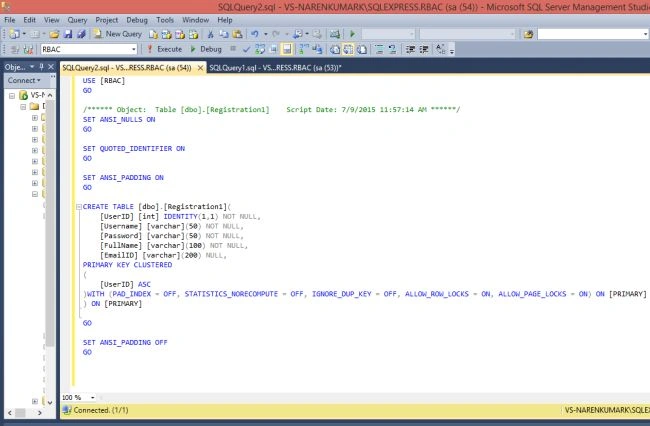
Step 2
Create a Stored Procedure as in the following: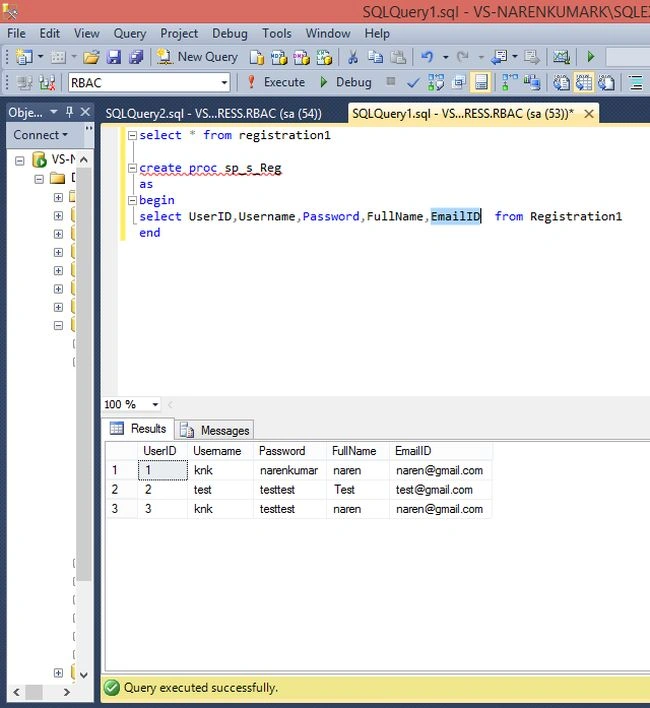
Stored Procedure
- create proc sp_s_Reg
- as
- begin
- select UserID,Username,Password,FullName,EmailID from Registration1
- end
Step 3
Create a project. Go to File, then New and click Project. Select ASP.NET MVC 4 Web Application and enter the project name, then click OK, select Empty, select View Engine Razor and press OK.
Step 4
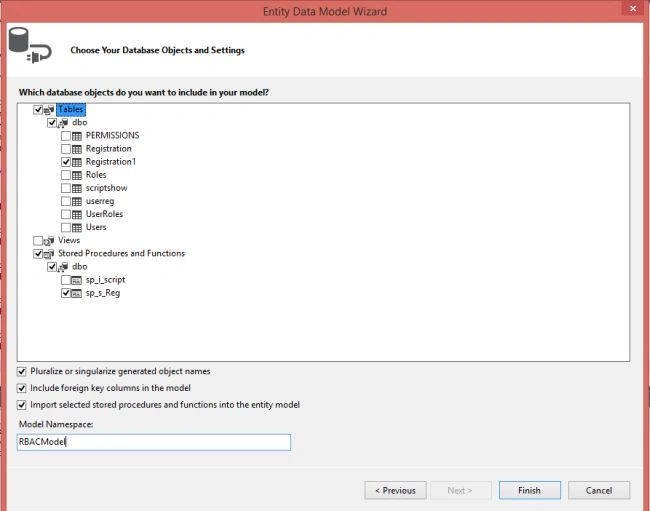
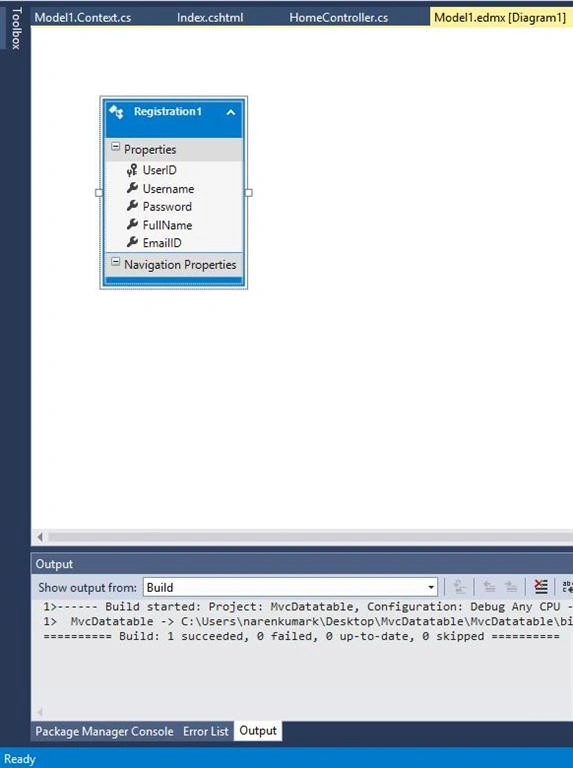
Add the Entity model as in the following: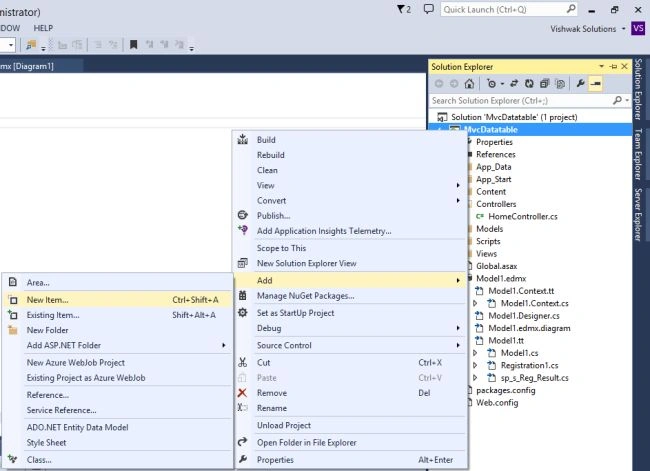

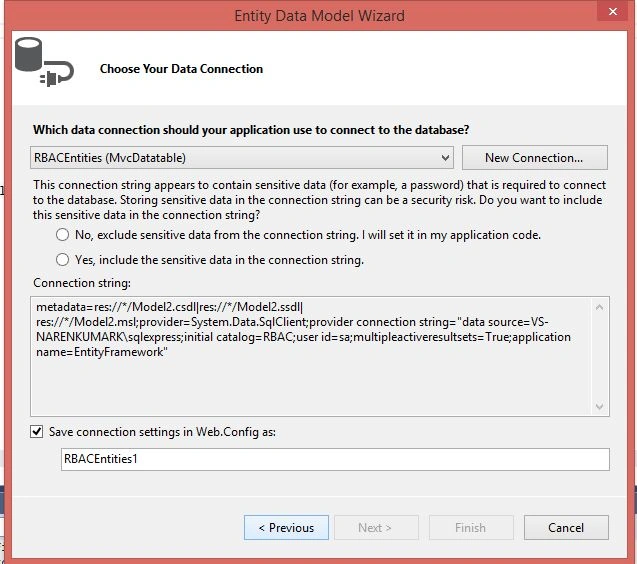
Step 5
Add a Controller as in the following: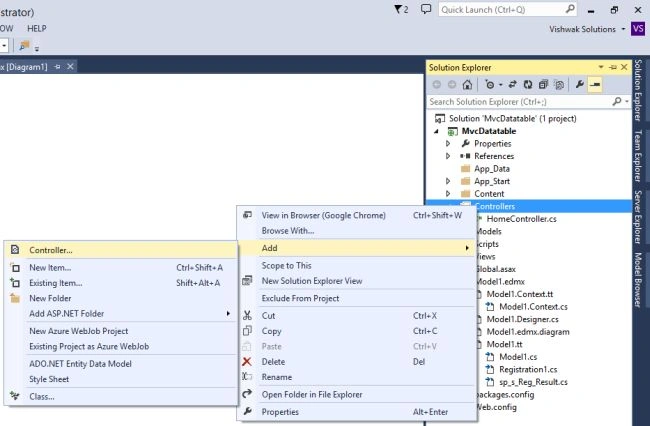
Home controller.cs
- using System;
- using System.Collections.Generic;
- using System.Linq;
- using System.Web;
- using System.Web.Mvc;
- namespace MvcDatatable.Controllers {
- public class HomeController: Controller {
- //
- // GET: /Home/
- public ActionResult Index() {
- RBACEntities r = new RBACEntities();
- var data = r.sp_s_Reg().ToList();
- ViewBag.userdetails = data;
- return View();
- }
- }
- }
Step 6
Add a View as in the following: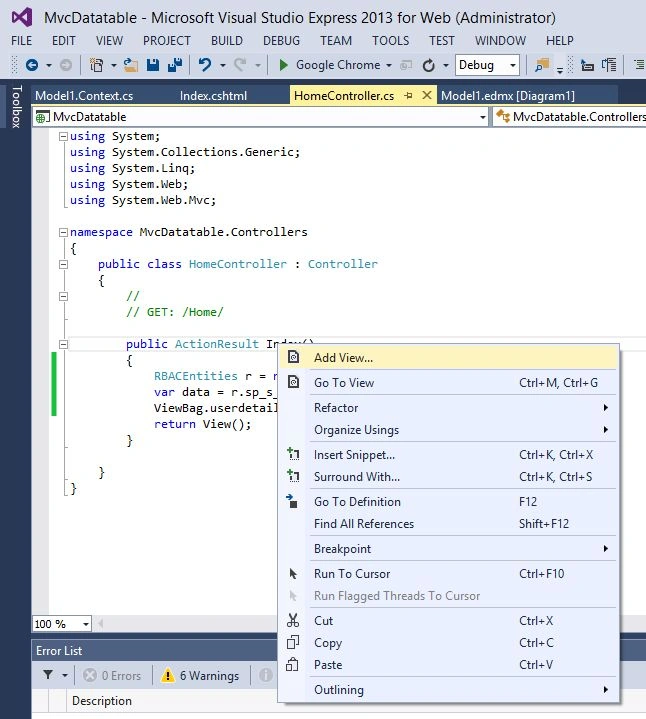
Index .cshtml
- @{
- ViewBag.Title = "Show Database value in DataTable";
- }
- <h2>Show Database value in DataTable</h2>
- <div>
- <table id="t01">
- <thead>
- <th>UserID</th>
- <th>Username</th>
- <th>Password</th>
- <th>FullName</th>
- <th>EmailID</th>
- </thead>
- @foreach (var item in ViewBag.userdetails)
- {
- <tr>
- <td>
- @item.UserID
- </td>
- <td>
- @item.Username
- </td>
- <td>
- @item.Password
- </td>
- <td>
- @item.FullName
- </td>
- <td>
- @item.EmailID
- </td>
- </tr>
- }
- </table>
- </div>
- <style>
- table#t01 {
- width: 100%;
- background-color: #f1f1c1;
- }
- table#t01 tr:nth-child(even) {
- background-color: #eee;
- }
- table#t01 tr:nth-child(odd) {
- background-color: #fff;
- }
- table#t01 th {
- color: white;
- background-color:blue;
- }
- table, th, td {
- border: 1px solid black;
- }
- table, th, td {
- border: 1px solid black;
- border-collapse: collapse;
- }
- table, th, td {
- border: 1px solid black;
- border-collapse: collapse;
- }
- th, td {
- padding: 15px;
- }
- </style>
Step 7
Run the project.

Sarthak MenparaPosted Jun 29, 2018, 5:38 AM
I want to show only one record from the database by passing id as parameter how can i show it?
subista maharjanPosted Jun 28, 2018, 1:46 AM
How can i fetch the data from the table and show the related partial view?
Viral ShahPosted May 10, 2018, 1:56 PM
Great article. It helped me a lot. Many thanks.
sachin madishetttyPosted Feb 8, 2018, 5:18 AM
I am unable to call the sp_s_Reg() method with the help of an entity object can u please help me out.
Satyesh SoniPosted Apr 27, 2017, 7:43 AM
I'm new in mvc. I want to display data without using entity framework. is it possible? send me code on [email protected]
elango pPosted Jul 13, 2016, 5:31 AM
Awesome post,......just awesome very nice and easy to learn
mahendran senthilPosted Nov 21, 2015, 4:54 AM
thank you
Naren Kumar KumaresanPosted Jul 31, 2015, 1:26 AM
I am show only database value here ....u can use alter query add that column name here ok
Deepankar SinghPosted Jul 30, 2015, 3:52 AM
HOW TO MAKE THIS DISPLAY TABLE DYNAMIC SO THAT I COULD ALTER THE ENTRY HERE AND THE DATABASE GETS UPDATED
Sibeesh VenuPosted Jul 17, 2015, 5:58 AM
Thanks for the information
Lalit RaghavPosted Jul 17, 2015, 5:01 AM
nice bhai
SharadPosted Jul 17, 2015, 3:36 AM
good one...
SharadPosted Jul 17, 2015, 3:36 AM
good one...
Pankaj Kumar ChoudharyPosted Jul 16, 2015, 6:48 PM
Good Explain Sir.....
Santhakumar MunuswamyPosted Jul 16, 2015, 3:16 PM
Nice Article! Thanks for sharing