

Introduction
I am writing this article to show you how to display directory structure in TreeView Just in Time as Windows Explorer does. We will build sample application as below screen shot that will perform that thing :)
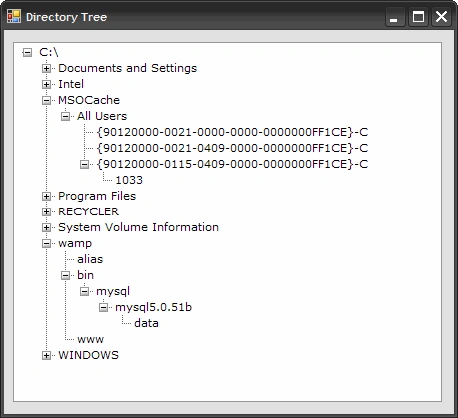
Technology
CSharp .net 2.0/3.5
Implementation
One way to fill the directory structure is to scan through each directory and add nodes in tree view control but this might be time consuming as it takes a lot time to scan whole directory structure.
But here we will fill the tree with some other approach in which we will not scan whole file system at once but we will add node to tree as user clicks [+] Expand of the node that will speed up the process as it does not need to scan thorough whole file system.
So lets get started with our example :)
First drag drop one TreeView control on the form as shown in screenshot.
Here is the whole code . Just read the code I am explaining it in just at the ending about how its working. :)
We are working with the file system so we need to import namespace first
using System.IO;
private void Form1_Load(object sender, EventArgs e)
{
TreeNode rootnode = new TreeNode(@"C:\");
treeView1.Nodes.Add(rootnode);
FillChildNodes(rootnode);
treeView1.Nodes[0].Expand();
}
void FillChildNodes(TreeNode node)
{
try
{
DirectoryInfo dirs = new DirectoryInfo(node.FullPath);
foreach (DirectoryInfo dir in dirs.GetDirectories())
{
TreeNode newnode = new TreeNode(dir.Name);
node.Nodes.Add(newnode);
newnode.Nodes.Add("*");
}
}
catch(Exception ex)
Kiruthika SabanayagamPosted Jan 10, 2019, 10:55 AM
private void findchildNodes(TreeNode rootNode){ try { DirectoryInfo dirs = new DirectoryInfo(rootNode.FullPath); foreach(var dir in dirs.GetDirectories()) { //// int i = 0; TreeNode[] subnodes = new TreeNode[1];//add empty subnode to add expand handle in the node subnodes[0] = new TreeNode("*"); TreeNode node = new TreeNode(dir.Name, subnodes); //rootNode.Nodes.Add("*"); rootNode.Nodes.Add(node); foreach (var file in Directory.GetFiles(dir.FullName)) { TreeNode node1 = new TreeNode(file); rootNode.Nodes.Add(node1); } } } catch(Exception ex) { MessageBox.Show(ex.Message); } }
Andrea CervellinPosted Mar 15, 2011, 4:25 AM
Hi, thanks for yours excellent solution. In my project I wish to view all the file that is contained in a folder. How can I add this new features? thank you
Al SPosted Jun 8, 2010, 8:50 AM
How would you add other nodes like My Computer and images or the node?