

There is something happening in the back end of the applications, the better user-friendly applications will just show some notifications to the user about the back end process. SharePoint already has this capability, but what about custom applications developed by us?
Nothing to worry about, SharePoint has an answer for that too. Yes, we can use the SharePoint built inJavaScript methods to achieve this. Here's the syntax to achieve this,
Syntax:
To add notification with custom message:
var notifyID = SP.UI.Notify.addNotification("<strHTML>",booleanSticky);
//Parameters
| Parameter | Description |
| strHTML | Html content to show in notification. |
| booleanSticky | true - Notification message displays until user clicks or until removeNotification methods calls , false - Notification message hides after some time. |
To add notification with spinning wheel:
var notifyID = SP.UI.Notify. showLoadingNotification (booleanSticky);
//Parameters
| Parameter | Description |
| booleanSticky | true - Notification message displays until user clicks or until removeNotification methods calls, false - Notification message hides after some time |
To remove notification message:
SP.UI.Notify.removeNotification(notification ID);
//Parameters
| Parameter | Description |
| notification ID | Id of the addNotification method |
Example:
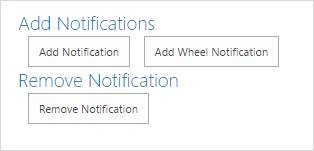
The below example contains three buttons: “Add Notification”, “Add Wheel Notification” and “Remove Notification”. Add Notifications buttons add the notification to the browser and Remove Notification button removes the notification from the browser.
- <div class="addnotifications">
- <h2>Add Notifications</h2>
<input id="btnAdd" type="button" value="Add Notification" onclick="AddMessageNotification()" />
<input id="btnAdd2" type="button" value="Add Wheel Notification" onclick="AddWheelNotification()" />
</div> - <div class="removenotificatins">
- <h2>Remove Notification</h2>
<input id="btnRemove" type="button" value="Remove Notification" onclick="RemoveNotification()" />
</div> - <script type="text/javascript">
- var notificationID = '';
- function AddMessageNotification()
- {
- notificationID = SP.UI.Notify.addNotification("Backend process running...", true);
- }
- function AddWheelNotification()
- {
- notificationID = SP.UI.Notify.showLoadingNotification(true)
- }
- function RemoveNotification()
- {
- SP.UI.Notify.removeNotification(notificationID);
- notifyId = '';
- }
- </script>
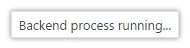
Clicking up on Add Notification button shows the below notification message,
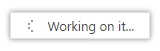
Clicking up on Add Wheel Notification button add the below notification message,
Clicking on Remove Notification button removes the active notification message based on the notification id.
Happy cracking the SharePoint!
Prasham SabadraPosted May 10, 2016, 7:38 AM
Thanks for Sharing!!!
Santhakumar MunuswamyPosted May 9, 2016, 11:23 PM
Thank your for well written
Shantha Kumar TPosted May 9, 2016, 12:00 PM
Thanks to all :)
Kuppurasu NagarajPosted May 9, 2016, 11:56 AM
Nice Sharing..
Debasis SahaPosted May 9, 2016, 8:39 AM
Good One..
Thiruppathi RPosted May 9, 2016, 1:26 AM
Good Info..