

This article will demonstrate how to Show, Delete, and Edit data in WPF Data Grid using LINQ to SQL Data Classes. What is LINQ to SQL?? When you want to use Language-Integrated Query (LINQ) to access data in a database, you do not connect directly to the database. Instead, you create classes that represent the database and its tables, and use those classes to interact with data. You can generate the classes through the Object Relational Designer or by running the SqlMetal.exe utility. For more information, see Object Relational Designer (O/R Designer) and Code Generation Tool (SqlMetal.exe).
So Let's start first of all add a new item LINQ to SQL data Classes.

Figure 1.
Now drag and drop database table using server explorer.
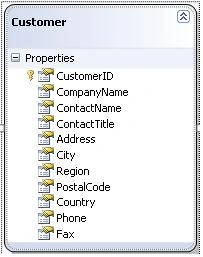
Figure 2.
If you are using Visual studio 2008 then you need to add a reference of WPF Toolkit, you don't need to add this reference in visual studio 2010.
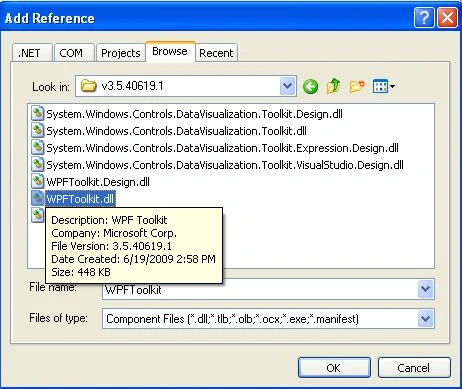
Figure 3.
Add wpf toolkit name space on your .xaml page or window whatever you using.
This is my DataGrid.
- <Grid>
- <grid:DataGrid x:Name="MyDataGrid" x:Uid="MyDataGrid" AutoGenerateColumns="False"
- AlternationCount="2" SelectionMode="Single" Margin="0,31,0,0">
- <grid:DataGrid.Columns>
- <grid:DataGridTextColumn Binding="{Binding Path=CustomerID}" IsReadOnly="True" Header="Customer ID" Width="SizeToHeader" />
- <grid:DataGridTextColumn Binding="{Binding Path=CompanyName}" Header="Company" Width="SizeToHeader" />
- <grid:DataGridTextColumn Binding="{Binding Path=ContactName}" Header="Name" Width="SizeToHeader" />
- <grid:DataGridTextColumn Binding="{Binding Path=City}"
- Header="City" Width="SizeToHeader" />
- <grid:DataGridTextColumn Binding="{Binding Path=Country}" Header="Country" Width="SizeToHeader" />
- <grid:DataGridTextColumn Binding="{Binding Path=Phone}"
- Header="Phone" Width="SizeToHeader" />
- <grid:DataGridTemplateColumn Header="Edit Row">
- <grid:DataGridTemplateColumn.CellTemplate>
- <DataTemplate>
- <Button Content="Edit" Click="EditButton_Click" />
- </DataTemplate>
- </grid:DataGridTemplateColumn.CellTemplate>
- </grid:DataGridTemplateColumn>
- <grid:DataGridTemplateColumn Header="Delete Row">
- <grid:DataGridTemplateColumn.CellTemplate>
- <DataTemplate>
- <Button Content="Delete" Click="DeleteButton_Click" />
- </DataTemplate>
- </grid:DataGridTemplateColumn.CellTemplate>
- </grid:DataGridTemplateColumn>
- </grid:DataGrid.Columns>
- </grid:DataGrid>
- <Button Height="23" Margin="12,2,0,0" Name="LoadButton" Content="Load Customers" VerticalAlignment="Top" Click="LoadButton_Click" HorizontalAlignment="Left" Width="126"></Button>
- </Grid>
- private void LoadButton_Click(object sender, RoutedEventArgs e)
- {
- LoadCustomers();
- }
- private void LoadCustomers()
- {
- CustomersDataContext cd = new CustomersDataContext();
- var customers = (from p in cd.Customers
- select p).Take(10);
- MyDataGrid.ItemsSource = customers;
- LoadButton.Content = "Customers Loaded";
- }
Now run your application, you will see output like this. When you click on Load Customers button your data will display in datagrid.
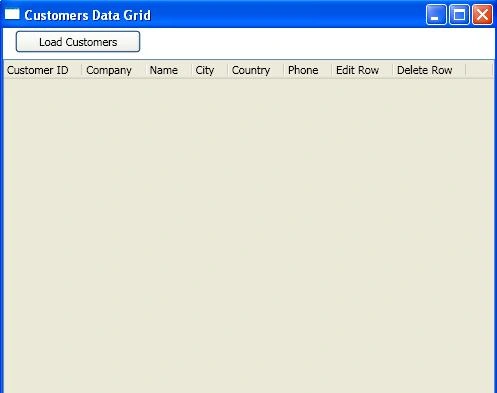
Figure 4.
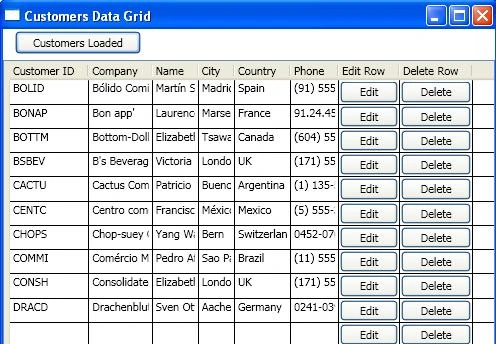
Figure 5.
- private void EditButton_Click(object sender, RoutedEventArgs e)
- {
- try
- {
- CustomersDataContext dataContext = new CustomersDataContext();
- Customer customerRow = MyDataGrid.SelectedItem as Customer;
- string m = customerRow.CustomerID;
- Customer customer = (from p in dataContext.Customers
- where p.CustomerID == customerRow.CustomerID
- select p).Single();
- customer.CompanyName = customerRow.CompanyName;
- customer.ContactName = customerRow.ContactName;
- customer.Country = customerRow.Country;
- customer.City = customerRow.City;
- customer.Phone = customerRow.Phone;
- dataContext.SubmitChanges();
- MessageBox.Show("Row Updated Successfully.");
- LoadCustomers();
- }
- catch (Exception Ex)
- {
- MessageBox.Show(Ex.Message);
- return;
- }
- }
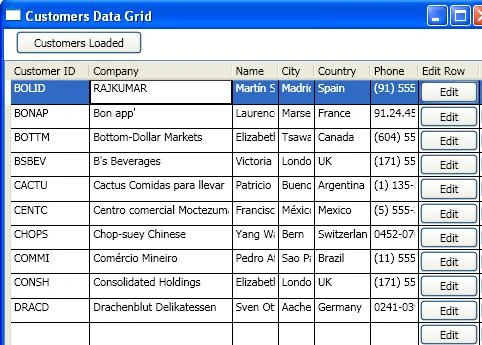
Figure 6.
- private void DeleteButton_Click(object sender, RoutedEventArgs e)
- {
- CustomersDataContext cd = new CustomersDataContext();
- Customer customerRow = MyDataGrid.SelectedItem as Customer;
- var customer = (from p in cd.Customers
- where p.CustomerID == customerRow.CustomerID
- select p).Single();
- cd.Customers.DeleteOnSubmit(customer);
- cd.SubmitChanges();
- MessageBox.Show("Row Deleted Successfully.");
- LoadCustomers();
- }
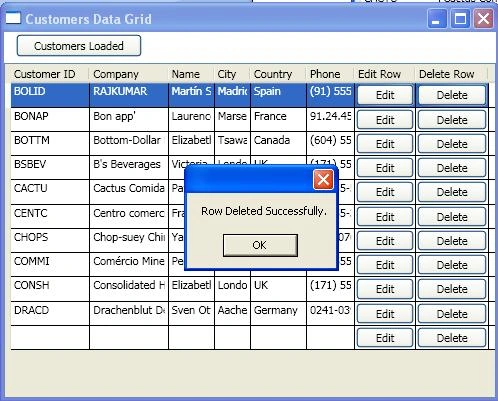
Figure 7.
aseman arabsorkhiPosted Jun 7, 2022, 6:35 PM
How can you edit grid row? after edit event selected row must be editable, but it is not
Bryan LemusPosted Jun 2, 2017, 1:59 PM
Me anda bien con solo cambiar "MyDataGrid.ItemsSource = customers;" por MyDataGrid.ItemsSource = customers.ToList();
samin hajianPosted Mar 16, 2016, 6:27 AM
i have this Error "Cannot implicitly convert type 'long' to 'string' " in update function. how can i convert it line to wpf project?
red funPosted Jan 5, 2016, 1:09 PM
edit is not working also delete does not working
vishal jainPosted Jan 29, 2015, 12:19 AM
Edit is not working. customRow.CompanyName gives these value System.Windows.Controls.DataGridTextColumn
Muhammad nauman khanPosted Jul 17, 2014, 3:22 AM
Thank you
diego urabayenPosted Mar 17, 2014, 10:57 PM
no anda el edit. Para que publican cosas que no funcionan?
Kris TimmermanPosted Aug 8, 2012, 2:57 PM
In MSVS 2010, I removed the "xmlns:grid=http://schemas.microsoft.com/wpf/2008/toolkit" and it was then able to find "DataGrid". How can you insert a new customer?
Pushkar GuptaPosted Mar 28, 2012, 6:21 AM
Hi, Thx for sharing this demo. Please let me know, I can i do it using MVVM Thx.
Indranil SarkarPosted Mar 21, 2012, 7:17 AM
Hello, Raj Kumar!! I have run of your project but your editing option is not working at all. I tried doing a different one by seeing of your code but It doesn't work with Edit with save part. If you do run and get the same problem then please update your article one.
Paras ParasPosted Mar 20, 2012, 9:36 AM
good Example
marius munteanPosted Nov 17, 2011, 4:14 AM
Code throws Object not referenced to an instance of an object at the edit button function: line with var
C BPosted Jul 13, 2011, 6:28 PM
At last a decent article on how to use the datagrid and commit changes back to a database table.
Olia TymarkinPosted Mar 29, 2011, 10:27 AM
Hi, I have a datagrid which is binded to the sql table (i am using linq to sql). when i present the grid , i want to be able to sort its columns by clicking its column header. so far i do not have this ability. on the other hand , when i bind another data grid to list of items that i take from this table , i can sort the datagrid by clicking its columns header. where do i make my mismake?
HOSSEIN ABBASZADEHPosted Mar 3, 2011, 6:12 PM
Thank u Dear!
Dharmendra GaurPosted Dec 10, 2009, 12:12 AM
can you suggest any ebook regarding WPG Datagrid
Dharmendra GaurPosted Dec 9, 2009, 11:53 PM
Hello Sir Nice article that really help, Can you suggest any tutorial link for WPF Datagrid.