

Introduction
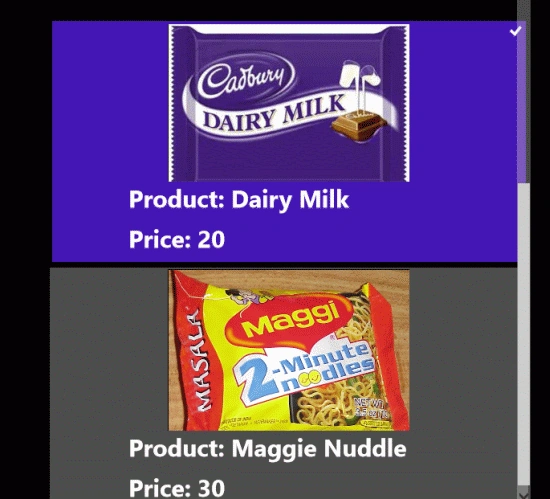
In this article we will show a list of a company's products with product images. To show these product details in a XAML page we will use a GridView with the help of LINQ. In this project we will add a class that will contain three properties product name, product price and product images. The data source of the GridView is an instance of a generic List class of class1 type that we have added to our project.
In the following we are including the entire code of the XAML file and the code behind file to create this mini application.
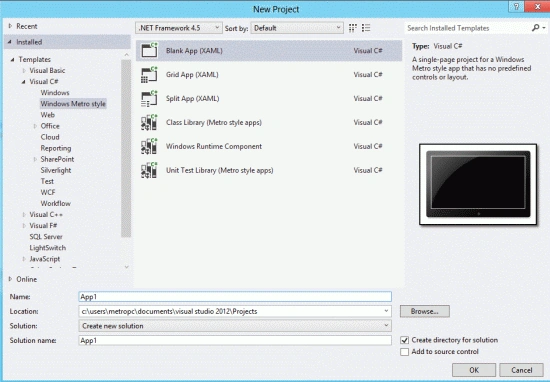
Step 1 : First, you will create a new Metro Style Application. Let us see the description with images of how you will create it.
- Open Visual Studio 2012
- File -> New -> Project
- Choose Template -> Visual C# -> Metro Style Application
- Rename the application
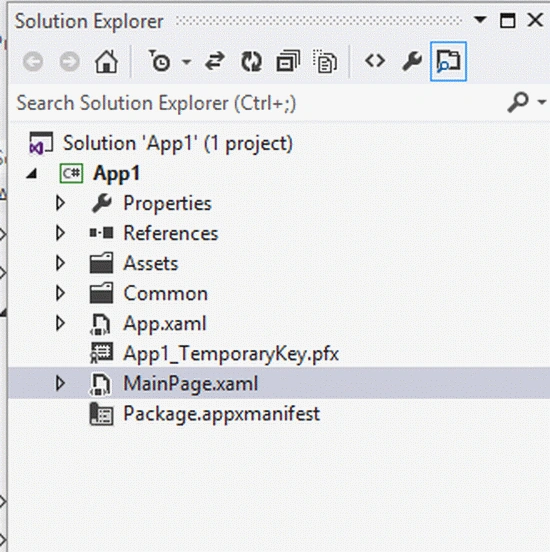
Step 2 : In the Solution Explorer there are two files that we will primarily work with; the MainPage.xaml and MainPage.xaml.cs files.
Step 3 : As we require we will add a class to our project first that will be used to make a query in LINQ. The related code in the class is sown below:
Code :
using System;
using System.Collections.Generic;
using System.Linq;
using System.Text;
using System.Threading.Tasks;
namespace App8
{
class Class1
{
string Pname;
string Pprice;
string prodpic;
public string _pname
{
get { return Pname; }
set { Pname = value; }
}
public string _Pprice
{
get { return Pprice; }
set { Pprice = value; }
}
public string _prodpic
{
get { return prodpic; }
set { prodpic = value; }
}
public Class1(string pn, string pp, string pic)
{
Pname = pn;
Pprice = pp;
prodpic = pic;
}
public Class1()
{ }
}
}
Step 4 : The MainPage.xaml file is as in the following code:
Code :
<Page
x:Class="App8.MainPage"
IsTabStop="false"
xmlns="http://schemas.microsoft.com/winfx/2006/xaml/presentation"
xmlns:x="http://schemas.microsoft.com/winfx/2006/xaml"
xmlns:local="using:App8"
xmlns:d="http://schemas.microsoft.com/expression/blend/2008"
xmlns:mc="http://schemas.openxmlformats.org/markup-compatibility/2006"
mc:Ignorable="d">
<Grid Background="Black">
<Grid.RowDefinitions>
<RowDefinition Height=".023*"></RowDefinition>
<RowDefinition Height=".333*"></RowDefinition>
</Grid.RowDefinitions>
<TextBlock Grid.Row="0" Text="Product Detail List" FontSize="35" FontWeight="ExtraBold" HorizontalAlignment="Center" VerticalAlignment="Center" Margin="520,22,518,5" Width="328"/>
<GridView x:Name="prodView" Width="600" Height="800" ScrollViewer.VerticalScrollBarVisibility="Visible"
Canvas.Left="240" ItemsSource="{Binding}" Grid.Row="1">
<GridView.ItemsPanel>

Join the conversation! Your thoughts help the community grow.