Introduction
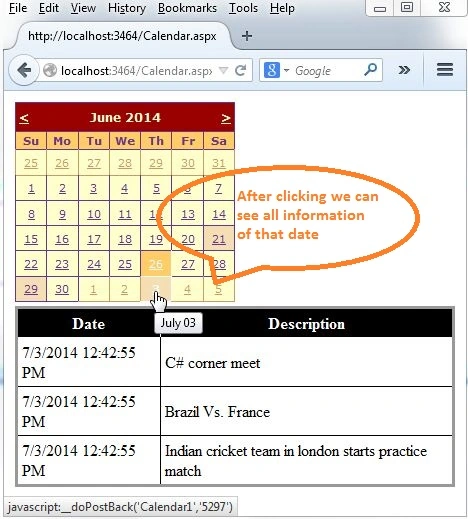
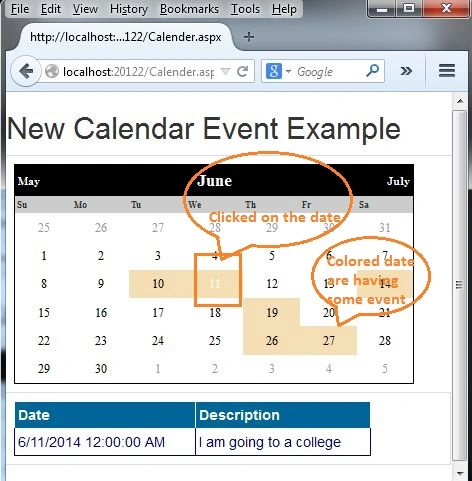
Adding a calendar in ASP.NET and displaying it in a webpage was the simplest task for us. Now in this article, we will learn how to add events in a specific day as well as the description for that event. Sometimes you can see after clicking the day and get all the information about that day event. In this article, we will see those days with events with a different color. We may add any other CSS as per your interest. There is an image of the calendar below, in this image we can see a simple calendar and every day with event information, I tried to make something like that.
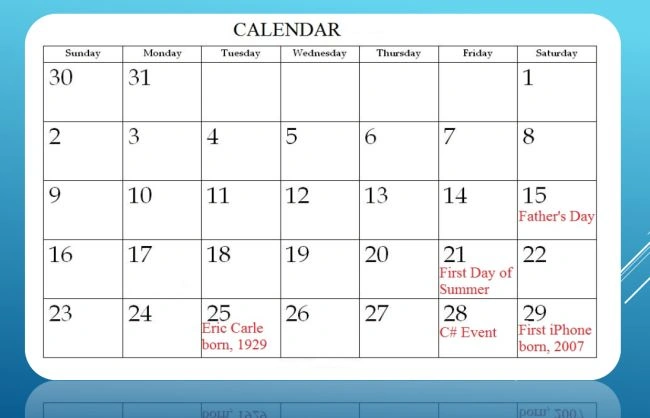
There are the following two flavors for adding an event in a calendar:
- Add Event day and description manually in code behind
- Adding all event days with a description from the database
Add Event day and description manually at code behind
For this flavor, we need to use a few simple steps.
Step 1
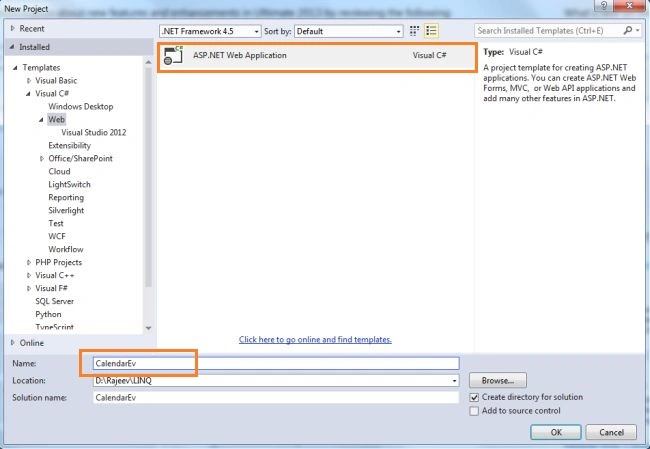
Add a project as in the following:
Step 2
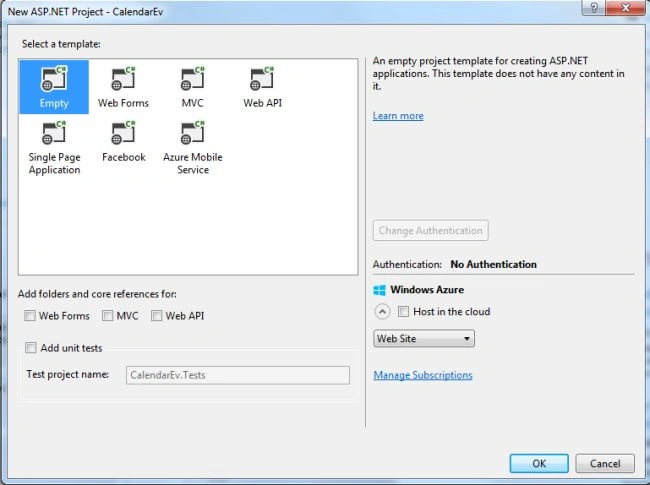
Choose an empty Template
Step 3
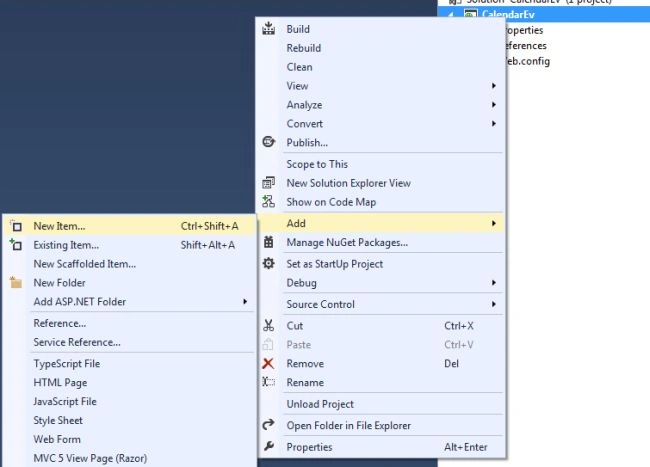
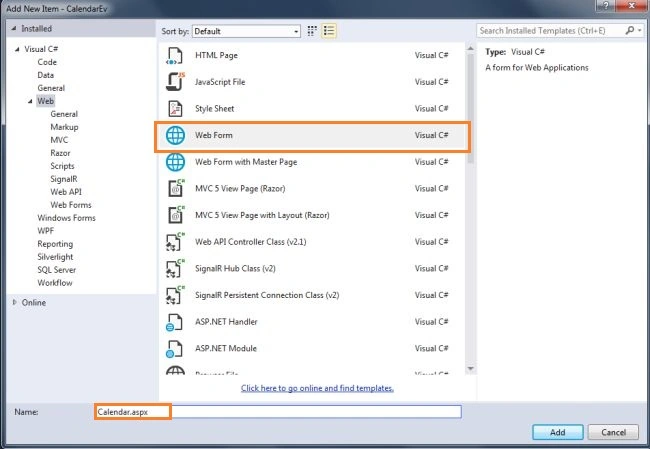
Add a web form. Right-click on the project in the Solution Explorer, choose Add -> New Item.
Step 4
Provide a nice name to the web form page as in the following:
Step 5
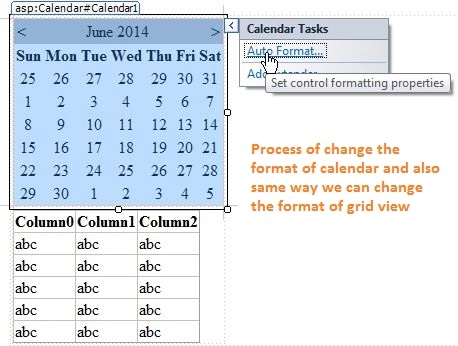
Add a grid view and calendar controls and apply the format
Step 6
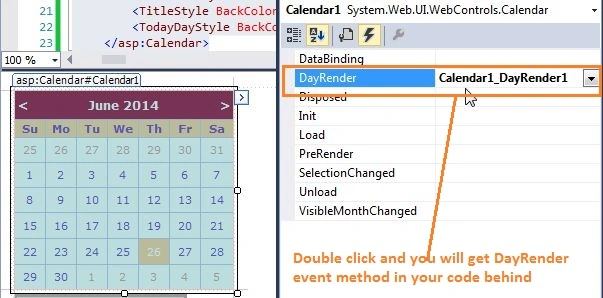
Enable the various events from the calendar control
Step 7
Adding code to the DayRender event
- DataRow[] rows = socialEvents.Select(
- String.Format(
- "Date >= #{0}# AND Date < #{1}#",
- e.Day.Date.ToShortDateString(),
- e.Day.Date.AddDays(1).ToShortDateString()
- )
- );
-
- foreach (DataRow row in rows)
- {
- System.Web.UI.WebControls.Image image;
- image = new System.Web.UI.WebControls.Image();
- image.ToolTip = row["Description"].ToString();
- e.Cell.BackColor = Color.Wheat;
- }
Step 8
Add code to the SelectionChanged event as in the following:
- System.Data.DataView view = socialEvents.DefaultView;
- view.RowFilter = String.Format(
- "Date >= #{0}# AND Date < #{1}#",
- Calendar1.SelectedDate.ToShortDateString(),
- Calendar1.SelectedDate.AddDays(1).ToShortDateString()
- );
-
- if (view.Count > 0)
- {
- GridView1.Visible = true;
- GridView1.DataSource = view;
- GridView1.DataBind();
- }
- else
- {
- GridView1.Visible = false;
- }
Step 9
Call the OnInit method as in the following:
- override protected void OnInit(EventArgs e)
- {
- InitializeComponent();
- base.OnInit(e);
- }
-
- private void InitializeComponent()
- {
- this.Calendar1.DayRender += new System.Web.UI.WebControls.DayRenderEventHandler(this.Calendar1_DayRender);
- this.Calendar1.SelectionChanged += new System.EventHandler(this.Calendar1_SelectionChanged);
- this.Load += new System.EventHandler(this.Page_Load);
-
- }
Step 10
Press F5 to run the project.
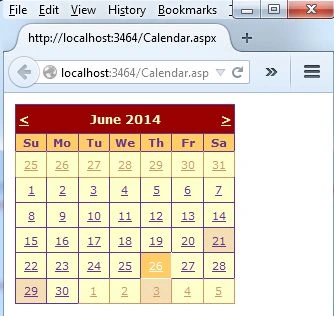
The following is the output when we click on a date with an event:
Adding all event days with description from database
For this flavor we need to follow up to step 6 from the previous flavor.
After following all six steps then use the following additional steps.
Step 1
Add another webpage and provide a nice name.
Step 2
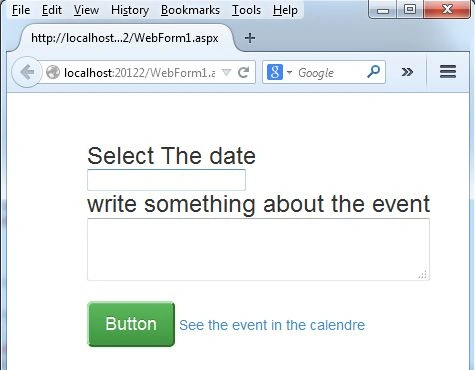
Make a design in a .aspx page for adding the date and description into the database.
Step 3
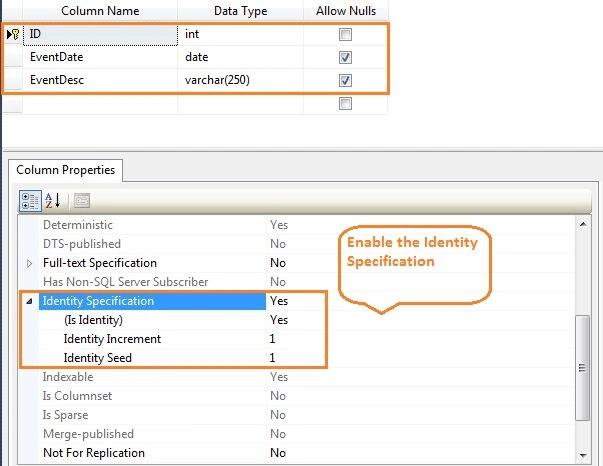
Make a table having 3 fields (ID, EventDate and EventDescription).
Step 4
Insert data into the table as in the following:
- DateTime d = Convert.ToDateTime(TextBox1.Text);
- string desc = TextBox2.Text;
- SqlConnection con = new SqlConnection("Data Source=.;Initial Catalog=Practice;User ID=sa;Password=***********");
- con.Open();
- SqlCommand cmd = new SqlCommand("insert into Calender values('"+d+"','"+desc+"') ", con);
- int x=cmd.ExecuteNonQuery();
- if(x==0)
- {
-
- lbl.ForeColor = System.Drawing.Color.Red;
- lbl.Text = "There is no any row affected in the database";
- }
- else
- {
- lbl.ForeColor = System.Drawing.Color.GreenYellow;
- lbl.Text=x+ " - Record is inserted successfully";
- }
Step 5
Bind the table data into the calendar.
- protected void Page_Load(object sender, EventArgs e)
- {
- BuildSocialEventTable();
- }
-
- private void BuildSocialEventTable()
- {
- SqlConnection con = new SqlConnection("Data Source=.;Initial Catalog=Practice;User ID=sa;Password=************");
- con.Open();
- SqlDataAdapter sda = new SqlDataAdapter("select EventDate,EventDesc FROM Calender", con);
- DataSet ds = new DataSet();
- sda.Fill(ds);
- socialEvents=ds.Tables[0];
- }
-
- private void Calendar1_DayRender(object sender, DayRenderEventArgs e)
- {
- DataRow[] rows = socialEvents.Select(
- String.Format(
- "EventDate >= #{0}# AND EventDate < #{1}#",
- e.Day.Date.ToShortDateString(),
- e.Day.Date.AddDays(1).ToShortDateString()
- )
- );
-
- foreach (DataRow row in rows)
- {
- System.Web.UI.WebControls.Image image;
- image = new System.Web.UI.WebControls.Image();
- image.ImageUrl = this.ResolveUrl("Dot.jpg");
- image.ToolTip = row["EventDesc"].ToString();
-
- e.Cell.BackColor = Color.Wheat;
- }
- }
-
- private void Calendar1_SelectionChanged(object sender, System.EventArgs e)
- {
- System.Data.DataView view = socialEvents.DefaultView;
- view.RowFilter = String.Format(
- "EventDate >= #{0}# AND EventDate < #{1}#",
- Calendar1.SelectedDate.ToShortDateString(),
- Calendar1.SelectedDate.AddDays(1).ToShortDateString()
- );
-
- if (view.Count > 0)
- {
- DataGrid1.Visible = true;
- DataGrid1.DataSource = view;
- DataGrid1.DataBind();
- }
- else
- {
- DataGrid1.Visible = false;
- }
- }
- private DataTable socialEvents;
Step 6
The following is the final output.
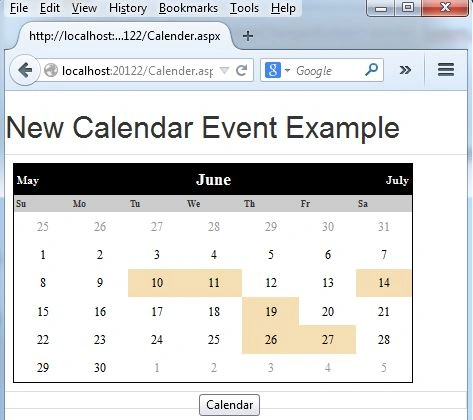
The following is the output when we click on a date:
 Summary
In this article, we saw how to use a calendar control in ASP.NET and add an event in a specific date with description in the calendar. We have also seen the binding date event in the calendar from a database. Thanks for reading my article.


Anders NielsenPosted Jul 3, 2018, 6:26 AM
I have noticed that a number or comments are related to the Calendar1_DayRender function: "DataRow[] rows = socialEvents.Select(String.Format("EventDate >= #{0}# AND EventDate < #{1}#", e.Day.Date.ToShortDateString(), e.Day.Date.AddDays(1).ToShortDateString()));" and as far as I can see the same goes for the Calendar1_SelectionChanged function. As many others I get the exception "String was not recognized as a valid DateTime". I have tried to follow your instructions but I cannot figure out what is wrong, it simply will not compile. The environment for the error is MS VS 2017 Community edition, MSSQL 2012. The date format in the table looks like yyyy-MM-dd when viewed in SSMS. Will you be kind enough to elaborate a bit on the functions? Kind Regards :-) /A
Mayank GalaPosted Apr 9, 2018, 8:44 AM
I am getting error at socialEvent
kavitha velpandianPosted Feb 27, 2018, 12:55 AM
I"m trying this code .. i hava an error in this line of String was not recognized as a valid DateTime. DataRow[] rows = socialEvents.Select(String.Format("Date >= #{0}# AND Date < #{1}#", e.Day.Date.ToShortDateString(), e.Day.Date.AddDays(1).ToShortDateString())); how to fix ..
Alkesh ParmarPosted Jun 24, 2017, 2:21 AM
I am geting an error "String was not recognized as a valid DataTime"
Former memberPosted Jan 10, 2017, 11:53 PM
Create table Events(Eid Int Primary Key Identity,EventName Varchar(250), StartDate Date Not Null,EventDescription Varchar(250))
Former memberPosted Jan 10, 2017, 11:45 PM
Protected void Calendar1_DayRender(object sender, DayRenderEventArgs e) { try { foreach (DataRow dr in ds.Tables[0].Rows) { DateTime dt = (DateTime)dr.Field<DateTime?>("StartDate"); if (e.Day.Date == dt.Date) { e.Cell.BackColor = System.Drawing.Color.LightSkyBlue; Literal ltr = new Literal(); string br = "<br/>"; ltr.Text = br + dr[0].ToString(); e.Cell.Controls.Add(ltr); } } } catch (Exception ex) { Response.Write(ex.ToString()); }
Former memberPosted Jan 10, 2017, 6:34 AM
NOTE: DATASOURCE MEANS USER SQLSERVER USERNAME; INITIAL CATALOG MEANS UR DATABASE NAME;INTEGRATEDSECURITY MEANS UR PASSWORD ; NO NEED TO CONFUSE EVERY THING IS CLEAR
Former memberPosted Jan 10, 2017, 6:26 AM
Hello Rajeev Ranjan Dont Put DB.CONFIG FILE ERROR U DONT KNOW ANY THING U LEARN FIRST
Former memberPosted Jan 10, 2017, 5:57 AM
Hi Friends,Above Code Is Runing But Design Is Same As U Seen Above Of The Page...
Former memberPosted Jan 10, 2017, 5:56 AM
Protected void Page_Load(object sender, EventArgs e) { try { using (con = new SqlConnection(ConfigurationManager.ConnectionStrings["ConStr"].ConnectionString)) { da = new SqlDataAdapter(); da.SelectCommand = new SqlCommand("select EventName,StartDate,EventDescription from Events ", con); da.Fill(ds); } } catch (Exception ex) { Response.Write(ex.ToString()); } }
Former memberPosted Jan 10, 2017, 5:49 AM
<asp:Calendar ID="Calendar1" runat="server" BackColor="White" BorderColor="Black" Font-Names="Verdana" Font-Size="9pt" ForeColor="Black" Height="479px" Width="941px" ondayrender="Calendar1_DayRender" ToolTip="Event Calendar" Caption="Calender Application" CaptionAlign="Top" OnSelectionChanged="Calendar1_SelectionChanged" style="margin-right: 76px" BorderStyle="Solid" CellSpacing="1" FirstDayOfWeek="Sunday"> <DayHeaderStyle Font-Bold="True" Height="8pt" Font-Size="8pt" ForeColor="#333333" /> <DayStyle BackColor="#CCCCCC" /> <NextPrevStyle Font-Size="8pt" ForeColor="White" Font-Bold="True" /> <OtherMonthDayStyle ForeColor="#999999" /> <SelectedDayStyle BackColor="#66FF33" ForeColor="White" /> <TitleStyle BackColor="#333399" Font-Bold="True" Font-Size="12pt" ForeColor="White" BorderStyle="Solid" Height="12pt" /> <TodayDayStyle BackColor="#999999" ForeColor="White" /> </asp:Calendar> <asp:GridView ID="GridView1" runat="server" AutoGenerateColumns="False"> <Columns> <asp:BoundField DataField ="EventName" HeaderText="EventName" /> <asp:BoundField DataField="StartDate" HeaderText="StartDate" /> <asp:BoundField DataField="EventDescription" HeaderText="EventDescription" /> </Columns> </asp:GridView>
Former memberPosted Jan 10, 2017, 5:48 AM
Using System.Data;using System.Data.SqlClient;using System.Drawing; using System.Configuration;
Former memberPosted Jan 10, 2017, 5:48 AM
Protected void Calendar1_SelectionChanged(object sender, EventArgs e) { con = new SqlConnection(constr); da = new SqlDataAdapter("Select EventName,StartDate,EventDescription From Events where StartDate='"+Calendar1.SelectedDate.ToString()+"'", con); ds = new DataSet(); da.Fill(ds); GridView1.DataSource = ds.Tables[0]; GridView1.DataBind(); }
Former memberPosted Jan 10, 2017, 5:47 AM
Above WEB.CONFIG FILE IS CORRECT Please U will Put Ur Web.ConFig File In Below CommentBox?
Former memberPosted Jan 10, 2017, 5:47 AM
No Need To Write AnyThing
Former memberPosted Jan 10, 2017, 5:47 AM
<connectionStrings> <add name="Constr" connectionString="Data Source=Ganesh;Initial Catalog=Forms;Integrated Security=SSPI; " providerName="System.Data.SqlClient" /> </connectionStrings> <appSettings> <add key="ValidationSettings:UnobtrusiveValidationMode" value="None"/> </appSettings>
Former memberPosted Jan 10, 2017, 12:31 AM
Database Design:- Same AS u Design Earlier
Former memberPosted Jan 10, 2017, 12:30 AM
Protected void Calendar1_DayRender(object sender, DayRenderEventArgs e) { try { foreach (DataRow dr in ds.Tables[0].Rows) { DateTime dt = (DateTime)dr.Field<DateTime?>("StartDate"); if (e.Day.Date == dt.Date) { e.Cell.BackColor = System.Drawing.Color.LightSkyBlue; Literal ltr = new Literal(); string br = "<br/>"; ltr.Text = br + dr[0].ToString(); e.Cell.Controls.Add(ltr); } } } catch (Exception ex) { Response.Write(ex.ToString()); }
Former memberPosted Jan 10, 2017, 12:29 AM
Actually This Code Is Not Running Please Correct Mistakes Day_Render Method
Former memberPosted Jan 3, 2017, 5:55 AM
Its Fake Code Not Runing in My Computer I Changed According To My Web.Config File .Please Check Calender1_Render Code... And Rectify The Error.
Sameer KhanPosted Oct 2, 2016, 10:53 AM
Hey Rajeev. Im using mysql database to retrieve data from database onto the calendar. but im having the same problems as others are having. My error "Cannot perform '<' operation on MySql.Data.Types.MySqlDateTime and System.DateTime.". if you could help. Thanks
Dale LambertPosted May 15, 2016, 5:01 PM
Hi Rajeev, I followed your way but I'm still getting the same issue as the others 'String was not recognized as a valid DateTime.' And yes I have my own connection string in my own web config file. Any help would be much appreciated. Thanks
Ayorinde BanjoPosted Apr 8, 2016, 6:26 AM
Hi Rajeev , I also got the same Exception in Calendar1_DayRender(object sender, DayRenderEventArgs e) . Exception is "String was not recognized as a valid DateTime." On this Code DataRow[] rows = socialEvents.Select( String.Format( "Date >= #{0}# AND Date < #{1}#", e.Day.Date.ToShortDateString(), e.Day.Date.AddDays(1).ToShortDateString() ) ); . Please help resolve.
Damian DamianPosted Jan 9, 2016, 7:22 AM
Thank you very much mr.Rajeev!This helped me a lot..
navinkumarPosted Jan 7, 2016, 6:59 AM
Hello Rajeev , i have got an Exception in Calendar1_DayRender(object sender, DayRenderEventArgs e) . Exception is "String was not recognized as a valid DateTime." On this Code DataRow[] rows = socialEvents.Select( String.Format( "Date >= #{0}# AND Date < #{1}#", e.Day.Date.ToShortDateString(), e.Day.Date.AddDays(1).ToShortDateString() ) ); . I had Followed your All Procedure as You Say. Help me !!
sudarshan deshmukhPosted Nov 28, 2015, 6:54 AM
hey rajeev just wanna ask , how to get event description on mouse over , i tried with javascript but it is displaying on header , is their anything can we implement with mouse over .
sudarshan deshmukhPosted Nov 16, 2015, 1:35 AM
i downloaded the code done the things as you mentioned in comments and above code but still error is displayed specific in this format("Date >= #{0}# AND Date < #{1}#" ).
Rajeev RanjanPosted Nov 5, 2015, 12:34 AM
jeff dzn customize the column names for the grid and increase the cell size it is defined in database. And aprt you can adjust this style sheet using css. you can use jquery model pop for displaying those events.
jeff dznPosted Nov 4, 2015, 7:41 PM
Awesome code. How do you customize the column names for the grid and increase the cell size? I am using the second flavor with the database. When I click on a date with events in it, the grid view shows the cells auto sizing with the data which results in squished columns.
Rajeev RanjanPosted Apr 20, 2015, 7:14 AM
As my suggestion : - only try to follow steps, and make itself, as i supposed you will never get any bug in ur code
Rajeev RanjanPosted Apr 20, 2015, 7:12 AM
As the error you have mentioned. Can you just have a look of ur code and tell me did you activate the calender_DayRender event and calender_SelectionChanged() event. if not then press f4 on the calender and double click on the both of them you will get automatically those events on the code behind. past those code there and then hit F5 ( or run the project) I hope you will not get any error. Thnx
Rajeev RanjanPosted Apr 20, 2015, 7:08 AM
dear Hurair Hashmi and sharmila thirumalai As i supposed you both are trying to downlaod the sample code and hiting the F5 button, and you are getting error, this is quite obvious for error, cuz i wasn't upload the web.cofig file inside it. There is only code and design.
Hurair HashmiPosted Apr 19, 2015, 11:04 AM
not able to solve the same problem which sharmila thirumalai was facing... NEED HELP...
Rajeev RanjanPosted Apr 17, 2015, 6:57 AM
try to add degugger at every field and find the exact error, if you couldn't then i will help you
Rajeev RanjanPosted Apr 17, 2015, 6:55 AM
and you are getting error ??
sharmila thirumalaiPosted Apr 17, 2015, 5:05 AM
ya I specified all the 3 fields as you said
Rajeev RanjanPosted Apr 17, 2015, 4:31 AM
did you specified EventDate in you table? EventDate is the the field of database which i was binding.
sharmila thirumalaiPosted Apr 17, 2015, 4:25 AM
i'm also getting same error as above person.but i didn't try to convert dateTime into string . the error is in "EventDate >= #{0} AND EventDate < #{1}".i have specified EventDate as only date in db.while retrieving EventDate it is in datetime format but arguments are in date format . i think this is the error but not sure. pls help me to get through this and thanks for ur code.
abc dummyPosted Feb 3, 2015, 7:03 AM
thanks for this code, but code gives an exception "String was not recognized as a valid DateTime." please give suggestion on this. i tried for removing time part from date but still it gives same error exception.
Rajeev RanjanPosted Jan 22, 2015, 10:32 PM
Try to follow my steps as I mentioned and make a fresh one. Thanks
kk kumarPosted Jan 22, 2015, 11:20 AM
Error 1 Could not load type 'CalendarEv.Calendar'. C:\Users\admin\Documents\MyDocuments\calendarCode\Calendar.aspx 1 i download code but show the above error
Ике ИкеPosted Jan 12, 2015, 2:13 PM
Can you please post the source code of the second part of this tutorial, the connection of the database? I don't know how to create the "See the event in the calendar" link on the page. Also tips for those that have some problems: don't forget to add using System.Data;using System.Drawing;
atalPosted Nov 3, 2014, 5:16 AM
good aticle
Prerana TiwariPosted Jun 27, 2014, 4:12 AM
Nice article.....