

This article shows how to show data using horizontal groups in a GridView in ASP.Net.
The following is my Data Table structure: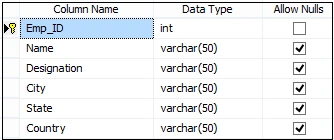
The data in my Data Table is: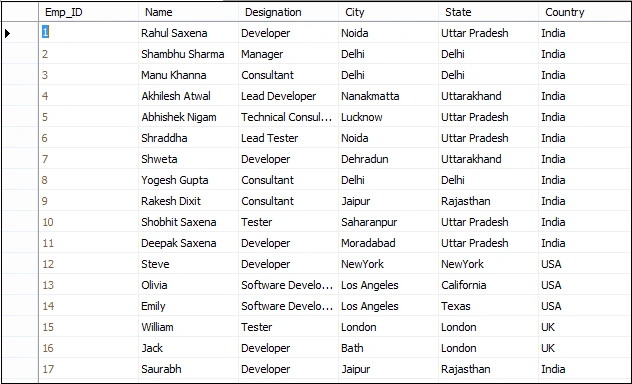
Now in a Grid View I will show the data first by country then in groups of states and last by city.
The following is my aspx code:
- <%@ Page Language="C#" AutoEventWireup="true" CodeBehind="Default.aspx.cs" Inherits="ShowingGroupingOfData.Default" %>
- <!DOCTYPE html>
- <html xmlns="http://www.w3.org/1999/xhtml">
- <head runat="server">
- <title>Showing Grouping Of Data In ASP.NET Grid View</title>
- </head>
- <body>
- <form id="form1" runat="server">
- <div>
- <table style="border: solid 15px blue; width: 100%; vertical-align: central;">
- <tr>
- <td style="padding-left: 20px; padding-top: 20px; padding-bottom: 20px; background-color: skyblue; font-family: 'Times New Roman'; font-size: 20pt; color: red;">Showing Grouping Of Data In a ASP.NET Grid View
- </td>
- </tr>
- <tr>
- <td style="text-align: left;">
- <asp:GridView ID="GridView1" runat="server" CellPadding="4" ForeColor="#333333" GridLines="Both" Width="100%">
- <AlternatingRowStyle BackColor="White" ForeColor="#284775" />
- <EditRowStyle BackColor="#999999" />
- <FooterStyle BackColor="#5D7B9D" Font-Bold="True" ForeColor="White" />
- <HeaderStyle BackColor="#5D7B9D" Font-Bold="True" ForeColor="White" />
- <PagerStyle BackColor="#284775" ForeColor="White" HorizontalAlign="Center" />
- <RowStyle BackColor="#F7F6F3" ForeColor="#333333" />
- <SelectedRowStyle BackColor="#E2DED6" Font-Bold="True" ForeColor="#333333" />
- <SortedAscendingCellStyle BackColor="#E9E7E2" />
- <SortedAscendingHeaderStyle BackColor="#506C8C" />
- <SortedDescendingCellStyle BackColor="#FFFDF8" />
- <SortedDescendingHeaderStyle BackColor="#6F8DAE" />
- </asp:GridView>
- </td>
- </tr>
- </table>
- </div>
- </form>
- </body>
- </html>
- using System;
- using System.Collections;
- using System.Collections.Generic;
- using System.Linq;
- using System.Web;
- using System.Web.UI;
- using System.Web.UI.WebControls;
- using System.IO;
- using System.Data;
- using System.Data.SqlClient;
- using System.Configuration;
- namespace ShowingGroupingOfData
- {
- public partial class Default : System.Web.UI.Page
- {
- SqlDataAdapter da;
- DataSet ds = new DataSet();
- DataTable dt = new DataTable();
- protected void Page_Load(object sender, EventArgs e)
- {
- if (!Page.IsPostBack)
- {
- BindGrid();
- }
- }
- private void BindGrid()
- {
- SqlConnection con = new SqlConnection();
- ds = new DataSet();
- con.ConnectionString = @"Data Source=INDIA\MSSQLServer2k8; Initial Catalog=EmployeeManagement; Uid=sa; pwd=india;";
- SqlCommand cmd = new SqlCommand("SELECT Country, State, City,Name, Designation FROM Employee ORDER BY Country,State, City", con);
- da = new SqlDataAdapter(cmd);
- da.Fill(ds);
- con.Open();
- cmd.ExecuteNonQuery();
- con.Close();
- if (ds.Tables[0].Rows.Count > 0)
- {
- GridView1.DataSource = ds.Tables[0];
- GridView1.DataBind();
- // First parameter is Row Collection
- // Second is Start Column
- // Third is total number of Columns to make group of Data.
- ShowingGroupingDataInGridView(GridView1.Rows, 0, 3);
- }
- }
- void ShowingGroupingDataInGridView(GridViewRowCollection gridViewRows, int startIndex, int totalColumns)
- {
- if (totalColumns == 0) return;
- int i, count = 1;
- ArrayList lst = new ArrayList();
- lst.Add(gridViewRows[0]);
- var ctrl = gridViewRows[0].Cells[startIndex];
- for (i = 1; i < gridViewRows.Count; i++)
- {
- TableCell nextTbCell = gridViewRows[i].Cells[startIndex];
- if (ctrl.Text == nextTbCell.Text)
- {
- count++;
- nextTbCell.Visible = false;
- lst.Add(gridViewRows[i]);
- }
- else
- {
- if (count > 1)
- {
- ctrl.RowSpan = count;
- ShowingGroupingDataInGridView(new GridViewRowCollection(lst), startIndex + 1, totalColumns - 1);
- }
- count = 1;
- lst.Clear();
- ctrl = gridViewRows[i].Cells[startIndex];
- lst.Add(gridViewRows[i]);
- }
- }
- if (count > 1)
- {
- ctrl.RowSpan = count;
- ShowingGroupingDataInGridView(new GridViewRowCollection(lst), startIndex + 1, totalColumns - 1);
- }
- count = 1;
- lst.Clear();
- }
- }
- }
Now run the application.
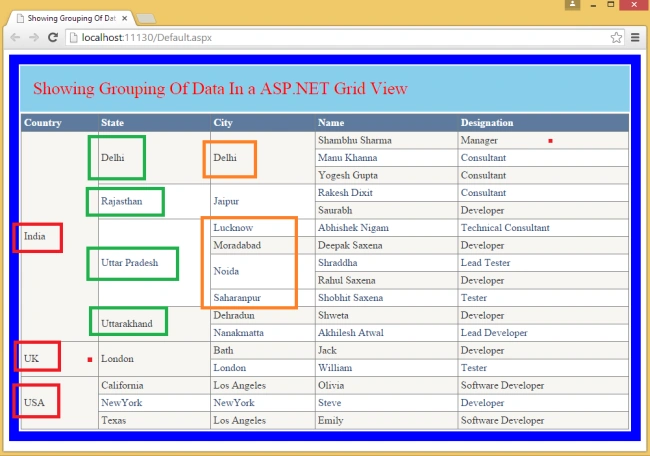
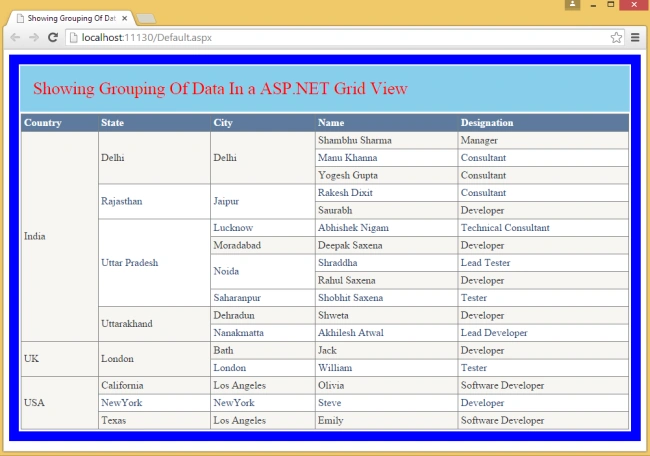
See here I am showing the data grouped horizontally first by country then by state and last by city.
Yan AungPosted Apr 2, 2019, 1:48 AM
Thank you so much for this! you just saved me a lot of effort.
nilang shahPosted Jan 30, 2018, 12:55 AM
Its really nice article and also helpful for small amount of data but if there is millions of data into gridview in that circumstance it will take too much time for processing and got stuck between recursive call so how can overcome into such scenario? is there any other way to handle such situation??
praveen palPosted Mar 10, 2017, 5:48 AM
Nice article Rahul brother!
Ria GhoshPosted Jan 11, 2017, 4:05 PM
Thank you so much for this! you just saved me a lot of effort. Had to make a few modifications but this works like a charm! thanks again.
Rahul Kumar SaxenaPosted Sep 4, 2015, 6:00 AM
Thanks Shridhar Sharma
Shridhar SharmaPosted Jul 21, 2015, 2:14 AM
Nice application to hands on. :)
Rahul Kumar SaxenaPosted Jul 18, 2015, 7:06 AM
Thanks Kautilya Vora
Rahul Kumar SaxenaPosted Jul 18, 2015, 7:06 AM
Thanks Sibeesh Venu bro...
Sibeesh VenuPosted Jul 18, 2015, 12:11 AM
Good One. Congrats. Article of the day
Rahul Kumar SaxenaPosted Feb 24, 2015, 8:05 AM
Thanks 2 All...
Nimit JoshiPosted Feb 11, 2015, 10:41 PM
Good One
Khargesh RajputPosted Feb 11, 2015, 4:52 AM
nice sir
Happy DotNetPosted Feb 11, 2015, 4:36 AM
very useful .....
Manish Kumar ChoudharyPosted Feb 11, 2015, 1:14 AM
Good one.