

In this article I am going to show how we can have a table data in a tree view format. Treeview is a viewer for hierarchical structures.
This is my table data.
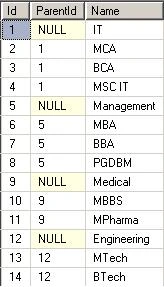
Image 1.
I put my database in App_data folder inside application.
This is my aspx code
<%@ Page Language="C#" AutoEventWireup="true" CodeFile="Default.aspx.cs" Inherits="_Default" %>
<!DOCTYPE html PUBLIC "-//W3C//DTD XHTML 1.0 Transitional//EN" "http://www.w3.org/TR/xhtml1/DTD/xhtml1-transitional.dtd">
<html xmlns="http://www.w3.org/1999/xhtml">
<head runat="server">
<title></title>
</head>
<body>
<form id="form1" runat="server">
<div>
<table cellpadding="2" cellspacing="2" border="2" width="50%" align="center">
<tr>
<td>
Hierarchical Structure of Table Data
</td>
</tr>
<tr>
<td>
<asp:TreeView ID="TreeView1" ExpandDepth="0" PopulateNodesFromClient="true" ShowLines="true"
ShowExpandCollapse="true" runat="server" />
</td>
</tr>
</table>
</div>
</form>
</body>
</html>
This is my aspx.cs code
using System;
using System.Collections.Generic;
using System.Linq;
using System.Web;
using System.Web.UI;
using System.Web.UI.WebControls;
using System.Data;
using System.Data.SqlClient;
public partial class _Default : System.Web.UI.Page
{
SqlConnection con;
SqlCommand cmd = new SqlCommand();
SqlDataAdapter da;
DataSet ds = new DataSet();
DataTable dt = new DataTable();
protected void Page_Load(object sender, EventArgs e)
{
if (!Page.IsPostBack)
{
GetData();
}
}
public void GetData()
{
con = new SqlConnection("Data Source=.; Initial Catalog=MyData; uid=sa; pwd=wintellect;");
cmd.CommandText = "Select * from CourseDetail";
cmd.Connection = con;
da = new SqlDataAdapter(cmd);
con.Open();
cmd.ExecuteNonQuery();
da.Fill(ds);
if (ds.Tables[0].Rows.Count > 0)
{
foreach (DataRow dr in ds.Tables[0].Rows)
{
if (dr.ItemArray[1] == DBNull.Value)
{
TreeNode t = BuildNode((string)dr.ItemArray[2]);
t.Value = "0";
FillNodeChildren(t, int.Parse(dr.ItemArray[0].ToString()));
this.TreeView1.Nodes.Add(t);
}
}
}
}
private TreeNode BuildNode(string Text)
{
return new TreeNode(Text);
}
// The level of tree
int intLevel = 0;
// Recursive function to populate Treeview node
public void FillNodeChildren(TreeNode _Parent, int _ParentID)
{
intLevel++;
DataView Data = new DataView(ds.Tables[0]);
foreach (DataRow dr in ds.Tables[0].Rows)
{
if (dr.ItemArray[1] != DBNull.Value)
{
if (object.Equals(dr.ItemArray[1].ToString(), _ParentID.ToString()))
{
TreeNode t = BuildNode((string)dr.ItemArray[2]);
t.Value = intLevel.ToString();
FillNodeChildren(t, int.Parse(dr.ItemArray[0].ToString()));
_Parent.ChildNodes.Add(t);
System.Diagnostics.Trace.WriteLine("Added node at level " + intLevel.ToString());
}
}
}
intLevel--;
}
}
Output
When I run the application then the page will be as follows
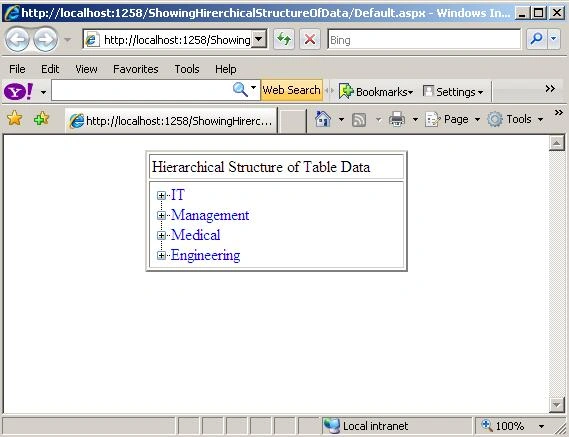
Image 2.
If I expand node then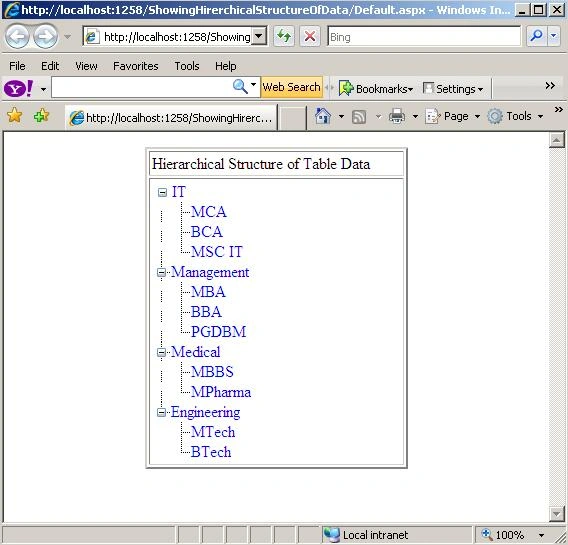
Image 3.
khurramPosted Jul 25, 2012, 7:16 AM
correction ... FillNodeChildren(t, int.Parse(dr.ItemArray[0].ToString()), ds); function definition .... public void FillNodeChildren(DataTreeNode _Parent, int _ParentID, DataSet ds) from .....short circuit
marwa marwaPosted Apr 15, 2011, 8:41 PM
thank you very Much for sharing your work :) and I want to ask if it's possible to change each element of the tree in a link Thank you in advance