

Introduction
In a previous article we have learned how to create a real-time chat application using SignalR and Bootstrap. So far we learned creation of group chat, Creation of Private Chat, Title Bar Notification Alert system, Message Count and Clear Chat History. And now we are going to learn the most trending feature in Chat Application which is “Emoji” or “Smiley” which makes our application more interactive. And another important and useful feature is sending attachments through chat, in file attachments we can send pictures/images, Word, PDF, Excel and text files. And also we can show/download the pictures/document files.
Emoji is a small digital image or icon used to express an idea or emotion in electronic communication, emoji livens up your text messages with tiny smiley faces. We are going to learn implementation of Emoji in the easiest way. There are a number of Emoji Package available, but here we are going to integrate “EmojinOne”. In my opinion this is the best smiley package which is easily available on the web. And also we are going to implement “SlimScroll” Jquey Plugin which provides interactive content scrollbar.
For those who missed the First article please refer to the article “SignalR Chat App With ASP.NET WebForm And BootStrap - Part One” and you can also download the project file.
For those who missed the last article please refer to the last article “SignalR Chat App With ASP.NET WebForm And BootStrap - Part Two” and you can also download the project file, so we will continue with the last article’s project file.
Integration of Emoji
As we are going to continue with our last project file, first we will integrate the Emoji, and the following reference files are required:
You can download Emoji Reference files which are available on cdnjs.com. Add CSS files are in “Content” directory and Javascript files in “Scripts” Folder. After adding these files in your project, add these files in “Chat.aspx” Design Page inside the header tag.
- <!--EmojiOneArea -->
- <link href="Content/emojionearea.min.css" rel="stylesheet" />
- <script src="Scripts/emojionearea.js"></script>
After adding these files, now we have to define Emoji area from where we can add emoji, so here we are defining message textbox as Emoji area. Simply write the Jquery function as follow:
- $(function () {
- $("#txtMessage").emojioneArea();
- });
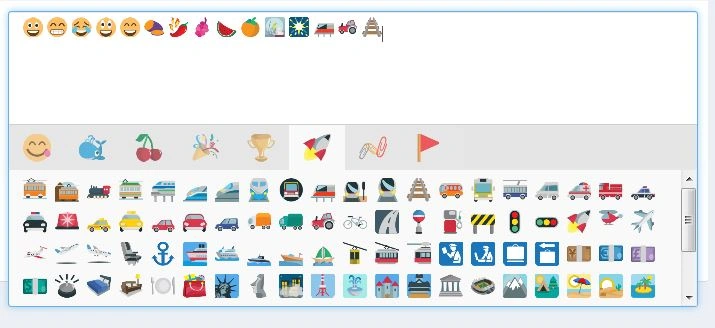
Now run your project you will see the Emoji Box with Message Textbox looks like as follow:
We have to apply the same way as Private Chat Box; we are creating a private chat Box Dynamically and embedding this code using Jquery, so we have to define the code dynamically because each time the Id of ChatBox Div will change so on the basis of dynamic id we have to find the Message Textbox and apply the function:
- $('#PriChatDiv').append($div);
- var msgTextbox = $div.find("#txtPrivateMessage");
- $(msgTextbox).emojioneArea();
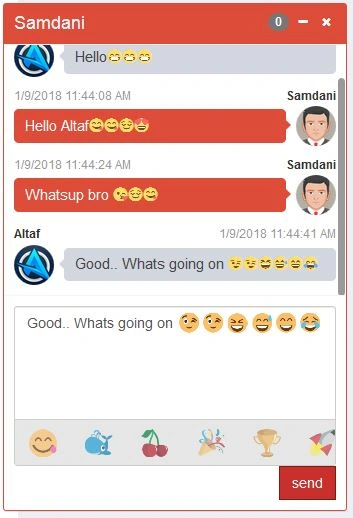
Again run the project and the see the output Emoji will apply in private chat box too. Now we have to parse these emojis in our chat, when we received the message which contains Emoji it gets parsed, there are a few methods of conversion / parsing of emojis and here we are using “.unicodeToImage(str)” method for parsing emoji, it will convert smiley Unicode into image.
- function ParseEmoji(div) {
- var input = $(div).html();
- var output = emojione.unicodeToImage(input);
- $(div).html(output);
- }
Here we are using online Emoji image resources, if you want to use these resources locally, then you have to download the EmojiOne Smiley Package and change the resource path in “emojionearea.js” file.
Example
- //var cdn_base = "http://DomainName/Emoji/dist/emojione/";
- var cdn_base = "https://cdnjs.cloudflare.com/ajax/libs/emojione/";
- // var cdn_base = "http://localhost:49251/Emoji/dist/emojione/";
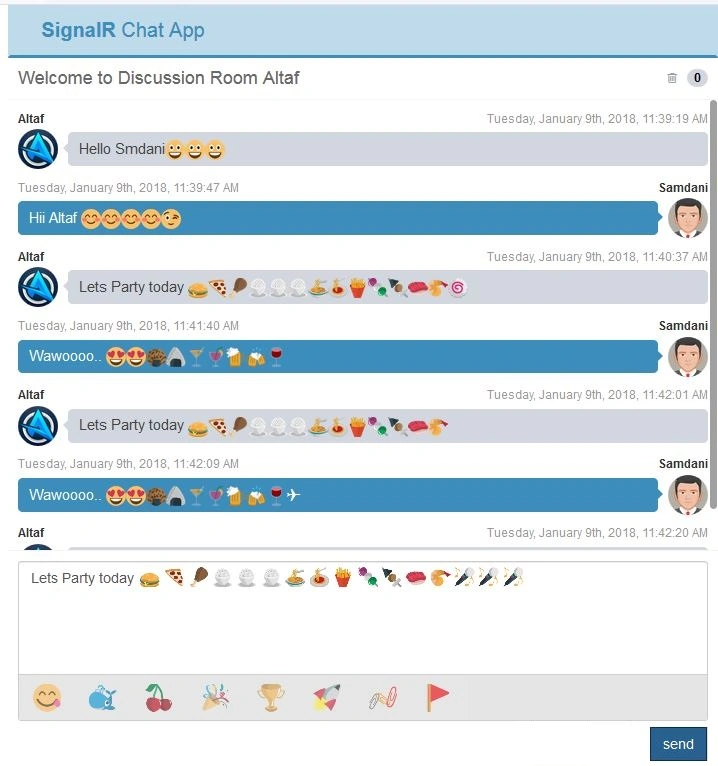
If we use these resources locally it will increase your app performance by decreasing the loading time of images. The output after adding Emoji will look like as follow:
Adding Feature of Sending Picture / File Attachment
Send Picture files through the chat, it will add an extraordinary feature to our app, we can send images, words, documents, Text files, PDF Files and Excel files. Here we are adding separate button for send attachment, we will use Ajax Tool “AsyncFileUpload”. So here we need to add AjaxToolkit in our project reference, we have already explained adding package in project using Nuget Package Manager in previous article. So add the package using Nuget Package Manager:
PM> Install-Package AjaxControlToolkit -Version 17.1.1
Now write the code for Attachment button. As we are using AsyncFileUpload for file upload but we are not showing it as we are wrapping File Upload inside the button, so user can only see the button and when it clicks on attachment button FileUpload events will be fired, the design code for attachment button is:
- <span class="upload-btn-wrapper">
- <button id="btnFile" class="btn btn-default btn-flat"><i class="glyphicon glyphicon-paperclip"></i></button>
- <ajaxToolkit:AsyncFileUpload OnClientUploadComplete="uploadComplete" runat="server" ID="AsyncFileUpload1" ThrobberID="imgLoader" OnUploadedComplete="FileUploadComplete" OnClientUploadStarted="uploadStarted" />
- </span>
There are Three Events generated by the “AsyncFileUpload” while clicking on FileUpload, in which two events are Client Side event and one is Server Side event, “OnUploadedComplete” is the server side event where we are storing files in a particular directory:
- protected void FileUploadComplete(object sender, EventArgs e)
- {
- string filename = System.IO.Path.GetFileName(AsyncFileUpload1.FileName);
- AsyncFileUpload1.SaveAs(Server.MapPath(this.UploadFolderPath) + filename);
- }
- function uploadStarted() {
- $get("imgDisplay").style.display = "none";
- }
- function IsValidateFile(fileF) {
- var allowedFiles = [".doc", ".docx", ".pdf", ".txt", ".xlsx",".xls", ".png", ".jpg", ".gif"];
- var regex = new RegExp("([a-zA-Z0-9\s_\\.\-:])+(" + allowedFiles.join('|') + ")$");
- if (!regex.test(fileF.toLowerCase())) {
- alert("Please upload files having extensions: " + allowedFiles.join(', ') + " only.");
- return false;
- }
- return true;
- }
- function IsImageFile(fileF) {
- var ImageFiles = [".png", ".jpg", ".gif"];
- var regex = new RegExp("(" + ImageFiles.join('|') + ")$");
- if (!regex.test(fileF.toLowerCase())) {
- return false;
- }
- return true;
- }
- function uploadComplete(sender, args) {
- var imgDisplay = $get("imgDisplay");
- imgDisplay.src = "images/loading.gif";
- imgDisplay.style.cssText = "";
- var img = new Image();
- img.onload = function () {
- imgDisplay.style.cssText = "Display:none;";
- imgDisplay.src = img.src;
- };
- imgDisplay.src = "<%# ResolveUrl(UploadFolderPath) %>" + args.get_fileName();
- var chatHub = $.connection.chatHub;
- var userName = $('#hdUserName').val();
- var date = GetCurrentDateTime(new Date());
- var sizeKB = (args.get_length() / 1024).toFixed(2);
- var msg1;
- if (IsValidateFile(args.get_fileName())) {
- if (IsImageFile(args.get_fileName())) {
- msg1 =
- '<div class="box-body">' +
- '<div class="attachment-block clearfix">' +
- '<a><img id="imgC" style="width:100px;" class="attachment-img" src="' + imgDisplay.src + '" alt="Attachment Image"></a>' +
- '<div class="attachment-pushed"> ' +
- '<h4 class="attachment-heading"><i class="fa fa-image"> ' + args.get_fileName() + ' </i></h4> <br />' +
- '<div id="at" class="attachment-text"> Dimensions : ' + imgDisplay.height + 'x' + imgDisplay.width + ', Type: ' + args.get_contentType() +
- '</div>' +
- '</div>' +
- '</div>' +
- '<a id="btnDownload" href="' + imgDisplay.src + '" class="btn btn-default btn-xs" download="' + args.get_fileName() + '"><i class="fa fa fa-download"></i> Download</a>' +
- '<button type="button" id="ShowModelImg" value="' + imgDisplay.src + '" class="btn btn-default btn-xs"><i class="fa fa-camera"></i> View</button>' +
- '<span class="pull-right text-muted">File Size : ' + sizeKB + ' Kb</span>' +
- '</div>';
- }
- else {
- msg1 =
- '<div class="box-body">' +
- '<div class="attachment-block clearfix">' +
- '<a><img id="imgC" style="width:100px;" class="attachment-img" src="images/file-icon.png" alt="Attachment Image"></a>' +
- '<div class="attachment-pushed"> ' +
- '<h4 class="attachment-heading"><i class="fa fa-file-o"> ' + args.get_fileName() + ' </i></h4> <br />' +
- '<div id="at" class="attachment-text"> Type: ' + args.get_contentType() +
- '</div>' +
- '</div>' +
- '</div>' +
- '<a id="btnDownload" href="' + imgDisplay.src + '" class="btn btn-default btn-xs" download="' + args.get_fileName() + '"><i class="fa fa fa-download"></i> Download</a>' +
- '<a href="' + imgDisplay.src + '" target="_blank" class="btn btn-default btn-xs"><i class="fa fa-camera"></i> View</a>' +
- '<span class="pull-right text-muted">File Size : ' + sizeKB + ' Kb</span>' +
- '</div>';
- }
- chatHub.server.sendMessageToAll(userName, msg1, date);
- }
- imgDisplay.src = '';
- }
When we click view button the image file will open in Modal popup, for this we are using Booststrap Modal, we are passing image path in button value and applying this path to the image inside the modal and then showing the modal.
- $(document).on('click', '#ShowModelImg', function () {
- $get("ImgModal").src = this.value;
- $('#ShowPictureModal').modal('show');
- });
When the number of messages increases in ChatBox the default browser vertical scrollbar will apply to the Chatbox, but here we will add a stylish scrollbar so we will add Jquery “SlimScroll” in Chatbox. We will add this through the Nuget Package Manager:
PM> Install-Package Jquery.slimScroll -Version 1.3.1
Add SlimScroll JavaScript file in header tag of design page.
<!--Jquery slimScroll -->
<script type="text/javascript" src="Scripts/jquery.slimscroll.min.js"></script>
- // Apply Slim Scroll Bar in Group Chat Box
- $('#divChatWindow').slimScroll({
- height: height
- });
- // Apply Slim Scroll Bar in Private Chat Box
- var ScrollHeight = $('#' + ctrId).find('#divMessage')[0].scrollHeight;
- $('#' + ctrId).find('#divMessage').slimScroll({
- height: ScrollHeight
- });
Output
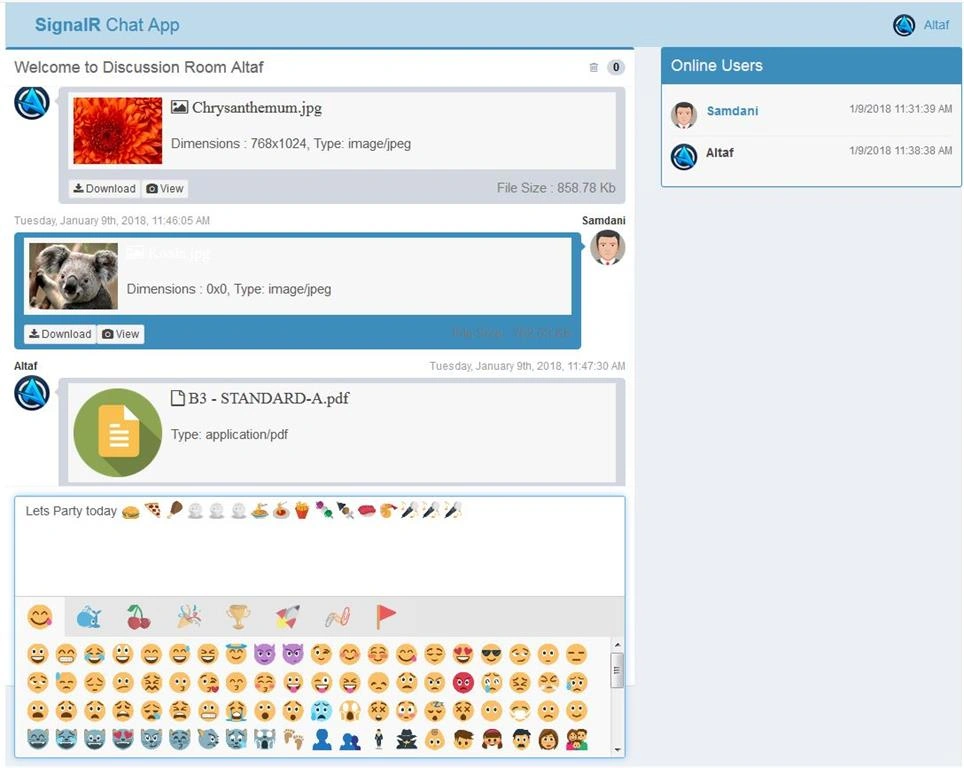
Now run the project and you the final output will look like below,
Conclusion
Here we learned the integration of Emoji in Private Chat and Group Chat with SignalR and sending attachment through chat by using Ajax Toolkit component “AsyncFileUpload”. So we learned the integration of AsyncFileUpload and its concepts such as client side events and server side events. And also Getting file Properties and displaying uploaded file properties, displaying image file in Modal popup, downloading files and also Jquery Plugin “SlimScroll” Integration in Scroll bar. So this is the final article of Chat application.
I hope this will help you and you lke this article, if you think we can add more features in this project please make a suggestion. If I like it I will write another article with some more new features, please don’t forget to download attached Project source code for your reference and to see the complete source, thank you for reading...
Please give your valuable feedback in the comment section.
Dennis J GordonPosted Mar 5, 2024, 3:32 AM
Yo, How do I speak to Altaf?
Afework HailePosted Apr 15, 2023, 10:50 PM
Altaf, this is great article. By far, this is the one example that worked for me. Everything works except there is no attachment option in the Privat Chat. Also, there is no functionality to do a group chat with selected users. For example, if I want to chat with three people only, how can it be done? So, I suggest that it would be great if you can add a functionality that would do a group chat just like in a WhatsApp and add attachment option to the Privat Chat. I strongly suggest you do the forth tutorial, which covers the missing functionality. Or, if you already have that covered in another website, please provide the link here. Thank you in advance.
muazam khanPosted Sep 27, 2022, 4:39 PM
Private chat is not working and not showing
muazam khanPosted Sep 27, 2022, 4:38 PM
Private chat not showing
Gaurav SharmaPosted Jun 4, 2022, 6:43 AM
If I am at chat window and I have not clicked on any user for private chat how to get notification that somebody sent me a message. something like badge that this user has sent you N number of private message.
Markus BreitensteinPosted Mar 13, 2022, 1:13 PM
Good project, but in part three, the complete bin folder is empty....
Soufiane BighidenePosted May 3, 2021, 11:53 PM
Can we create anther table to save chat data to DB ?
Ishfaq AhmedPosted Apr 7, 2021, 10:28 AM
How to send files in private chat. ?
A AndorPosted Feb 15, 2021, 12:18 PM
I tried the project local, and every thing is ok. but when tried to publish it on a cloud server, online users dose not appear, can you help me to solve this issue ?
Ary AlfiantoPosted Feb 11, 2021, 1:57 AM
Hi mr altaf your tutorial very helpfully thanks
Ivan QuispePosted May 27, 2020, 4:23 AM
When i refresh the page all private chat disappear
MouliDesigns indiaPosted Apr 6, 2020, 10:37 PM
When i refresh the page i get the same username twice,thrice.....how can i get rid of this...
Former memberPosted Mar 4, 2020, 11:47 PM
How to get all contacts from database pls help me
Former memberPosted Feb 26, 2020, 5:16 AM
Really awesome
Jacky BENONCOCHARDPosted Feb 25, 2020, 8:06 AM
En te remerciant
Jacky BENONCOCHARDPosted Feb 25, 2020, 8:06 AM
Bonjour Altaf, je te remercie pour ce partage, je voudrais int?grer l'envoi d'une valeur boolean au message je ne vois pas comment faire, te serait-il possible de m'indiquer une solution.
Mark IstvanPosted Feb 24, 2020, 2:04 PM
Q: When you have couple of people already in a chat group chatting, and a new one joins, I've noticed that past 'chats' are visible to those that connect afterwards. How can this be prevented such that when one connects, they only see stuff at that point
Mark IstvanPosted Feb 24, 2020, 2:01 PM
Love the articles!!!
Mlondi MaphumuloPosted Dec 18, 2019, 4:32 AM
This is awesom, thank you for the article Altaf
ali toloPosted Aug 26, 2019, 5:54 AM
I want to Send Picture in private chat too. please help me
Pratik ShirsePosted Aug 16, 2019, 4:04 AM
Database not available
Gopal GopalPosted Jun 30, 2019, 10:56 AM
Where is ConnC class where it is created and how it could be done.Pleasehelp me on this.
Ringgo SantosPosted Jun 23, 2019, 6:16 AM
I am using signalR version 2.4.1 in visual studio 2017 .net 4.7.2 but having problem. i tried to use other version but still having issue... can anyone help me?
Ringgo SantosPosted Jun 23, 2019, 6:14 AM
Does it work in visual 2017 .net 4.7.2 mvc 5?
santhoshi niPosted Mar 20, 2019, 6:36 AM
Nice one sir ...
Samuel JuveraPosted Jan 29, 2019, 1:24 PM
Have a problem with the presskey enter in the textbox it jumps to another line
Altaf AnsariPosted Jan 2, 2019, 3:09 AM
You can create method in HUB class to save the chat
Abneer IlyasPosted Jan 2, 2019, 2:36 AM
Hello Altaf, Can you please explain how can we save the chat in xml or database tables (SQL server) ?
Bobindra KumarPosted Dec 14, 2018, 5:09 AM
Hi Sir i just want to send a broadcast message like a watapps the single user send a message only for selected users at once if do you have any idea please suggest me
Colin GallowayPosted Sep 28, 2018, 6:52 AM
Hello Altaf, This is the best SignalR chat demo I've seen in terms of functionality and visual appearance - great work indeed. Would it be possible to show the same app but using MVC Razor instead of webforms..? A Part 1 version in MVC to start would be a great learning curve for me. All the best..
Ajay GuptaPosted Sep 12, 2018, 3:07 AM
Dear Altaf how can I bookmark this article
Dignesh PatelPosted Sep 4, 2018, 11:50 PM
Could not load type 'SignalRChat.Global'. Fatch to this error pls help me
or turjamenPosted Aug 19, 2018, 11:32 AM
Mr. Altaf.. I have tried your Web Chat App.. But I’m getting some error.. 1) Messages tittle always say “New messages from Users” even if I replaced all messages.. Nothing happen.. 2) Textbox messages can’t clear.. If I click textbox.. Message send but textbox still have values.. When I comment all emoji codes.. It works.. What problem sir?? Thank you
Azure ZooPosted Aug 1, 2018, 9:29 PM
Mr. Altaf.. I have tried your Web Chat App.. But I’m getting some error.. 1) Messages tittle always say “New messages from Users” even if I replaced all messages.. Nothing happen.. 2) Textbox messages can’t clear.. If I click textbox.. Message send but textbox still have values.. When I comment all emoji codes.. It works.. What problem sir?? Thank you
Altaf AnsariPosted Jul 30, 2018, 7:16 AM
Yes you can..
Faijal VahoraPosted Jul 25, 2018, 12:13 AM
Can i send the file attachment to private chat
AbdiHakim HusseinPosted Jul 21, 2018, 8:07 AM
Can you please show us how Video from PC/Mobile camera can be LIve streamed using SignalR Please?
ram prasadPosted Jun 12, 2018, 1:56 AM
I was searching for this kind off stuff from last two days finally i find it. thank you sir..
Rahul SinghPosted May 15, 2018, 5:14 AM
I am unable to add attachments for in the private chat window. Can you please help.
Stanley HuiPosted May 10, 2018, 1:25 PM
That is very great article and source codes for beginner. How can admin create new group and add users into it? and how to kick user offline? can you add chat log function?
alex victorPosted Apr 15, 2018, 6:46 AM
Thank you bro for the article. can you please add the group chat also ...? Also saving the messages in database. Directly we can add to db in the Hub file?
Altaf AnsariPosted Mar 26, 2018, 11:44 PM
Please see the This article : https://www.c-sharpcorner.com/article/signalr-chat-app-with-asp-net-webform-and-bootstrap/
Altaf AnsariPosted Mar 26, 2018, 11:41 PM
Hello @Jasmin Patel, See first part of this article you will get SQL script
jasmin patelPosted Mar 25, 2018, 1:12 AM
Can you please share database script for message and for file
Altaf AnsariPosted Mar 18, 2018, 11:18 PM
See first part of this article you will get SQL script
Durgesh PandeyPosted Mar 17, 2018, 5:57 AM
SQL Script file is missing...
shubhanshu bhardwajPosted Mar 7, 2018, 10:35 PM
Hello sir , can you please guide me how to show users list whether they are online or not and also see the conversation between both of us.If user is online then can do chat with him.
Sumeet IlluminatePosted Feb 27, 2018, 12:23 AM
And how can i save message history in database
Sumeet IlluminatePosted Feb 27, 2018, 12:21 AM
When i copy the url and run on another tab it creates another online member with same credentials
Micheal JamesPosted Jan 29, 2018, 5:05 AM
Hi Altaf... Got your code working what am expecting. Thank you so much.
Trevor JustusPosted Jan 23, 2018, 4:29 PM
Is it possible to have group security and only allow certain users into a group chat as well has authenticate user and password securely?