

In previous articles, we learned how to create a real-time chat application using SignalR. So far, we have learned Integration of SignalR, Bootstrap, and creation of group chat. So in this article, we are going to add some additional features like Private Chat, Notification System, Message Counting, and Clear Chat function etc.
Our application will become more interactive after adding these feature and you will learn more about SignalR and Jquery, how we can create a function in HUB class or how can we call these Hub class’s function form Client side using Jquery and how we can dynamically generate HTML Code using Jquery and append these codes with already exist in HTML Div.
For those who missed the previous article please refer to the previous article “SignalR Chat App With ASP.NET WebForm And BootStrap - Part One” and also download the project file, so we will continue with the last article’s project file.
Creation of Private ChatAs we are going to continue with our last project, first we are going to add “Private Chat”. We already have the Online User List, so here we have to create HTML design for private chat and later we will use this design for private chat, so we will add the new DIV after the group chat DIV, the HTM Code will be,
- <div class="row">
- <div class="col-md-12">
- <div class="row" id="PriChatDiv">
- </div>
- <!--/.private-chat -->
- </div>
- </div>
- var UserLink = $('<a id="' + id + '" class="user" >' + name + '<a>');
- $(code).click(function () {
- var id = $(UserLink).attr('id');
- if (userId != id) {
- var ctrId = 'private_' + id;
- OpenPrivateChatBox(chatHub, id, ctrId, name);
- }
- });
- // Creation and Opening Private Chat Div
- function OpenPrivateChatBox(chatHub, userId, ctrId, userName) {
- var PWClass = $('#PWCount').val();
- if ($('#PWCount').val() == 'info')
- PWClass = 'danger';
- else if ($('#PWCount').val() == 'danger')
- PWClass = 'warning';
- else
- PWClass = 'info';
- $('#PWCount').val(PWClass);
- var div1 = ' <div class="col-md-4"> <div id="' + ctrId + '" class="box box-solid box-' + PWClass + ' direct-chat direct-chat-' + PWClass + '">' +
- '<div class="box-header with-border">' +
- ' <strong class="box-title">' + userName + '</strong>' +
- ' <div class="box-tools pull-right">' +
- ' <span data-toggle="tooltip" id="MsgCountP" title="0 New Messages" class="badge bg-' + PWClass + '">0</span>' +
- ' <button type="button" class="btn btn-box-tool" data-widget="collapse">' +
- ' <i class="fa fa-minus"></i>' +
- ' </button>' +
- ' <button id="imgDelete" type="button" class="btn btn-box-tool" data-widget="remove"><i class="fa fa-times"></i></button></div></div>' +
- ' <div class="box-body">' +
- ' <div id="divMessage" class="direct-chat-messages">' +
- ' </div>' +
- ' </div>' +
- ' <div class="box-footer">' +
- ' <input type="text" id="txtPrivateMessage" name="message" placeholder="Type Message ..." class="form-control" />' +
- ' <div class="input-group">' +
- ' <input type="text" name="message" placeholder="Type Message ..." class="form-control" style="visibility:hidden;" />' +
- ' <span class="input-group-btn">' +
- ' <input type="button" id="btnSendMessage" class="btn btn-' + PWClass + ' btn-flat" value="send" />' +
- ' </span>' +
- ' </div>' +
- ' </div>' +
- ' </div></div>';
- var $div = $(div1);
- // Closing Private Chat Box
- $div.find('#imgDelete').click(function () {
- $('#' + ctrId).remove();
- });
- // Send Button event in Private Chat
- $div.find("#btnSendMessage").click(function () {
- $textBox = $div.find("#txtPrivateMessage");
- var msg = $textBox.val();
- if (msg.length > 0) {
- chatHub.server.sendPrivateMessage(userId, msg);
- $textBox.val('');
- }
- });
- // Text Box event on Enter Button
- $div.find("#txtPrivateMessage").keypress(function (e) {
- if (e.which == 13) {
- $div.find("#btnSendMessage").click();
- }
- });
- // Clear Message Count on Mouse over
- $div.find("#divMessage").mouseover(function () {
- $("#MsgCountP").html('0');
- $("#MsgCountP").attr("title", '0 New Messages');
- });
- // Append private chat div inside the main div
- $('#PriChatDiv').append($div);
- }
In above code we are creating a div for private chat, so here is a button for closing chat box, and also we are displaying the number of new message in message counter which is located at the header of the chat box. And also clearing the message counter on mouse over. We are applying scroll bar to the chat div if the number of messages exceeds it and it will take more space in div. Also applying different CSS styles to the div each time while opening the opening the Chat box.
Code for Private Chat Message Send- chatHub.client.sendPrivateMessage = function (windowId, fromUserName, message, userimg, CurrentDateTime) {
- var ctrId = 'private_' + windowId;
- if ($('#' + ctrId).length == 0) {
- OpenPrivateChatBox(chatHub, windowId, ctrId, fromUserName, userimg);
- }
- var CurrUser = $('#hdUserName').val();
- var Side = 'right';
- var TimeSide = 'left';
- if (CurrUser == fromUserName) {
- Side = 'left';
- TimeSide = 'right';
- }
- else {
- var Notification = 'New Message From ' + fromUserName;
- IntervalVal = setInterval("ShowTitleAlert('SignalR Chat App', '" + Notification + "')", 800);
- var msgcount = $('#' + ctrId).find('#MsgCountP').html();
- msgcount++;
- $('#' + ctrId).find('#MsgCountP').html(msgcount);
- $('#' + ctrId).find('#MsgCountP').attr("title", msgcount + ' New Messages');
- }
- var divChatP = '<div class="direct-chat-msg ' + Side + '">' +
- '<div class="direct-chat-info clearfix">' +
- '<span class="direct-chat-name pull-' + Side + '">' + fromUserName + '</span>' +
- '<span class="direct-chat-timestamp pull-' + TimeSide + '"">' + CurrentDateTime + '</span>' +
- '</div>' +
- ' <img class="direct-chat-img" src="' + userimg + '" alt="Message User Image">' +
- ' <div class="direct-chat-text" >' + message + '</div> </div>';
- $('#' + ctrId).find('#divMessage').append(divChatP);
- var htt = $('#' + ctrId).find('#divMessage')[0].scrollHeight;
- $('#' + ctrId).find('#divMessage').slimScroll({
- height: htt
- });
- }
Here we are calling the “SendPrivateMessage” function through the JavaScript which we have added in Hub Class that we have already added with the name of “ChatHub.cs”.
Code for the ChatHub.cs Class File- public void SendPrivateMessage(string toUserId, string message)
- {
- string fromUserId = Context.ConnectionId;
- var toUser = ConnectedUsers.FirstOrDefault(x => x.ConnectionId == toUserId);
- var fromUser = ConnectedUsers.FirstOrDefault(x => x.ConnectionId == fromUserId);
- if (toUser != null && fromUser != null)
- {
- string CurrentDateTime = DateTime.Now.ToString();
- string UserImg = GetUserImage(fromUser.UserName);
- // send to
- Clients.Client(toUserId).sendPrivateMessage(fromUserId, fromUser.UserName, message, UserImg, CurrentDateTime);
- // send to caller user
- Clients.Caller.sendPrivateMessage(toUserId, fromUser.UserName, message, UserImg, CurrentDateTime);
- }
- }
Here the integration of private chat is completed now, run the project and see the output, the output will look like as follows,

Creation of Title bar Alert
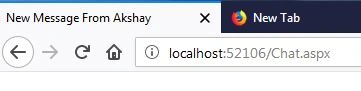
Here we are going to integrate Title bar alert system like Facebook, when we received the new message from online users it will display the notification on page title bar, here we have simply applied notification by using JavaScript,
- IntervalVal = setInterval("ShowTitleAlert('SignalR Chat App', '" + Notification + "')", 1000);
Here we are using “ShowTitleAlert” function in an interval which we are setting to 1000, so it will display the message alert in set interval periods. And it will break/clear the interval on focusing on the window event.
- // Show Title Alert
- function ShowTitleAlert(newMessageTitle, pageTitle) {
- if (document.title == pageTitle) {
- document.title = newMessageTitle;
- }
- else {
- document.title = pageTitle;
- }
- }
User can Clear the old chat history if he wants, for clearing chat history we added the clear chat icon on the top of the group chat box header, in private chat we can clear the chat by closing the chat box, but in group chat we cannot close the chat box, so here we have given the option of clearing chat.
Create a function for clearing chat in Hub Class,
- // Clear Chat History
- public void clearTimeout()
- {
- CurrentMessage.Clear();
- }
- // Clear Chat
- $('#btnClearChat').click(function () {
- var msg = $("#divChatWindow").html();
- if (msg.length > 0) {
- chatHub.server.clearTimeout();
- $('#divChatWindow').html('');
- }
- });
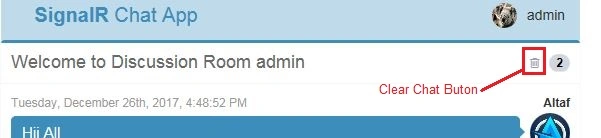
Now run the project and you will see the final output will look like below:

Conclusion
Here you will learn the integration of Private Chat with SignalR and how to create a title Bar alert using JavaScript. We have created function first in HUB class then calling these functions in Jquery functions, dynamically generated HTML Code and appended these HTML codes with existing HTML DIV and applying different CSS Styles each time while creating the ChatBox. So this is the Second part of “SignalR Chat App” tutorial, I will show you the integration of “Emoji” in chat for making more interactive chat applications in my next article, also we will integrate sending attachments through the chat sending image file in chat and downloading or displaying image in chat.
Hope this will help you and you will like this article. I have the attached project source code so you can download the source code for your reference. Thank you for reading...
Please give your valuable feedback in the comment section.
<<Click here for previous part Click here for Next part >>
muazam khanPosted Sep 27, 2022, 4:17 PM
Private box not showing ?
Paulo UmetsuPosted Mar 31, 2021, 5:31 AM
It works fine isolated however when I added it into my project only allows me to add two different users. If I added the third one, the app freezes until I close the browser of one of the chat.
Carlos AriasPosted Sep 4, 2020, 5:37 PM
For scroll down chatwindow use $("#divChatWindow").animate({ scrollTop: $('#divChatWindow').height() }, 3000); source: https://stackoverflow.com/questions/10503606/scroll-to-bottom-of-div-on-page-load-jquery/11551414#11551414
Carlos AriasPosted Sep 4, 2020, 5:35 PM
For clear txtMessage $(".emojionearea-editor").html(''); source example:https://www.semicolonworld.com/question/61073/clear-the-form-textarea-after-submit-emoji-picker-with-jquery
Bhavesh ShrivastavPosted May 28, 2020, 1:22 PM
Private chat not opening in small screen or mobile
Amit SharmaPosted Apr 24, 2020, 2:35 AM
When writing message and press enter than it is signout when clicking on send button message going
Minh Phú PLPosted Jun 26, 2019, 10:47 PM
Hello everyone
Ringgo SantosPosted Jun 23, 2019, 6:12 AM
Does it work on visual studio 2017 .net 4.7.2 mvc 5?
erum mirzaPosted Jun 9, 2019, 5:16 AM
Download failed :(
ishwar giriPosted May 30, 2019, 2:42 AM
Great sir ,, its working thnku so much
santhoshi niPosted Mar 20, 2019, 4:55 AM
I got it same ..but style are not applying is there any style sheets and js files i need to add extra..please reply sir
Pankaj NaikPosted Dec 1, 2018, 12:43 PM
Private chat windows and messages get deleted after page refresh
mesn mesnPosted Nov 6, 2018, 10:12 AM
Line 22: using (cmd = new SqlCommand(Query, con))Line 23: { Line 24: con.Open(); Line 25: sdr = cmd.ExecuteReader(); Line 26: if (sdr.HasRows)
arsal younaPosted Aug 9, 2018, 12:40 PM
Can anyone help me in identifying where the chat messages are being stored.
balagangadhar TPosted Aug 9, 2018, 6:28 AM
After i used your code it is working fine in debug mode. But when i publish the same it is not showing online users in the right hand side. Can you please help me in this case as it is very critical from me in my project
balagangadhar TPosted Aug 9, 2018, 6:27 AM
Dear altaf,
osama shabbirPosted Jun 1, 2018, 7:33 AM
Altaf Ansari you did not include the reference for jquery.slimscroll.min.js in chat.aspx file then how slimScroll functionality is working in your code?
osama shabbirPosted May 31, 2018, 10:21 AM
Great Work...!
MohdAzwan AbdullahPosted May 2, 2018, 11:23 PM
How to change this into ASP MVC ?.
Mohammad HamzaPosted May 1, 2018, 4:42 AM
When i tried to send message via private chat it automatically goes to login window why
Altaf AnsariPosted Apr 30, 2018, 8:26 AM
See the next article i have implemented the same thing
Aliya AngelPosted Apr 30, 2018, 8:23 AM
How we upload Image ??
shubhanshu bhardwajPosted Feb 21, 2018, 11:37 PM
Hello sir, can you please guide how to make more groups in this app?
shubhanshu bhardwajPosted Feb 18, 2018, 10:07 PM
Hello sir, Please guide me how to create more groups and add users with that .
shubhanshu bhardwajPosted Feb 16, 2018, 3:31 AM
Hello sir, thanks for your reply i am done with that
Altaf AnsariPosted Feb 13, 2018, 10:14 PM
Can you please share your code what you have done so i will suggest you in a better way..
shubhanshu bhardwajPosted Feb 13, 2018, 8:48 PM
I can save private messages in database but struggling in order to render them on click of a user window. so can you please guide me ...
shubhanshu bhardwajPosted Feb 13, 2018, 2:41 AM
Because i have integrated this code with in my website and it is working fine now i need some modification, so can you please tell me how to do that i have asked to you?
shubhanshu bhardwajPosted Feb 13, 2018, 2:39 AM
Is it possible to open only one private chat box with whom we want to do chat?
Kit ThomasPosted Feb 6, 2018, 2:59 PM
Part two is missing slimScroll (it's in part three though)
Altaf AnsariPosted Jan 31, 2018, 6:59 AM
There is nothing special with signal while publishing app on iis... simply follow the procedure of adding a .net application to iis.. you can get procedure online simply search on google
ehsan aliPosted Jan 31, 2018, 3:52 AM
How to publish it on iis please sir make a tutorial on iis publish
Altaf AnsariPosted Jan 29, 2018, 2:50 AM
In previous article i have explained database, you will get db code in previous article, so please refer previous article first..
ehsan aliPosted Jan 29, 2018, 2:08 AM
You did not provided proper code and db sir
Altaf AnsariPosted Jan 26, 2018, 10:30 PM
Http://www.c-sharpcorner.com/article/signalr-chat-app-with-asp-net-webform-and-bootstrap-part-three/
Altaf AnsariPosted Jan 26, 2018, 10:29 PM
Please refer next part and download source file.. And try the same :
Micheal JamesPosted Jan 26, 2018, 10:09 AM
Error Could not load type 'SignalRChat.Global'. C:\Users\admin\Downloads\SignalRChat_Two\SignalRChat\Global.asax 1
Micheal JamesPosted Jan 26, 2018, 10:06 AM
Am not able to run your code. Can you help me?