

Introduction
SignalR is a new library from Microsoft to develop real-time web applications. This library has been recently added to the Asp.Net Family. SignalR can work on .Net Framework 4.0 or later, it cannot work on the previous versions of .Net like v3.5 or prior. I have been learning about SignalR for quite some time now and I have thought to start a series of articles where I'll explain SignalR right from scratch. In this article, I explain how the SignalR library can be installed in your application. Please note the following points.
- By default, SignalR is not available with Visual Studio 2010. So if you are using VS 2010 and want to use SignalR in your application, then you will have to explicitly install it from the internet.
- For VS-2012, you can download and install the "Asp.Net 2012 fall Update" and can enjoy using SignalR for your application. Some links to download the updates are here.
- A. Asp.Net & Web Tools 2012.2: http://www.asp.net/vnext/overview/latest
- B. Asp.Net & Web Tools 2012.2 Release Notes:http://www.asp.net/whitepapers/aspnet-and-web-tools-20122-release-notes
- Installing SignalR is application-specific. For example, if you install it in Application A then you cannot use the library in Application B. You will need to install the library again for the new application.
- SignalR does not deal with database operations.
SignalR is lightweight and very simple to use. Let's try and understand how we can install it in our application. The following is the procedure for installing the SignalR package in your application.
Step 1. To install SignalR, you must first install the "Package Manager Console". You can download "Package Manager Console" from this link: "http://visualstudiogallery.msdn.microsoft.com/27077b70-9dad-4c64-adcf-c7cf6bc9970c"
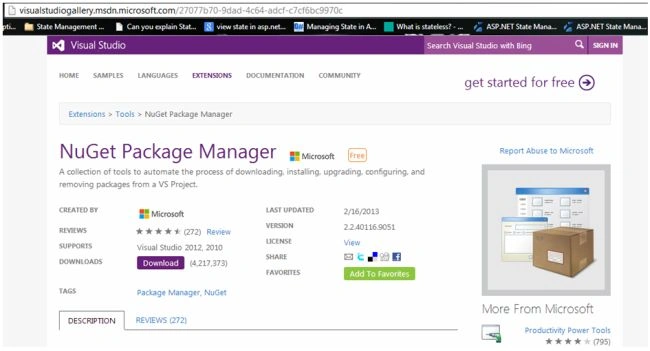
The site should look something like as shown in the image above. Now simply click on the "Download" button and install this "Package Manager Console".
Step 2. Once the installation is complete, create/open your web application and you should be able to view this link in the "Tools" tab as shown in the image below.
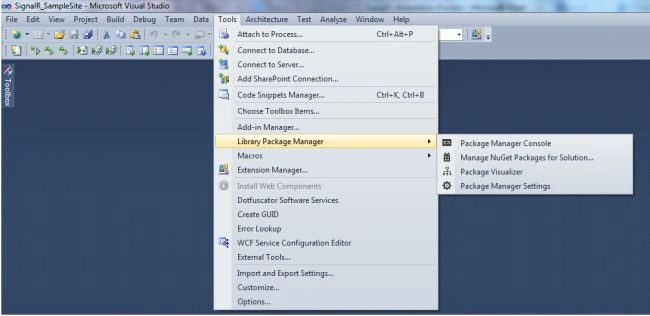
Step 3. Now click on the "Package Manager Console" option and you will see a window as shown in the image below.
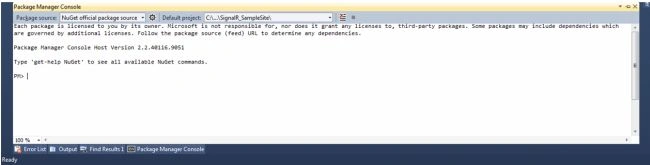
Step 4. Now to install "SignalR Package", you must simply copy the statement shown below and paste it into the package manager console area. Here's the link to copy the command as shown below in the image. http://nuget.org/packages/Microsoft.AspNet.SignalR/.
Please note that while installing the SignalR package you need to have an internet connection.

The final output should look something like this.
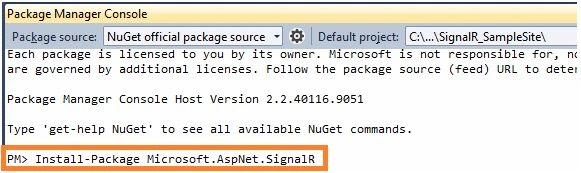
Step 5. After writing the content in the "Package Manager Console", press Enter.
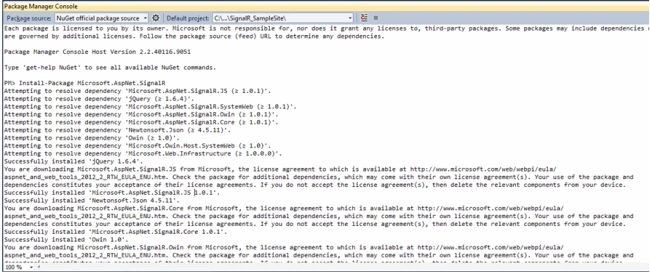
Step 6. All the necessary references and JQuery files are installed.
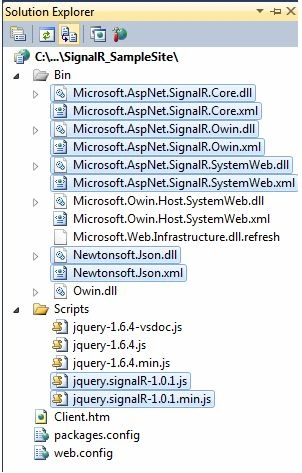
Step 7. After the SignalR package is installed, you also need to add "Json2" so that the request is parsed properly. Browsers like IE 8 or its previous version have problems parsing JSON or sending XHR Requests for long polling. Hence in the "Package Manager Console" add the following command and it will automatically install the Json2.js file and some references in your project

Here's the link for adding the command: http://nuget.org/packages/json2
That's it, You have successfully installed the SignalR package in your web application. Hope you liked this simple article on "SignalR (Part 1) - Installation Process". In the next article, we will try to learn about the transport techniques used by SignalR for transferring data. Thank you for reading this article!!!
Shivanand ArurPosted Apr 3, 2013, 8:20 AM
SignalR is quite new and is just a small part of the Asp.net family. I think we should have a new category for SignalR so that it becomes very easy for people to find out articles related to this in a better way.
Shivanand ArurPosted Apr 3, 2013, 8:16 AM
You are absolutely right sir, SignalR was not available in the first release. It was made available with the Asp.Net Fall 2012 Update Build Release. I have made the required changes in the article as well.
Mahesh ChandPosted Apr 2, 2013, 7:36 PM
I think SignalR does not come in VS 2012 first release but Updates have it.
Mahesh ChandPosted Apr 2, 2013, 6:50 PM
Great start Shivanand. Do you want us to add a new category on SignalR? OR should this be a part of ASP.NET or Web Development?