

SignalR Overview
Hello friends, today I am going to explain to you how to create a simple chat application using SignalR. Before looking at the code and understanding, let's try and understand what "SignalR" is.
SignalR is nothing but an Asynch Library which can be used to develop web applications and those applications provide some services which runs asynchronously. In other terms, SignalR is a library that can be used to create Real-Time applications. In general terms, I feel the term "Real-Time" means something or some event that actually happens with us at a particular time. Well, then "Real-Time" in terms of a web application would mean "An immediate response sent by the Server on the Client's request". There is a brief explanation of the term Real-Time here...
Alright now moving towards SignalR, earlier it was not a part of the ASP.Net Family, but now Microsoft has incorporated it into VS 2012 and the .Net Framework 4.5. You can download the package here "Microsoft Asp.Net Fall 2012 Update BUILD Release". Check out the Overview section before downloading the package.
SignalR is a library that is supported only by .Net Framework 4.0 and 4.5. So if you are one of those unlucky guys that want this library but are still working using .Net Framework 3.5, it's now high time to switch to the latest framework version.
How do SignalR works?
You might have heard about some more terms like "Long Polling" or "Forever Frames" or "Web Sockets" or "Server-Sent Events", if not then stay tuned for my next article on all these topics. Let me say those terms are "Concepts".
These concepts are used to create a persistent connection with the server and allow the client to interact with a Server. But there are a few drawbacks to each of these concepts. Well, I am not going to write about it in this article though. So SignalR is a new Concept / Technology which has overcome the problems associated with these concepts.
The most important funda behind using any of these concepts is to create a connection with the Server and do the required work. Well, SignalR it basically makes use of all of these concepts, but depending upon the Client. Now "Client" here is nothing else but the user's browser. So if a user sends a request and tries to connect to the Server, SignalR first checks what kind of support this Client gives; whether it supports "Web Sockets" or "Forever Frames" depending upon the support, SignalR makes a persistent connection between the Server and the Client.
This connection is not just for a few minutes or seconds. It remains persistent until the user shuts/closes the browser explicitly. Here a few other, very important entities are relevant; they are "Hubs" and "Clients". I won't explain them here, but definitely will add it to my next article on SignalR.
The following is an overview of the interaction between the Server and the Client.
SignalR Interactions
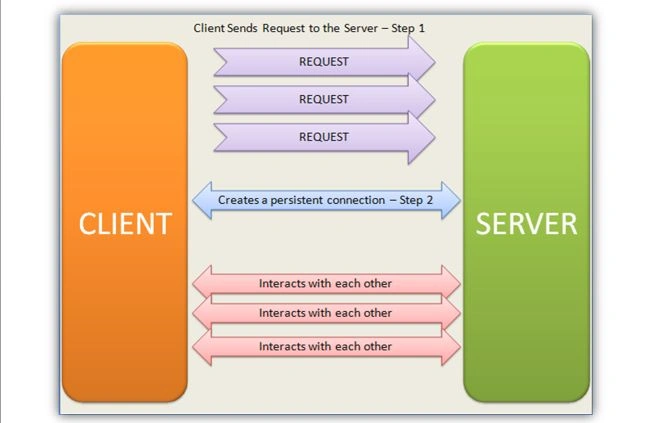
Explanation - In the image, the Client sends requests to the Server. The Server, using SignalR, checks if the Client supports any of the following data transportation techniques:
1. Web Sockets
2. Forever Frames
3. Server-Sent Events
4. Long Polling
If the Client supports any of these techniques, the Server creates a connection between them and starts a conversation (Request-Response action).
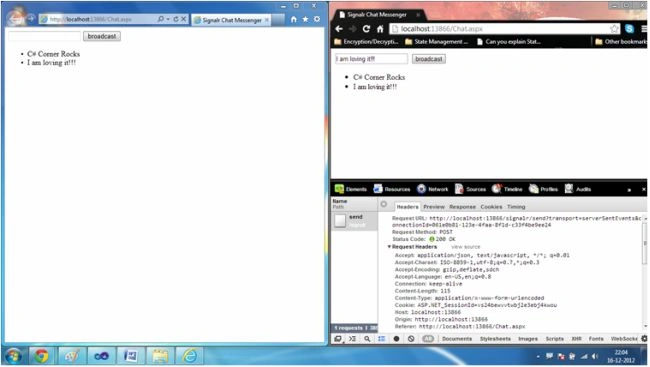
My Chat Application: Alright, by now you definitely might have had an overview of "SignalR". Now it's time to have a look at the Sample Chat Application. I have created this application using .Net Framework 4.0 and Visual Studio 2010. Since I don't have VS 2012 I cannot download the fall package.
But no need to worry, there is another way to add the SignalR Library to your application. The following are the steps for installing the library to your application.

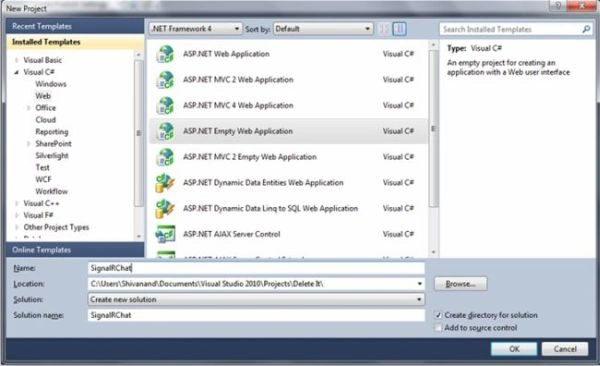
2. The "New Project" window opens up. In the left panel, select your preferred language and select "Web". I love C# and hence this project is created using C#. Just give your project a name and click on "Ok"
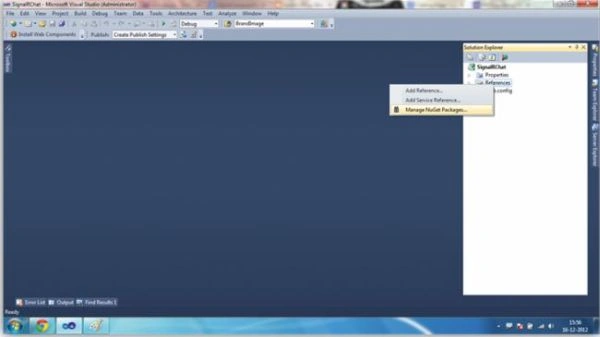
3. Now Visual Studio will load your project and your application will be created something as shown in the image below. Now it's time to add the SignalR package. So just right-click on the "References" folder and select "Manage NuGet Packages". If you do not have the "Nuget manager", then you can download the library using the Package Manager Console... Click here.
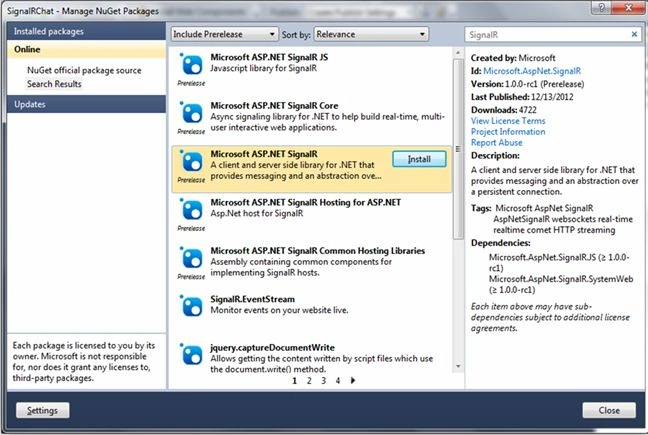
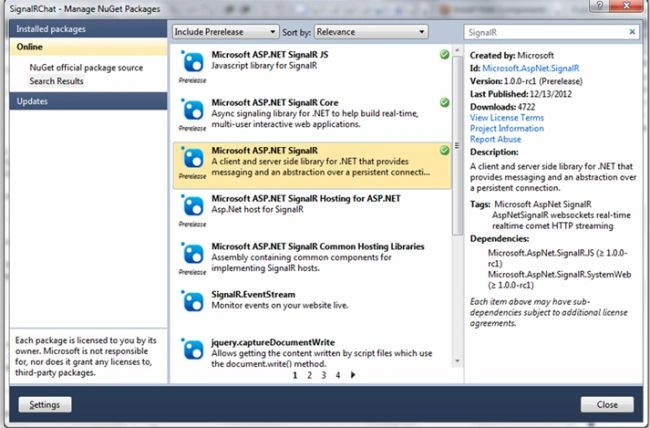
4. After clicking on the "Manage Nuget Packages", a window will popup, Check the image below – Select "Microsoft ASP.NET SignalR" and click on "Install".
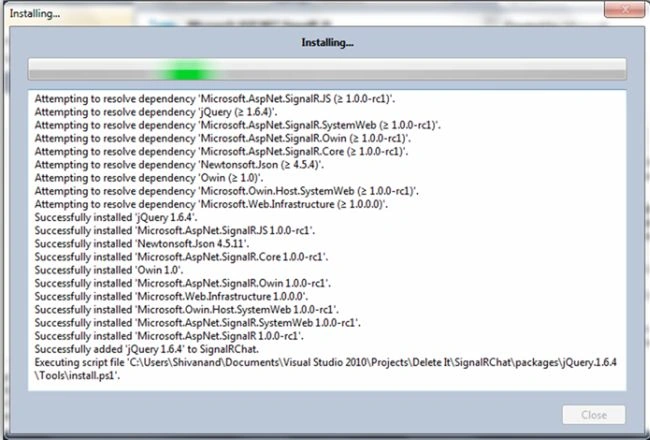
5. Now the installation begins and the window should look something like this:
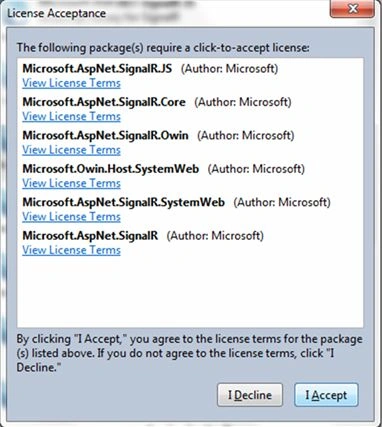
7. Once the installation is completed, the final window will look something like this:
 8. The following jQuery file will be installed in your application; see the "Solution Explorer" in the image below:
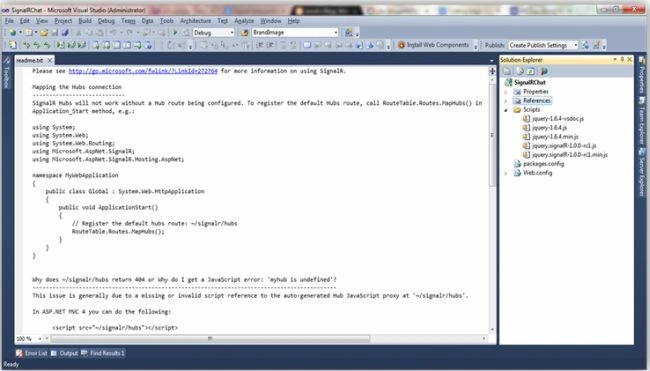
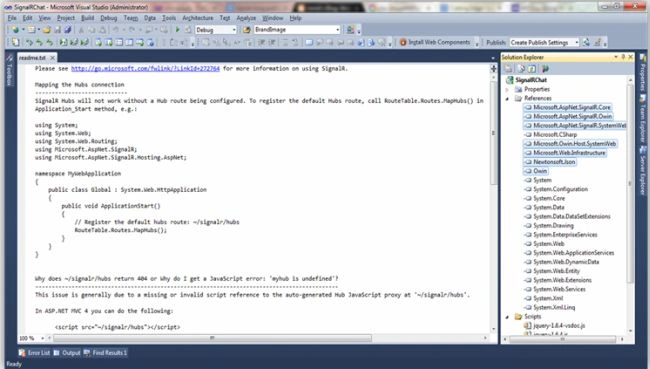
9. And the following references will be added. Check the Solution Explorer on the right side in the image below:

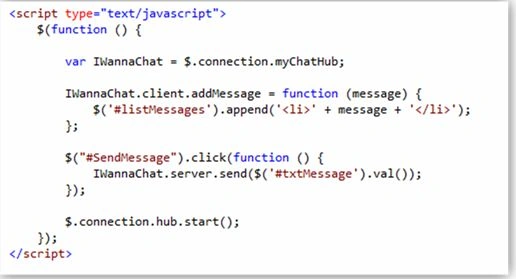
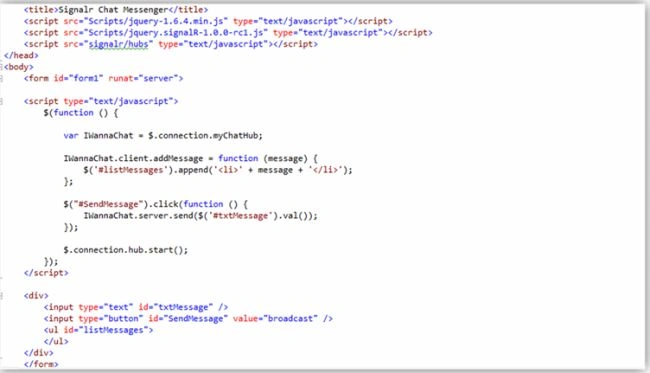
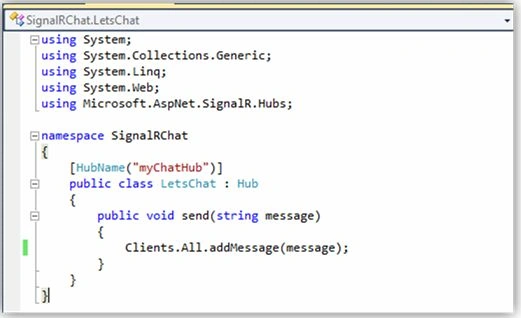
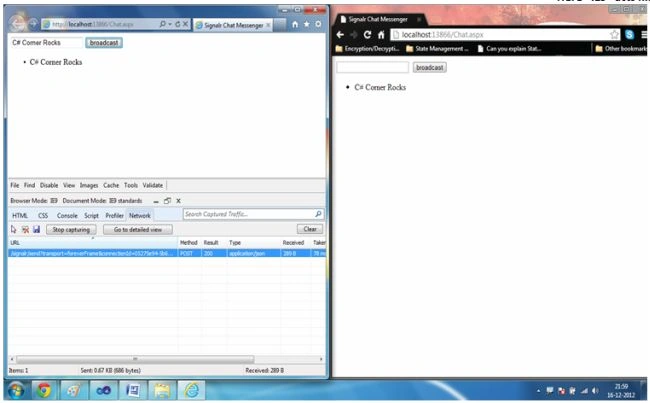
umar siddiquePosted Jun 13, 2022, 12:14 PM
How to send message to specific user?
Joe HillmerPosted May 24, 2021, 4:13 AM
Unfortunately, this example has problems. Works on one computer but when you try to connect to other computers, it hangs.
harry codePosted Feb 2, 2019, 1:10 AM
How to get all the names of users online?
Achintya JainPosted Oct 17, 2018, 2:07 AM
Can you share the post with simple example how websocket will work with SignalR?
Saba NoorPosted Aug 24, 2015, 10:53 PM
how do check those message whose type
prajaktaPosted Jun 8, 2015, 7:39 AM
Nice explanation. I am trying to store chat in database using Signalr in asp.net. But not getting any link similar to my problem.[i am not using MVC]. I got one link- http://www.asp.net/signalr/overview/performance/scaleout-with-sql-server It save data in sql server but creates its own table. also, chat is stored in encrypted(binary) format. whenever i wants to get chat history, it does not decrypt. Can you help me in this pls?
Gurbax BhangalPosted Sep 6, 2014, 2:02 AM
i have implement this on master page and according to the browser limitation we can not have 6 concurrent connection from the same domain.... and if i open tabs more than six then my pages are loading(waiting for available socket..) unless i closed the previous tabs. Then how can i overcome this issue.. if you have any solution then please provide me on [email protected]
Vitaliy RadovanskiPosted Aug 17, 2014, 7:38 PM
Nowadays there's a really powerfull tool to add a chat to any app you are developing - namely QuickBlox: http://quickblox.com/developers/Web_XMPP_Chat_Sample
Mahmoud AliPosted Apr 19, 2014, 7:29 AM
Its awesome Thanks for efforts , but can i make it chat with a windows form together at the same solution
MichaelPosted Mar 12, 2014, 8:10 AM
Hello. I have use your example in order to create chat for my website. hovewer i have a problem and I may need your help if you can please. If I type in textbox and press the enter instead of click the button it doesn't work. For this reason I use panel in order to set the button as defaultbutton. After couple messages when I use it with the Enter button it stops working. Does anyone know why?? thanks in advance!!
Yusuf KaratoprakPosted Jan 9, 2013, 11:17 AM
is there any advantages of signalR instead of using Comet : http://www.codeproject.com/Articles/74619/Ajax-Chat-Sample-via-Comet-Ajax
Nirav PatelPosted Dec 30, 2012, 11:32 PM
Can you please guide how to store chat conversation in sql server, Because I want to maintain the chat history
Nirav PatelPosted Dec 30, 2012, 11:32 PM
Can you please guide how to store chat conversation in sql server, Because I want to maintain the chat history
Shivanand ArurPosted Dec 28, 2012, 9:47 AM
One of my friends posted the Fall 2012 link on my Facebook account.. In that there was a brief description about SignalR... So just checked it out and I started liking it... Will post few more articles on SignalR soon, buut don't get enough time... Anyways, thanks... :D
Terrance CPosted Dec 28, 2012, 9:20 AM
Thanks, nice article. How did you come across learning about SignalR?
Shivanand ArurPosted Dec 28, 2012, 3:56 AM
Thank u Ashish.
Ashish TomarPosted Dec 28, 2012, 3:55 AM
Nice Article !!
Shivanand ArurPosted Dec 26, 2012, 2:29 PM
Thanks pradeep
Pradeep DeokarPosted Dec 25, 2012, 3:03 AM
Thanks , Nice Article
Shivanand ArurPosted Dec 24, 2012, 12:05 PM
Thanks Manoj!!! :)
manoj prabakaranPosted Dec 24, 2012, 12:37 AM
nice article
Shivanand ArurPosted Dec 19, 2012, 5:30 AM
Thank u Dinesh Sir... :)
Dinesh BeniwalPosted Dec 19, 2012, 5:19 AM
Great Work.
Shivanand ArurPosted Dec 19, 2012, 5:19 AM
Thank u Deepak. :)
Deepak MiddhaPosted Dec 19, 2012, 5:05 AM
very nice explanation ....
Shivanand ArurPosted Dec 19, 2012, 2:51 AM
Thank u Vithal... :)
Vithal WadjePosted Dec 19, 2012, 12:46 AM
super..........
Shivanand ArurPosted Dec 18, 2012, 1:19 PM
Thank U very much Mahesh Sir... Such comments makes us move. :) Yes as everybody said this is a startup... I am working on another article on SignalR. Will try to post it soon. But honestly I feel that I'm in love with SignalR... It is simply amazing... Thank U all once again. :)
Mahesh ChandPosted Dec 18, 2012, 12:53 PM
I agree with other comments. Very good start. I like how you explain what SignalR is in the beginning. People get the idea with that.
Shivanand ArurPosted Dec 18, 2012, 10:42 AM
Thank U Vishnu...
Vishnujeet KumarPosted Dec 18, 2012, 10:01 AM
awesome startup : shiva..
Shivanand ArurPosted Dec 18, 2012, 2:00 AM
Sure... Will let U know... Thanks!!!
Kamal RawatPosted Dec 18, 2012, 1:42 AM
@Shivanand: If i could be of any help in SignalR please let me know.
Shivanand ArurPosted Dec 18, 2012, 12:39 AM
Thank you venkat... Even I m working on the chat application, will try to make it more real and will post it soon.. Thanks once again... :)
Venkatesh KumarPosted Dec 18, 2012, 12:35 AM
I thought to update SingalR chat app... it's good start Shivanand Arur...
Shivanand ArurPosted Dec 18, 2012, 12:34 AM
Yes kamal Sir, I am going to write one more article on SignalR soon and will attach the updated application with it... Thank you... :)
Kamal RawatPosted Dec 18, 2012, 12:01 AM
And one suggestion if you can use other methods as well in this.. 1. reconnect 2. disconnect Would be appreciable..
Kamal RawatPosted Dec 18, 2012, 12:00 AM
Nice one...Good startup..