

It's simple but effective CRM; Windows applications using a Microsoft Access database.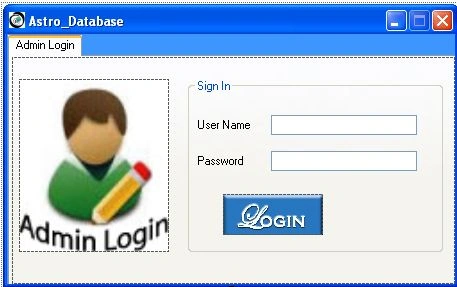
1. First of all design the form like this then use code as in the following:
using System;
using System.Collections.Generic;
using System.ComponentModel;
using System.Data;
using System.Drawing;
using System.Linq;
using System.Text;
using System.Windows.Forms;
namespace Combobox_related_datagridview
{
public partial class Form2 : Form
{
public Form2()
{
InitializeComponent();
}
private void groupBox2_Enter(object sender, EventArgs e)
{
}
private void pictureBox4_Click(object sender, EventArgs e)
{
if (textBox3.Text == "Astro" && textBox4.Text == "Acoglobal")
{
Form3 f3 = new Form3();
f3.Show();
this.Hide();
}
else
{
errorProvider1.SetError(textBox3, "error");
errorProvider1.SetError(textBox4, "error");
label5.Text = "Login Details Wrong";
}
}
private void textBox4_TextChanged(object sender, EventArgs e)
{
}
}
}
- Now design the second form like it.
- And the code is like the following:

using System;
using System.Collections.Generic;
using System.ComponentModel;
using System.Data;
using System.Drawing;
using System.Linq;
using System.Text;
using System.Windows.Forms;
namespace Combobox_related_datagridview
{
public partial class Form3 : Form
{
public Form3()
{
InitializeComponent();
}
private void progressBar1_Click(object sender, EventArgs e)
{
}
private void Form3_Load(object sender, EventArgs e)
{
progressBar1.Maximum = 60;
}
private void timer1_Tick(object sender, EventArgs e)
{
fn_prbar_();
}
public void fn_prbar_()
{
progressBar1.Increment(1);
if (progressBar1.Value == progressBar1.Maximum)
{
timer1.Stop();
MessageBox.Show("Database has been connected");
timer1.Stop();
this.Hide();
Form1 f1 = new Form1();
f1.Show();
}
}
}
}
- Now the final one.

using System;
using System.Collections.Generic;
using System.ComponentModel;
using System.Data;
using System.Drawing;
using System.Linq;
using System.Text;
using System.Windows.Forms;
using System.Data.OleDb;
using System.Collections.Specialized;
namespace Combobox_related_datagridview
{
public partial class Form1 : Form
{
string ConnectionString = System.Configuration.ConfigurationSettings.AppSettings["Astro"];
OleDbCommand com;
OleDbDataAdapter oledbda;
DataSet ds;
string str;
string str2;
public Form1()
{
InitializeComponent();
}
private void Form1_Load(object sender, EventArgs e)
{
comboBox1.Hide();
comboBox2.Hide();
dataGridView1.Hide();
textBox9.Hide();
pictureBox5.Hide();
}
private void comboBox1_SelectedIndexChanged(object sender, EventArgs e)
{
OleDbConnection con = new OleDbConnection(ConnectionString);
con.Open();
str = "select * from Sheet1 where Region='" + comboBox1.Text + "'";
com = new OleDbCommand(str, con);
oledbda = new OleDbDataAdapter(com);
ds = new DataSet();
oledbda.Fill(ds, "Sheet1");
dataGridView1.DataMember = "Sheet1";
dataGridView1.DataSource = ds;
con.Close();
}
private void label1_Click(object sender, EventArgs e)
{
}
private void comboBox2_SelectedIndexChanged(object sender, EventArgs e)
{
OleDbConnection con = new OleDbConnection(ConnectionString);
con.Open();
str2 = "select * from Sheet1 where Courses='" + comboBox2.Text + "'";
com = new OleDbCommand(str2, con);
oledbda = new OleDbDataAdapter(com);
ds = new DataSet();
oledbda.Fill(ds, "Sheet1");
dataGridView1.DataMember = "Sheet1";
dataGridView1.DataSource = ds;
con.Close();
}
private void button1_Click(object sender, EventArgs e)
{
}
private void dataGridView1_CellContentClick(object sender, DataGridViewCellEventArgs e)
{
if (e.RowIndex >= 0)
{
DataGridViewRow row = this.dataGridView1.Rows[e.RowIndex];
textBox1.Text = row.Cells["Participants Name"].Value.ToString();
textBox2.Text = row.Cells["Organization"].Value.ToString();
textBox3.Text = row.Cells["Contact No"].Value.ToString();
textBox4.Text = row.Cells["Email ID"].Value.ToString();
textBox5.Text = row.Cells["Courses"].Value.ToString();
textBox6.Text = row.Cells["Region"].Value.ToString();
textBox7.Text = row.Cells["ID"].Value.ToString();
}
}
private void button2_Click(object sender, EventArgs e)
{
}
private void pictureBox1_Click(object sender, EventArgs e)
{
}
private void textBox3_TextChanged(object sender, EventArgs e)
{
}
private void textBox2_TextChanged(object sender, EventArgs e)
{
}
private void label6_Click(object sender, EventArgs e)
{
}
private void textBox5_TextChanged(object sender, EventArgs e)
{
}
private void label9_Click(object sender, EventArgs e)
{
}
private void label8_Click(object sender, EventArgs e)
{
}
private void pictureBox3_Click(object sender, EventArgs e)
{
System.Diagnostics.Process.Start("D:\\Dhiraj\\SQL Alumni data\\Combobox related datagridview\\Astrowix CRM\\Reminder_APP.exe");
}
private void pictureBox1_Click_1(object sender, EventArgs e)
{
MessageBox.Show("Thank You For Using Astrowix Database..");
this.Hide();
}
private void pictureBox4_Click(object sender, EventArgs e)
{
}
private void label5_Click(object sender, EventArgs e)
{
}
private void comboBox3_SelectedIndexChanged(object sender, EventArgs e)
{
//comboBox3.Text = "Select your ID";
if (comboBox3.SelectedIndex == 0 || comboBox3.SelectedIndex == 1 || comboBox3.SelectedIndex == 2 || comboBox3.SelectedIndex == 3)
{
label11.Text = "Welcome " + comboBox3.Text + " Start Calling...";
comboBox1.Show();
comboBox2.Show();
dataGridView1.Show();
comboBox3.Hide();
pictureBox5.Show();
textBox9.Show();
OleDbConnection con = new OleDbConnection(ConnectionString);
con.Open();
str = "select * from Sheet1";
com = new OleDbCommand(str, con);
comboBox1.Text = "Select any Region";
comboBox1.Items.Add("Select any Region");
comboBox1.Items.Add("Delhi");
comboBox1.Items.Add("Mumbai");
comboBox1.Items.Add("Bangalore");
comboBox1.Items.Add("Chandigarh");
comboBox1.Items.Add("Hyderabad");
comboBox1.Items.Add("Bhubaneshwar");
comboBox1.Items.Add("Chennai");
comboBox1.Items.Add("Cochin");
comboBox1.Items.Add("Gurgaon");
comboBox1.Items.Add("Guwahati");
comboBox1.Items.Add("Indore");
comboBox1.Items.Add("Kolkata");
comboBox1.Items.Add("Noida");
comboBox1.Items.Add("Pune");
comboBox1.Items.Add("Trivandrum");
comboBox2.Text = "Select any Course";
comboBox2.Items.Add("Select any Course");
comboBox2.Items.Add("PMP");
comboBox2.Items.Add("MSP");
comboBox2.Items.Add("ITIL");
str2 = "select * from Sheet1";
com = new OleDbCommand(str2, con);
OleDbDataReader reader = com.ExecuteReader();
// while (reader.Read())
// {
// comboBox1.Items.Add(reader["Region"].ToString());
// comboBox2.Items.Add(reader["Courses"].ToString());
// }
//
con.Close();
reader.Close();
}
else
{
label11.Text = "Please Select your ID";
}
}
private void button1_Click_1(object sender, EventArgs e)
{
}
}
}
David WoodPosted Jun 16, 2022, 8:32 AM
This is so incomplete, that I wasted my time downloading it.
Altaf AnsariPosted Feb 26, 2015, 1:14 AM
The 'Microsoft.Jet.OLEDB.4.0' provider is not registered on the local machine.
jack the bestPosted Feb 12, 2015, 9:51 PM
hi can you help me?how add you category for the products and on product frm show you a combox with all category?