

Introduction
We always face online registration form, application form, feedback form, query
form and even if we want to create new email id we must face form to feed our
information or else. But for the beginners of ASP.Net, it is very complex task
to accomplish. Because when I was beginner in the same, I faced lots of problem
like database configuration settings on local host and even on shared host. But
in this article I will explain the simplest way to get connected with MS SQL
Server Database, and also to fetch all information on web form. In different
books, web articles there are couples of way discussed to accomplish but here is
the simplest one.
Perquisites
There is something listed which I expect from you
- You should know, how to open and create simple web pages and tables
- You should know, how to create MS SQL Server Databases
- You should have Visual Studio 2005/2008 or Visual Web Developer 2005/2008 installed and running ok.
Step 1:
Create a web page and place the controls as listed below:
| Control Name | Property 1 | Property 2 | Property 3 |
| TextBox1 | Id =fname | ||
| TextBox2 | Id =lname | ||
| TextBox3 | Id =dob | ||
| TextBox4 | Id =gender | ||
| TextBox5 | Id =fathername | ||
| TextBox6 | Id =contact | ||
| TextBox7 | Id =address | ||
| Button1 | Id =submit | Text=Submit | |
| Label1 | Id =conform | Text= Submitted, thank you ! | Visible=False |
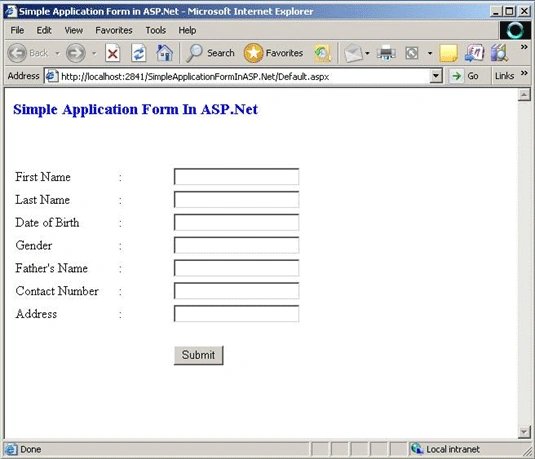
Step 2:
In this step we will create the database in MS SQL Server as per the information
given below:
Database Name = onlineapplicationform.mdf
Table Nem = onlineapplication
| Columns Name | Data Types | Allow Nulls | Property 3 |
| id | int | Not Checked | |
| fname | varchar(50) | Checked | |
| lname | varchar(50) | Checked | |
| dob | varchar(50) | Checked | |
| gender | char(10) | Checked | |
| fathername | varchar(50) | Checked | |
| contact | int | Checked | only 6 digits |
| address | varchar(100) | Checked |
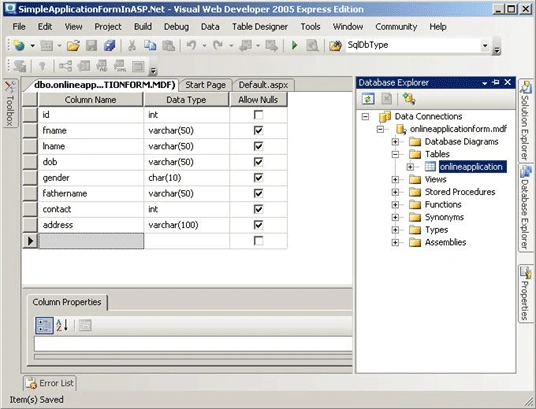
Step 3:
In this step we will discuss, how to show that data available in database on web
form. For this, we simply drag the table named 'onlineapplication' from Database
Explorer and drop it on the web form. Now it will automatically establish the
connect strings in web.config file. But we don't have any data in database to
show it on form so simply it will show you 'There are no data records to
display' message on the form. Now take a step to code behind to connect it to
database and then after we can insert our data in table and view it on form that
what we have given. Here is the screenshots of working process.
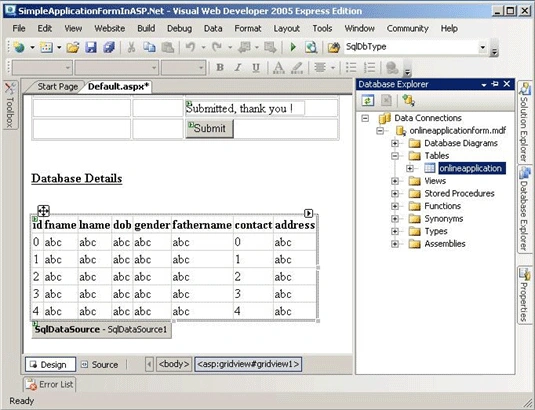
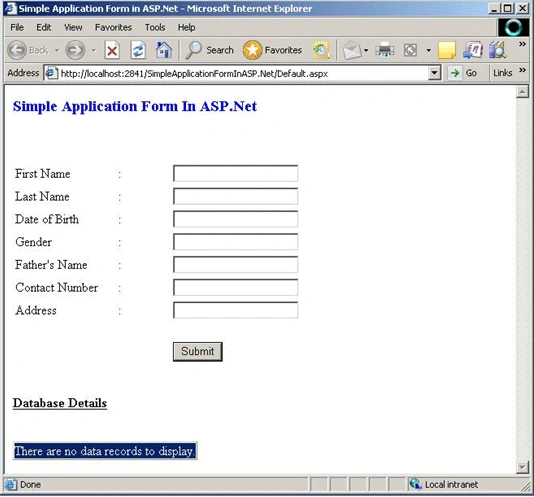
Step 4:
In this step we will discuss about the coding.
In Default.aspx Page
<%@
Page Language="C#"
AutoEventWireup="true"
CodeFile="Default.aspx.cs"
Inherits="Default2"
%>
<!DOCTYPE html PUBLIC "-//W3C//DTD XHTML 1.0 Transitional//EN" "http://www.w3.org/TR/xhtml1/DTD/xhtml1-transitional.dtd">
<html
xmlns="http://www.w3.org/1999/xhtml"
>
<head
runat="server">
<title>Simple
Application Form in ASP.Net</title>
</head>
<body>
<form
id="form1"
runat="server">
<div>
<div>
<strong><span
style="font-size: 14pt;
color: #0000ff">Simple Application Form In ASP.Net</span></strong><br
/>
<br
/>
<br
/>
<br
/>
<table>
<tr>
<td
style="width: 123px">
First Name</td>
<td
style="width: 63px">
:</td>
<td
style="width: 193px">
<asp:TextBox
ID="fname"
runat="server"></asp:TextBox></td>
</tr>
<tr>
<td
style="width: 123px">
Last Name</td>
<td
style="width: 63px">
:</td>
<td
style="width: 193px">
<asp:TextBox
ID="lname"
runat="server"></asp:TextBox></td>
</tr>
<tr>
<td
style="width: 123px">
Date of Birth</td>
<td
style="width: 63px">
:</td>
<td
style="width: 193px">
<asp:TextBox
ID="dob"
runat="server"></asp:TextBox></td>
</tr>
<tr>
<td
style="width: 123px">
Gender</td>
<td
style="width: 63px">
:</td>
<td
style="width: 193px">
<asp:TextBox
ID="gender"
runat="server"></asp:TextBox></td>
</tr>
<tr>
<td
style="width: 123px">
Father's Name</td>
<td
style="width: 63px">
:</td>
<td
style="width: 193px">
<asp:TextBox
ID="fathername"
runat="server"></asp:TextBox></td>
</tr>
<tr>
<td
style="width: 123px">
Contact Number</td>
<td
style="width: 63px">
:</td>
<td
style="width: 193px">
<asp:TextBox
ID="contact"
runat="server"></asp:TextBox></td>
</tr>
<tr>
<td
style="width: 123px">
Address</td>
<td
style="width: 63px">
:</td>
<td
style="width: 193px">
<asp:TextBox
ID="address"
runat="server"></asp:TextBox></td>
</tr>
<tr>
<td
style="width: 123px;
height: 21px">
</td>
<td
style="width: 63px;
height: 21px">
</td>
<td
style="width: 193px;
height: 21px">
<asp:Label
ID="conform"
runat="server"
Text="Submitted, thank
you !" Visible="False"
Width="152px"></asp:Label></td>
</tr>
<tr>
<td
style="width: 123px">
</td>
<td
style="width: 63px;
text-align: center">
</td>
<td
style="width: 193px">
<asp:Button
ID="submit"
runat="server"
Text="Submit"
OnClick="submit_Click"
/></td>
</tr>
</table>
</div>
<br
/>
<br
/>
<strong><span
style="text-decoration:
underline">Database Details</span></strong><br
/>
<br
/>
<asp:GridView
ID="GridView1"
runat="server"
AutoGenerateColumns="False"
DataSourceID="SqlDataSource1"
EmptyDataText="There
are no data records to display.">
<Columns>
<asp:BoundField
DataField="id"
HeaderText="id"
SortExpression="id"
/>
<asp:BoundField
DataField="fname"
HeaderText="fname"
SortExpression="fname"
/>
<asp:BoundField
DataField="lname"
HeaderText="lname"
SortExpression="lname"
/>
<asp:BoundField
DataField="dob"
HeaderText="dob"
SortExpression="dob"
/>
<asp:BoundField
DataField="gender"
HeaderText="gender"
SortExpression="gender"
/>
<asp:BoundField
DataField="fathername"
HeaderText="fathername"
SortExpression="fathername"
/>
<asp:BoundField
DataField="contact"
HeaderText="contact"
SortExpression="contact"
/>
<asp:BoundField
DataField="address"
HeaderText="address"
SortExpression="address"
/>
</Columns>
</asp:GridView>
<asp:SqlDataSource
ID="SqlDataSource1"
runat="server"
ConnectionString="<%$
ConnectionStrings:onlineapplicationformConnectionString1
%>"
ProviderName="<%$
ConnectionStrings:onlineapplicationformConnectionString1.ProviderName
%>"
SelectCommand="SELECT
[id], [fname], [lname], [dob], [gender], [fathername], [contact], [address] FROM
[onlineapplication]">
</asp:SqlDataSource>
Satyajit DasPosted May 27, 2012, 9:29 AM
Hi. I am using this form and exactly your codes. I wanted to use edit, update and delete option in the grid view. Can you please help me with the source code? Its urgent sir
walid lamartiPosted Apr 27, 2011, 1:31 AM
can i know your email address so i can send you my script if you have time you can check it thank you
walid lamartiPosted Apr 27, 2011, 12:47 AM
throw new Exception(msg); error i modify code and i create database ms sql but it's stop here
gowri sankarPosted Jan 13, 2011, 6:56 AM
its useful for me
Satyapriya NayakPosted Jun 7, 2010, 7:58 AM
Hi Abhimanyu, Good work for beginners. Keep on posting.... Cheers!!!