

In this article we will see how to implement a filter functionality using AngularJS. If you are a beginner to AngularJS then just go through these links:
modules, directives, data binding.
Step 1
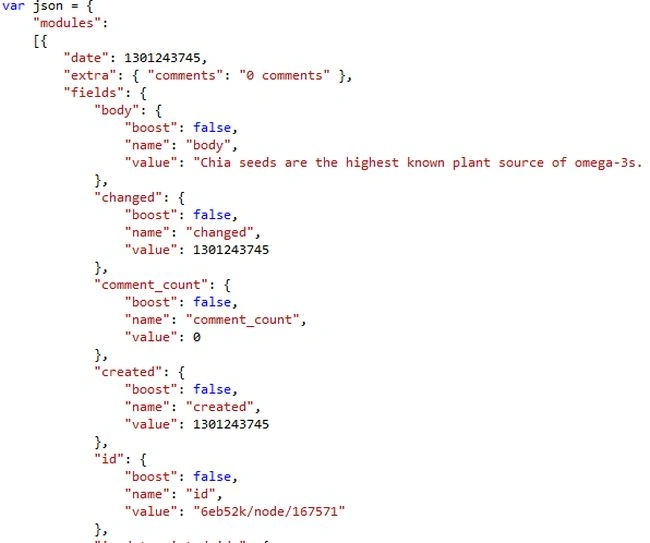
In the controller add JavaScript logic for model data. In this example we hardcoded the JSON data as specified below.
Step 2
As parts of the controller definition, just add this data as a $scope module:

Step 3
In the view page, just start with the input control to enter the search keyword, and assign the search text to AngularJS model “q”.

Step 4
Before we show the search results, we need to render some data using the “ng-repeat “ directive and bind the model values, like id and body text as part of the data view.

Step 5
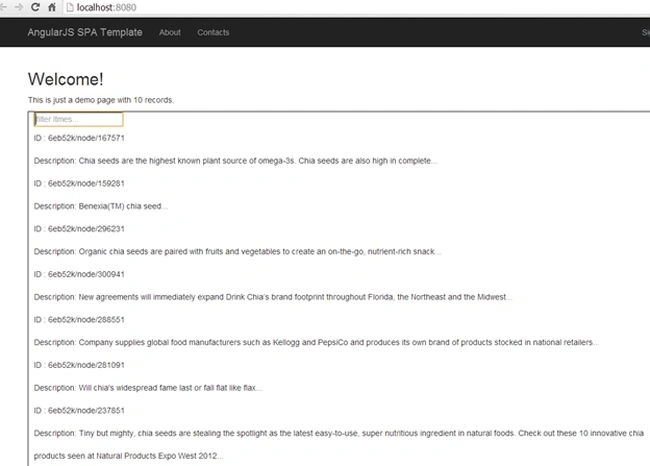
We will just check to render the output image as expected; the controller data will render in the page.
Step 6
Just type some text to filter:
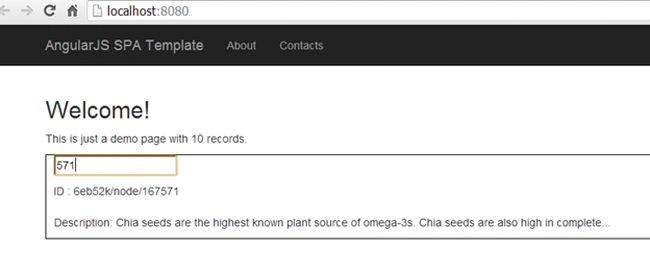
This will filter automatically because AngularJS will do the filter as we mentioned “filter:q” as part of “ng-repeat”.
Summary
An AngularJS “filter” selects a subset of items from an array and returns it as a new array. It’s really easy to add filter functionality.
In the controller add JavaScript logic for model data. In this example we hardcoded the JSON data as specified below.
Step 2
As parts of the controller definition, just add this data as a $scope module:
Step 3
In the view page, just start with the input control to enter the search keyword, and assign the search text to AngularJS model “q”.
Step 4
Before we show the search results, we need to render some data using the “ng-repeat “ directive and bind the model values, like id and body text as part of the data view.
Step 5
We will just check to render the output image as expected; the controller data will render in the page.
Step 6
Just type some text to filter:
This will filter automatically because AngularJS will do the filter as we mentioned “filter:q” as part of “ng-repeat”.
Summary
An AngularJS “filter” selects a subset of items from an array and returns it as a new array. It’s really easy to add filter functionality.
Join the conversation! Your thoughts help the community grow.