

First of all I will describe hide and show methods and then will create the demonstration page.
Introduction
The .hide() and .show() methods, without any parameters can be like smart shorthand methods for .css('display', 'string'), where 'string' is the appropriate display value. The effect, as might be expected, is that the matched set of elements will be immediately hidden or shown without animation.
The .hide() method sets the inline style attribute of the matched set of elements to display: none. Even smart part here is that it remembers the value of the display property typically blocks or inline before it was changed to none.
And the .show() method restores display properties of the matched set of elements to whatever they initially were before "display: none" was applied.
Setup the Demonstration Page
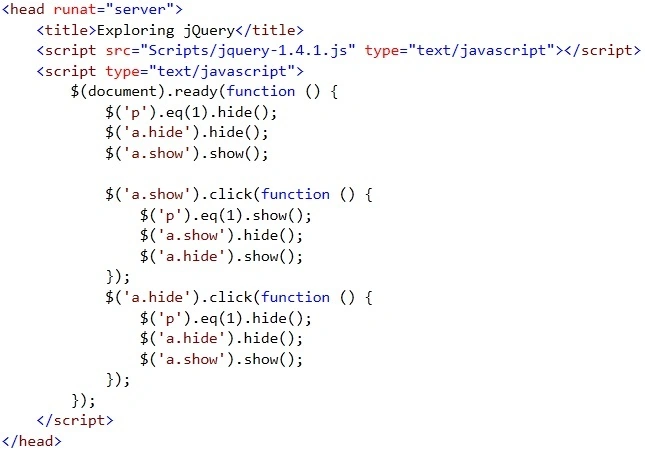
Let's create the demonstration page; find the code below. Using jQuery I will hide the second <p>.
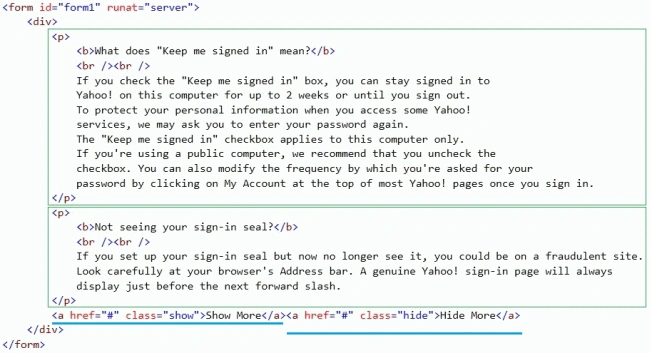
In the above image you can see, there are two <p> tags. I will hide and show the second paragraph in this demonstration. I am also using two <a> tags, first one to show the <p> and the second one to hide the <p> and <a> tags has show and hide class respectively and this will be used to identify which one is being clicked.
Lajapathy ArunPosted Apr 11, 2012, 1:02 PM
I am eager to know what is the tool you are using to create GIf image.