

Language-INtegrated Query (LINQ) is a Microsoft .NET Framework component that adds native data querying capabilities to .NET languages. In other words LINQ has the power of querying on any source of data (Collection of objects, database tables or XML Files). We can easily retrieve data from any object that implements the IEnumerable<T> interface and any provider that implements the IQueryable<T> interface.
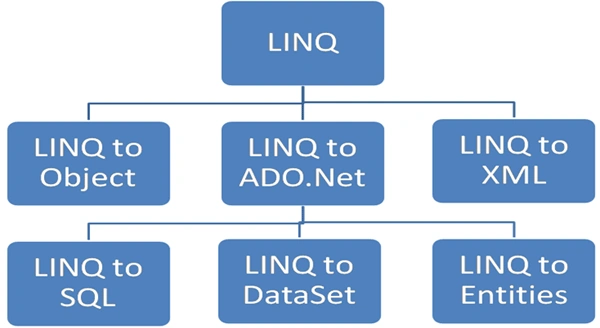
Microsoft basically divides LINQ into the following three areas:
- LINQ to Object : Queries performed against in-memory data
- LINQ to ADO.Net
- LINQ to SQL (formerly DLinq) : Queries performed against the relation database; only Microsoft SQL Server is supported.
- LINQ to DataSet : Supports queries by using ADO.NET data sets and data tables.
- LINQ to Entities : Microsoft ORM solution
- LINQ to XML (formerly XLinq) : Queries performed against the XML source.
LINQ to SQL
LINQ to SQL translates our actions to SQL and submits the changes to the database. Here we will perform Select, Insert, Update and Delete operations on a COURSE table.
Step 1: Create a COURSE Table in the database
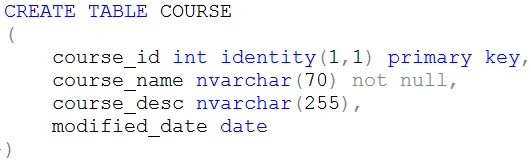
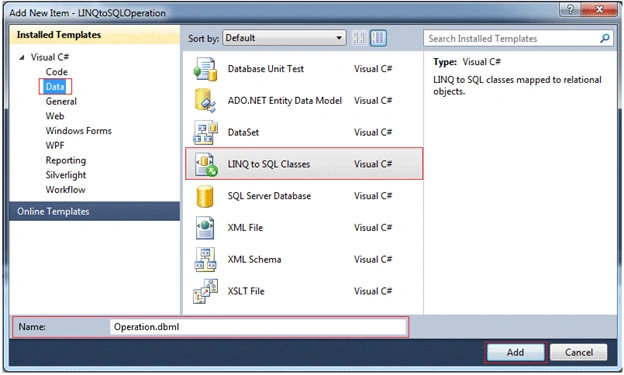
Step 2: Create a ContextData file using the Object Relational Designer:
Create a new item, select the LINQ to SQL classes (as shown in the following figure) and name it Operation.dbml.
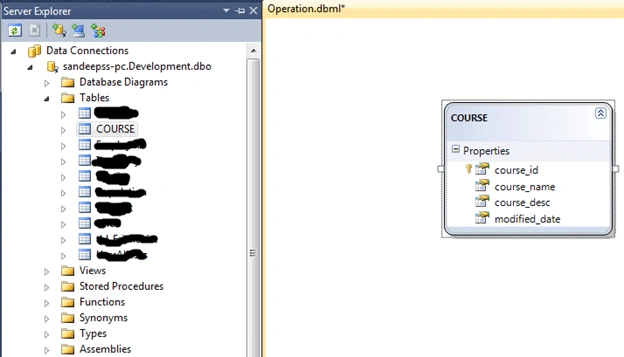
After clicking the Add button the ContextData file is created. Now we should drag all the tables onto the left-hand side of the designer and save (as shown in the following figure). This will create all the mappings and settings for each table and their entities.
For .dbml files the database connection string is defined in the web.config file as:
- <connectionStrings>
- <add name="DevelopmentConnectionString" connectionString="Data Source=sandeepss-PC;Initial Catalog=Development;User ID=sa;
- Password=*******" providerName="System.Data.SqlClient" />
- </connectionStrings>
The SELECT Operation
- private void GetCourses()
- {
- //create DataContext object
- OperationDataContext OdContext = new OperationDataContext();
- var courseTable = from course in OdContext.GetTable<COURSE>() select course;
- //grdCourse is gridview id
- grdCourse.DataSource = courseTable;
- grdCourse.DataBind();
- }
- private void AddNewCourse()
- {
- //Data maping object to our database
- OperationDataContext OdContext = new OperationDataContext();
- COURSE objCourse = new COURSE();
- objCourse.course_name = "B.Tech";
- objCourse.course_desc = "Bachelor Of Technology";
- objCourse.modified_date = DateTime.Now;
- //Adds an entity in a pending insert state to this System.Data.Linq.Table<TEntity>and parameter is the entity which to be added
- OdContext.COURSEs.InsertOnSubmit(objCourse);
- // executes the appropriate commands to implement the changes to the database
- OdContext.SubmitChanges();
- }
- private void UpdateCourse()
- {
- OperationDataContext OdContext = new OperationDataContext();
- //Get Single course which need to update
- COURSE objCourse = OdContext.COURSEs.Single(course => course.course_name == "B.Tech");
- //Field which will be update
- objCourse.course_desc = "Bachelor of Technology";
- // executes the appropriate commands to implement the changes to the database
- OdContext.SubmitChanges();
- }
- private void DeleteCourse()
- {
- OperationDataContext OdContext = new OperationDataContext();
- //Get Single course which need to Delete
- COURSE objCourse = OdContext.COURSEs.Single(course => course.course_name == "B.Tech");
- //Puts an entity from this table into a pending delete state and parameter is the entity which to be deleted.
- OdContext.COURSEs.DeleteOnSubmit(objCourse);
- // executes the appropriate commands to implement the changes to the database
- OdContext.SubmitChanges();
- }
To perform select, insert, update and delete operations we create a table and create a data context class; in other words a dbml file. In this file designer view we drag and drop the COURSE table from the Server Explorer. This data context class is an Object and table mapping and we perform the operation on the object and database updated according to the action using the submitChanges() method.
shekhar dhumalPosted Jun 18, 2018, 2:03 AM
How to bind the data in table using linq query in mvc 5
Lulitha GihanPosted Nov 13, 2016, 9:48 AM
Thankz singh ,, supperb, can you post combobox data loading sample please,,
Upendra Pratap ShahiPosted Apr 29, 2016, 1:49 PM
nice one...
Deepak SomvanshiPosted May 19, 2015, 8:46 AM
v good
Sagar ShindePosted Sep 17, 2014, 10:05 AM
Awesome Article................
prasanth crajanPosted Aug 4, 2014, 12:45 PM
Awesome to my Linq learning
Laxmikanta TripathyPosted Jun 30, 2014, 7:19 AM
It is very helpful for beginner thanks.
Sandeep Singh ShekhawatPosted May 2, 2014, 3:14 AM
Welcome dear tej pratap singh
tej pratap singhPosted May 1, 2014, 3:47 AM
THANKS
Niraj TiwariPosted Apr 24, 2014, 11:41 AM
We are going to write a code for Insert -Update -Delete in asp.net,c# and sql server using Linq. Firstly we have one question – What is Linq to sql ? Linq to sql is an open ORM implementation that ships on the .net framwork “ORCAS” realease and which allow you to model a relational database using .net classes. Linq to sql fully supports transaction, view, stored procedure, join.It’s provides an easy way to integrated data validation and business logic rules into your data model. You Can also Download this demo Codefor this execution : -Download demo code herehttp://nirajtiwari.com/insert-updated-delete-using-linq-asp-netc/
Niraj TiwariPosted Apr 24, 2014, 11:41 AM
http://nirajtiwari.com/insert-updated-delete-using-linq-asp-netc/
Sandeep Singh ShekhawatPosted Mar 28, 2014, 1:21 AM
Welcome dear Hussain Ahmed!
Hussain AhmedPosted Mar 27, 2014, 6:13 AM
Thanks
Sandeep Singh ShekhawatPosted Feb 6, 2014, 6:38 AM
Thanks Raj..
raj kadamPosted Feb 6, 2014, 4:28 AM
grate job !!
Sandeep Singh ShekhawatPosted Dec 31, 2013, 11:24 PM
Thanks @Ehtesham
Ehtesham MehmoodPosted Dec 31, 2013, 5:33 PM
Great tutorial :)
Sandeep Singh ShekhawatPosted Oct 19, 2013, 12:02 AM
You are welcome @Fathy Geaiessah.
Fathy GeaiessahPosted Oct 18, 2013, 9:56 PM
Thanks, very good.
Sandeep Singh ShekhawatPosted Jul 23, 2013, 11:53 PM
Thanks to all of you for your valuable feedback..
Raghunath singh raoPosted Feb 12, 2013, 1:16 AM
thnx
Rashmiranjan DalabeheraPosted Jan 7, 2013, 7:32 AM
Nice one
Sandeep Singh ShekhawatPosted Dec 9, 2012, 6:22 AM
Thanks to All
Bharat BhushanPosted Nov 4, 2012, 8:13 AM
Nice
Richa GargPosted Oct 29, 2012, 12:59 AM
Thats a great article.......
David BallackPosted Oct 28, 2012, 11:13 PM
Nice article.
dipali goelPosted Oct 28, 2012, 11:09 PM
This such a knowledgable article i'll try this definitely