

This article will show you how to use InstallShield LE From VS2012 to create a Setup file to install an application.
And To create setup of Website you can refer this below link:
Create Setup of Website Using Install Shield LE in Visual Studio 2012
Step 1 - Add InstallShield Project in Solution
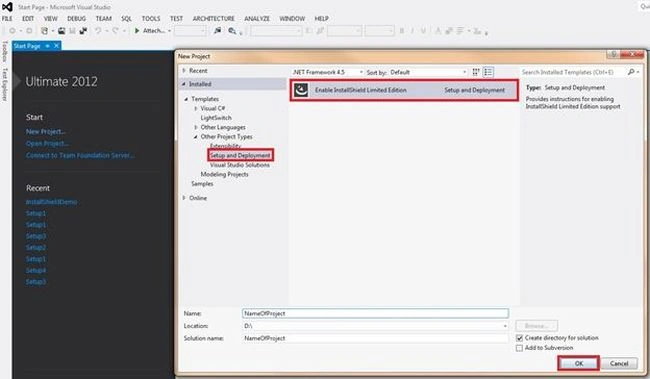
For the first time we need to download software, when we click on the "OK" button as in the above screen it will open a link to download the InstallShield software. It will look as in the following image:
Link: C:\Program Files (x86)\Microsoft Visual Studio 11.0\Common7\IDE\Extensions\InstallShield\InstallShieldProject\1033\InstallShield_ult.html
If you want to download the Express Edition then follow this link:
http://learn.flexerasoftware.com/content/IS-EVAL-InstallShield-Express
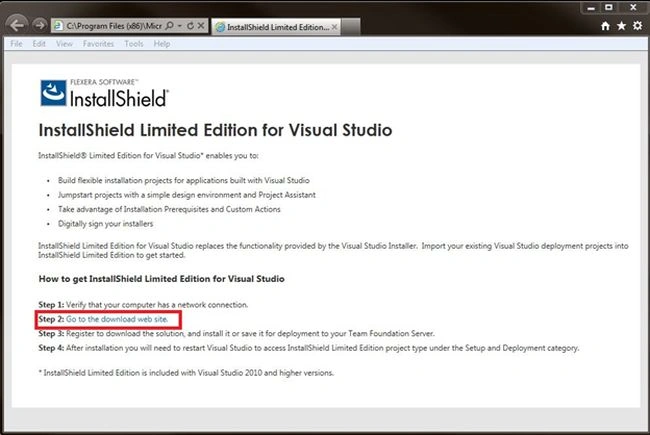
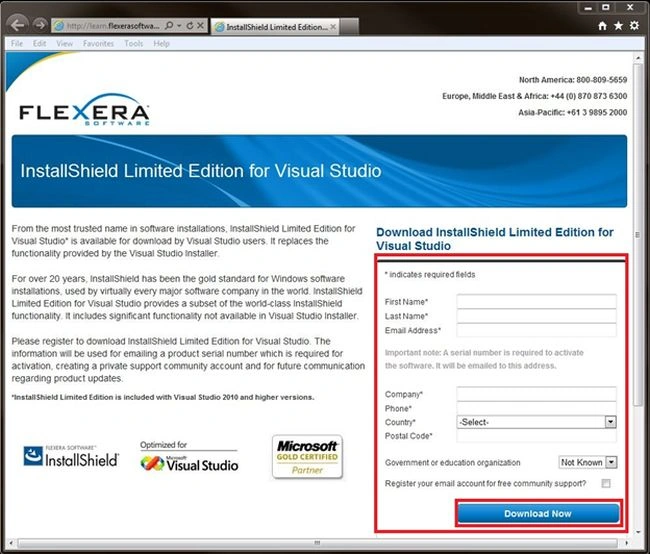
When you click on the Step 2: Go to the Download Web site you will be able to see the page as in the following image. You just have to download the InstallShield LE software from this page.
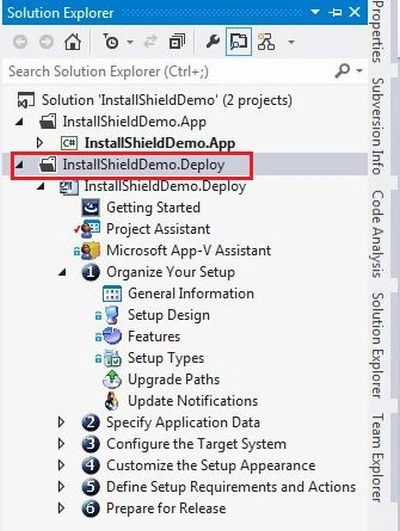
Install it and now open VS2012 and add the InstallShield project to the solution as shown in following image. Here I have added the WPF application as InstallShieldDemo.App and the InstallShield Project as InstallShieldDemo.Deploy.
Step 2 - Give Application Information
After adding the InstallShield Project you will be able to see this screen:
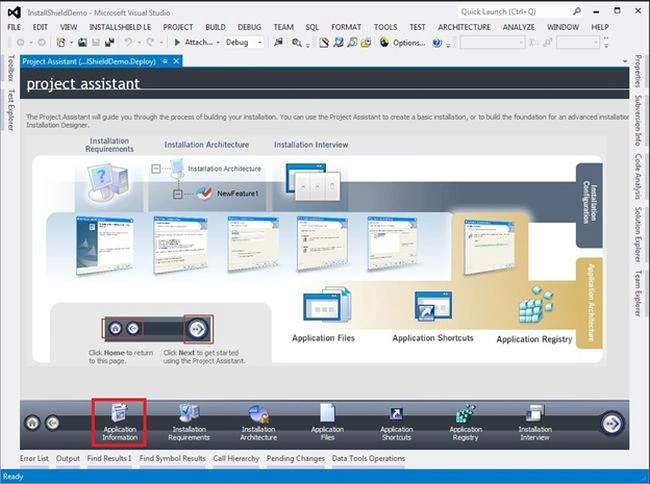
Then click on Application Information in the bottom of the screen and fill in the information.
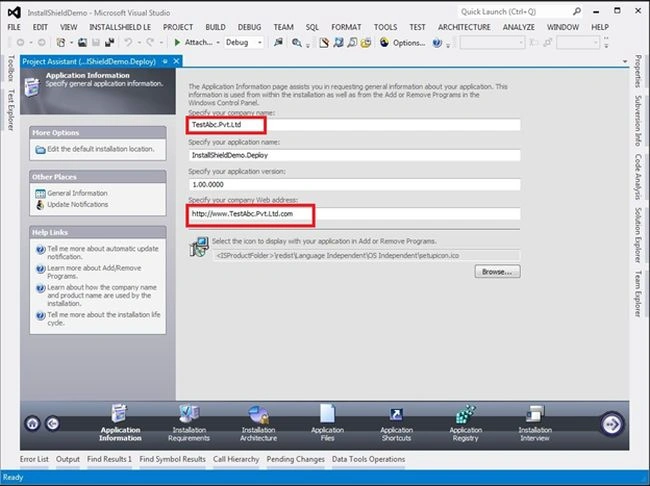
Step 3 - Click on Installation Requirements
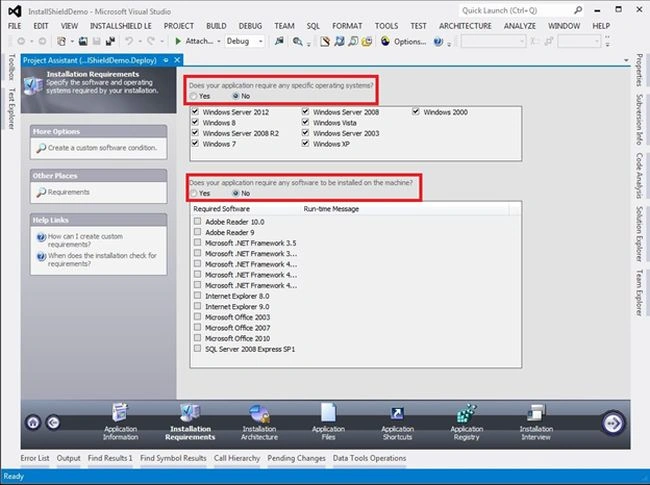
You can specify requirements for your application. It will check for these things before installation of your application. Then and then it will allow installation.
Step 4 - Click on Application Files
In InstallShield LE the Installation Architecture feature is not available.
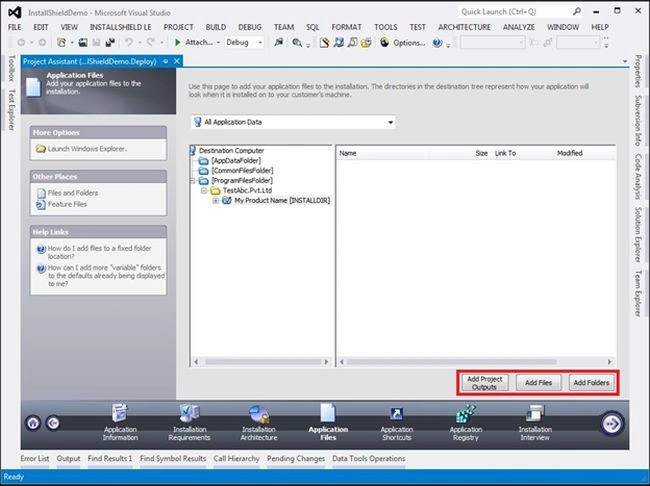
You can use any of these buttons to insert the application output file or necessary files. If your project is located on TFS or any other server then Use Add Project Outputs to add the Projects outputs and other necessary file so you can avoid the problem of a local path reference.
By clicking On Add Project Outputs you can the following image and you can select the options depending on your requirements.
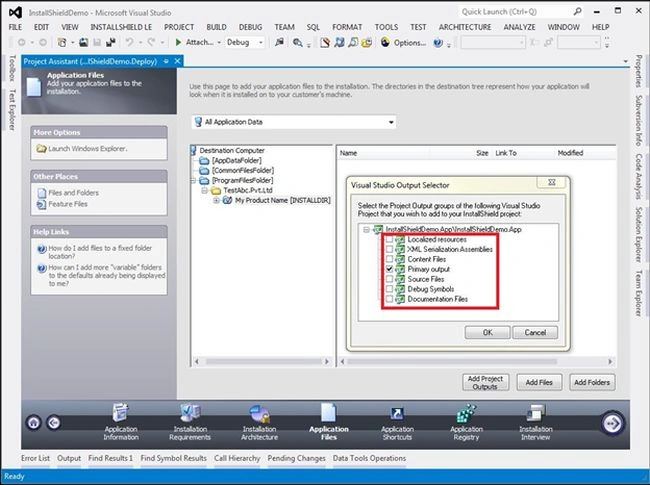
Or you can add the local reference of the output file from application\bin\debug folder.
Step 5 - Click application shortcuts
Here click on new and select the output file.
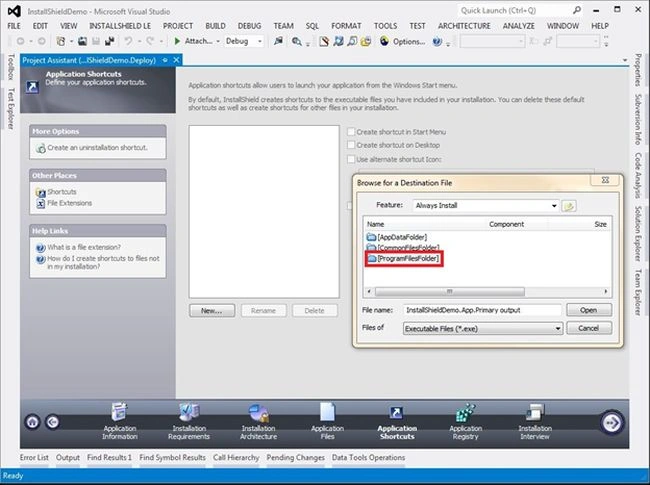
Click on programFilesFolder => TestAbc.Pvt.Ltd => My product Name =>select output file.
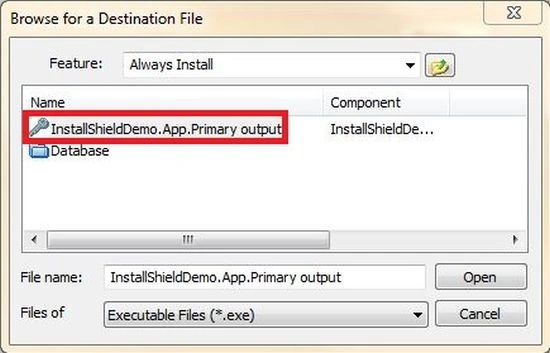
Now you will see this screen:
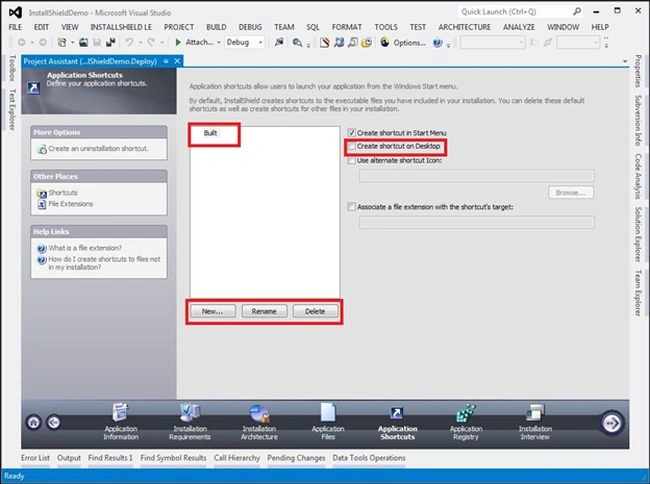
Here you can rename the application.
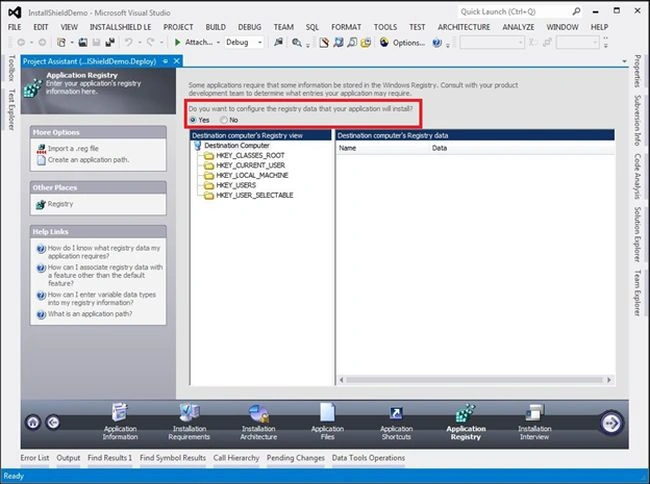
Step 6 - Click on Application Registry
IF your application requires you to change something in the registry then you can use this option:
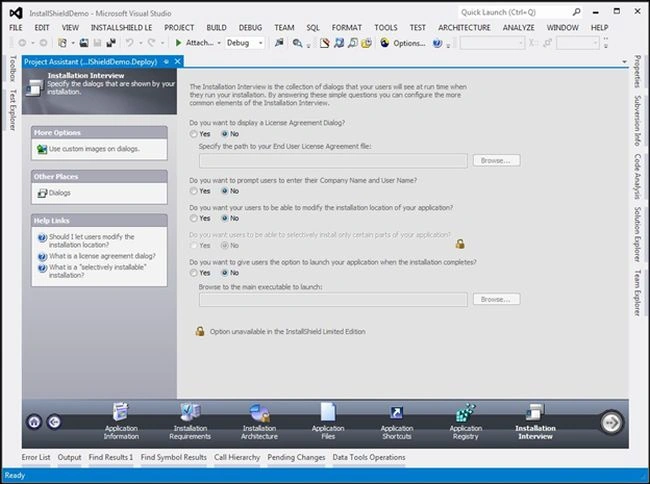
Step 7 - Click on Installation interview
Here you can use an option as per your application requirements.
From step 8 all the steps are optional.
Step 8 - Now go to the Solution Explorer, Select Redistributables option.
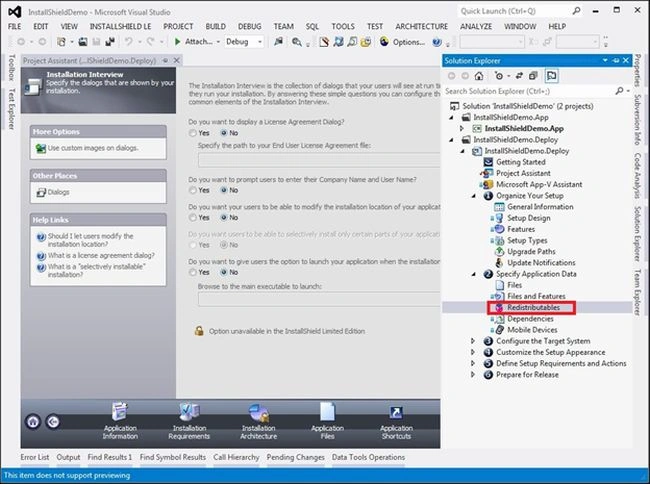
Select the Prerequisite for your application at the client side.
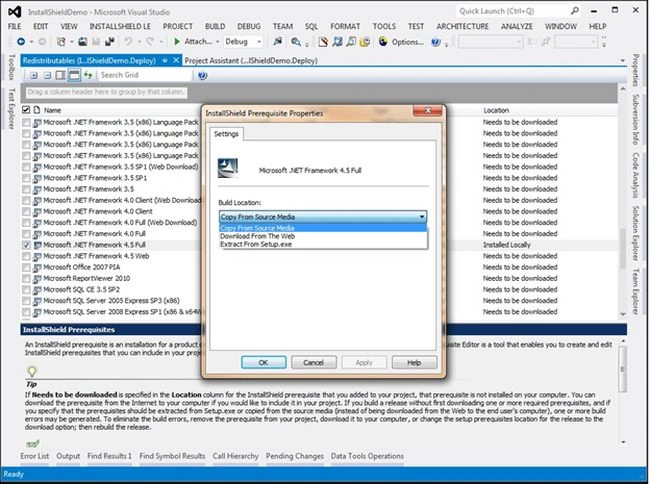
As you can see in the following image I have selected the Microsoft .Net Framework 4.5 full and I have right-clickrd it, to select the option. After that it will ask you to download some prerequisite software. Allow that operation; it will add this software to your setup when the setup is created.
The option Extract from steup.exe will combine the prerequisite software to your setup. It will create a single setup file. But you can set for the size to be increased.
Step 9
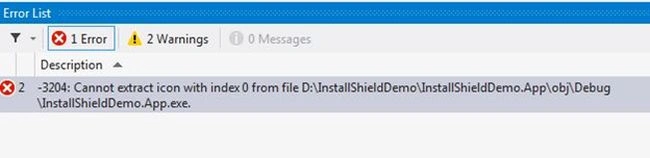
If you are getting an error regarding the Icon then do this. Then select the option Shortcuts/Folders from the Solution Explorer.
The error looks like:
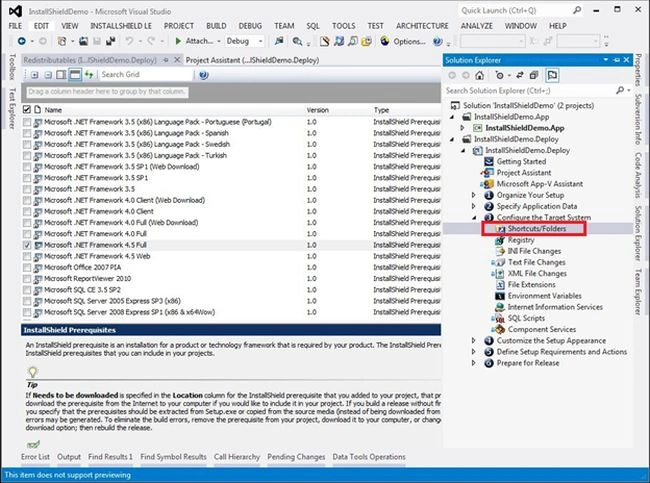
Then give the default icon to the application by giving the icon from the system or you can use any file.
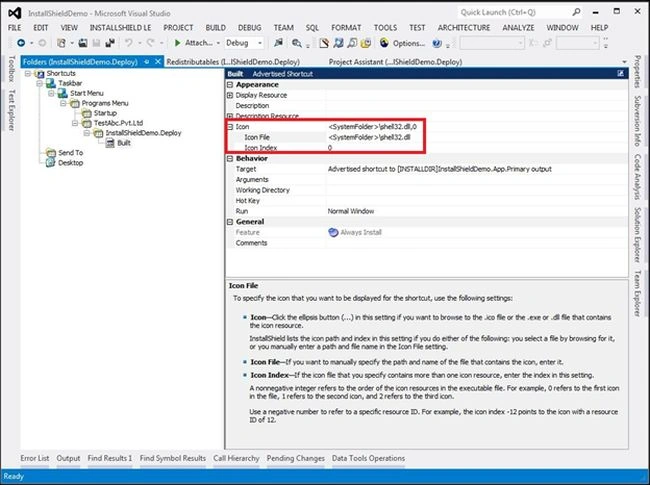
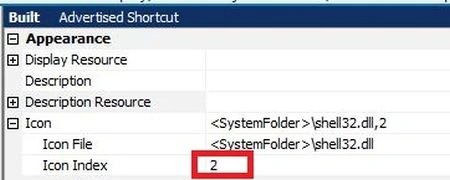
You can change the icon by changing the number of the Icon Index, as in the following image:
Now build the project. And your setup file will be created.
Go to the path:
Application folder\Express\DVD-5\DiskImages\Disk1\setup
Double-click on setup; it will automatically install the application.

To Create Setup File
We just need to build the project InstallShieldDemo.Deploy from solution Explorer to build the project select the project and right Click on it then select the Build Option.
And you we get the setup file for the application.
Now If you see the setup file folder it will have many more additional Files but if you want to make only Single Setup File then follow the Below steps
Step 1 : Select the Project and click on Build option from VS2012 and then select Option Configuration Manager(see the below image)

Step 2: Select the option SingleImage (See the below image)
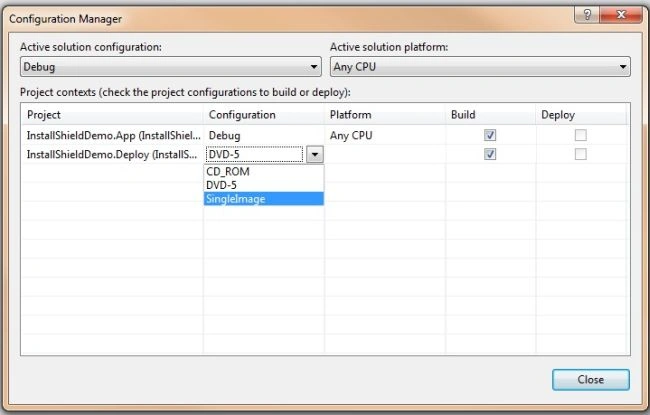
When you see the setup File folder it will contains only one Setup File (see the below Image)

If anyone is not able to understand any thing from the Article or have any question then you can tell me, I will try my best.
Thank you.
Shubhangi ChaturvediPosted Jun 11, 2020, 3:01 AM
Hi Jay, I have a setup project created in visual studio. I need to add an functionality for Uninstallation according to which during uninstallation, if user select the checkbox to delete the files and folder, then only it should be deleted. Can you guide me how to add user interface for uninstall option
Melchor VictorianoPosted Jul 24, 2019, 1:36 AM
Hi good day. i need to include the .net framework 4.5 full. but i dont know how. it said in the location that needs to be downloaded. and i already installed it in my pc.. please help.
Alice NguyenPosted May 24, 2019, 3:23 AM
Very helpful article, Thanks so much
Prince PrincePosted Apr 10, 2019, 2:11 AM
Very helpful article, thanks, I have developed vs2012 Application on 64bit cpu and 32bit window. How to create setup file in install shield that installs and run Application on any CPU (64bit CPU-32bit window / 64bit CPU-64bit window etc.). Please help.
Murali KannanPosted Mar 23, 2018, 12:03 AM
How to prepare for release? when ever i'm updating application, my client is loosing his datafile
Bhavesh SharmaPosted Aug 25, 2017, 10:04 AM
Hi, Can you give an idea about how to update setup (Setup version ) and how can i remove previous version, when i install latest Setup version?
khushbu bhalodiaPosted Jun 1, 2017, 12:51 AM
Hi I have developed my Cafe Billing system, But when I created setup file and install then my database error is database is readonly, Can you please help me to solve to create setup file with database.
Arun KumarPosted May 24, 2017, 1:00 AM
Can you please tell me, how to add installer class here ? To get a connection string while installing a set up file.
Veeramani DhanakodiPosted May 11, 2017, 3:12 AM
Nice work Jay... Gr8 stuff.. Its working for me...
Pushpesh PandeyPosted Jan 17, 2017, 1:11 PM
Solution to create setup file with database in vs 2012, visit this link https://pushpesh9.blogspot.in/2017/01/steps-to-create-setup-file-in-visual.html
Pushpesh PandeyPosted Jan 17, 2017, 1:10 PM
Check solution here https://pushpesh9.blogspot.in/2017/01/steps-to-create-setup-file-in-visual.html
Ziddi KhattakPosted Nov 22, 2016, 2:26 AM
The setup does't work on other pc, due to no database, how will you embed db in your setup file ???
kalu singh raoPosted Jul 9, 2016, 10:56 AM
Nice...
Silas MoshePosted Jun 15, 2016, 1:32 AM
I was able to run the installation but when launching the application, it says i dont have the necessary permissions to run the application
Juan HenaoPosted Feb 18, 2016, 8:27 AM
How to add Crystal Reports MSI files to the setup project. Thank you
Ankit UpadhyayPosted Jan 7, 2016, 7:46 AM
there is an error while installing or uninstalling error 1904, 1905 flash.ocx
amrendra kumarPosted Oct 24, 2015, 10:26 AM
Please help me
amrendra kumarPosted Oct 24, 2015, 10:25 AM
I want to know how to create setup with SQL database in c#.
Manikandan APosted Sep 23, 2015, 4:30 AM
How to register COM dll ?
Bharat MittalPosted Sep 17, 2015, 4:48 PM
how can i add two project in one setup file like i have one windows service project and one windows appilication project. i want to install both with single installation file. please tell me this can be possible or no ???
Vijay RangsPosted Jun 3, 2015, 1:17 PM
Could you please explain me that how do we set administrator full permission to files and folder when create exe?
Sateswar SahuPosted May 15, 2015, 12:13 AM
Good article on Developing setup project... Thanks for sharing....
rash dexterPosted May 4, 2015, 7:29 AM
Thanks for Nice Article.. Will you plz provide "Step by Step creating setup in Vs2012 with Database". I am looking for setup with database. Thanks
Abdul Amin KhanPosted Apr 29, 2015, 10:17 AM
I created Setup Successfully. But when i install it it works properly only first time. when we start second time it showing error. "Object Reference not to set an instance of an object". And its also running continuously in task manager. Please help me to resolve this issue......
Humayun Kabir MamunPosted Mar 16, 2015, 7:57 AM
Nice...
Rahul Kumar SaxenaPosted Mar 16, 2015, 2:11 AM
Good Show...
Srinivasan K KPosted Mar 16, 2015, 12:19 AM
I have used older setup project rather than going for Installshield, now your article induced me to use installshield. Thanks Jay.
Venkata PraneethPosted Jan 8, 2015, 10:23 AM
Hi Jay, Thank you for the information. It was very helpful. But i still have a problem regarding the confusion as to how to particularly specify what files we need for setup requirements. I am developing a software in c# VS 2013. I have been using the regular publishing method of the VS. But i wanted to use Install Shield, so i started using it. So, the problem is that, i have two projects [which are combined to give out the desired results]. The regular publish method does not ask me what kind of files do i require, as it simply publishes the main content through which i can install and use the application. but when i am using install shield, it has a page called as application files, where i have to particularly specify which files are needed for the installation setup file. But i do not have an idea exactly what files are needed. how can i overcome this problem ? Please help me guys. I hope i have not disturbed anyone by asking a simple question. Hoping for a nice solution, soon. thank you in advance.
Prafulla SahuPosted Dec 11, 2014, 7:06 AM
hi Karthik, it's quite late for this reply may be other people found useful, press shift key then right click, you will get your Run as Administrator menu in your context menu.
Prafulla SahuPosted Dec 11, 2014, 7:02 AM
hi Jay, thanks for your article it is awesome I went through it and I have created a setup file but I have a doubt i.e after created a setup file it is not creating a .msi extension file rather than it's creating an exe file could you please suggest me how can I create/convert this exe file to .msi extension file.
Shivani SharmaPosted Sep 1, 2014, 1:39 AM
hi...Thanks for your this article..I have successfully installed my set up this article. .how can i get automatic updation of my set up using install shiled
Suvarna DmelloPosted Aug 27, 2014, 5:39 AM
Hi I would like to Install SQL server 2012 Express edition Automatically without clicking next. How can I achieve this using InstallShield Limited edition using VisualStudio?
Anil KumarPosted Jul 16, 2014, 4:26 AM
I want my application to follow following steps before install using InstallShield:- Check if MySql is exist on system or not. Install MySql if it is not installed on system. Finally after install required softwares to run this application the application should be install. For this purpose i am using "InstallShield 2013". But when I am trying to make setup with this it doesn't allow MySql to appear in "Installation Requirements" section. Please help me to resolve this that how InstallShield 2013 can allow MySql to appear in Installation requirements.
usman aliPosted Jul 6, 2014, 1:11 PM
I am finding an error when I install my app on other Pc
usman aliPosted Jul 6, 2014, 1:11 PM
(null) is not valid Win 32 application
Muaz ul HaqPosted Jul 3, 2014, 5:40 AM
i m using mysql through xampp controller... how will i use this ?
komal KhatkolePosted Jun 16, 2014, 6:12 AM
hello jay , here i am getting the same error as you have mentioned in step 9 even after i did as per you said. But difference is that i am getting the same error twice when then after when i select an icon , 1 error gets vanish but still 1 is there.
haitham shaPosted Jun 7, 2014, 7:50 AM
thanks, i wanna to put sap crystal report run time in my setup
Deep GhetiyaPosted Jun 5, 2014, 4:49 AM
Hello Jay.......... Thanks for this blog...... But i want to know that How to make this installation file such that user can install it only One time and in only one PC ... can any one help me please....???
Manoj NankaniPosted May 2, 2014, 1:30 AM
I am not understanding step 4 properly.Which files I have to reference I have 12 projects in my solution and a main application project.How to add project and files?? Can someone help me here?? Thanks in advance
Vasid QureshiPosted Apr 22, 2014, 9:58 AM
Problem with step 4 in output "visual studio selector dialog". unable to find any output Selector or where to select outputfile.! Need Help Thanks in Advance!
nidhi DeshmukhPosted Apr 17, 2014, 12:44 AM
This link is very usefull ,, But can you explain for add database script and another tool kit if that is use in our Application ....
murat erkmenPosted Mar 4, 2014, 6:22 PM
hi everyone. I follow steps and i created setup of may app succesfully. The problem is i conrolled databse in my program if not exist create new one.I m using SQLite.and When i start project it create new natabse on desktop. i want to it will be created in a folder under C:\db. How i succeed it. thanks
Dinesh bhenkiPosted Jan 2, 2014, 8:32 AM
Thanks. what i need it.
Aejaaz AhmedPosted Jan 1, 2014, 10:36 AM
hello thanks for great article...i did as per ur guidelines..but when i installed on other system i encountered error as "LOGIN FAILED FOR USER BLAHBLAH......".I think the cause is connectionstring...but how to set it in such a way that it should be universal that means whereever i install it must run...
Jay ParekhPosted Dec 16, 2013, 8:57 AM
niyel Malpartida Arev ,What error u r getting? if not then may be there is not prob in Setup ,may be other issue..?
niyel Malpartida ArevPosted Dec 13, 2013, 9:24 PM
as would do to add more installation packages?
niyel Malpartida ArevPosted Dec 13, 2013, 9:22 PM
friend a question, the installer works best on windows 7, but to install windows 8 also works but the problem is that does not connect to the database, any ideas?
GreenPosted Dec 9, 2013, 3:47 PM
What does the end-user see? You talk about things from the Developer point of view but not the end-user point of view
supholo karPosted Nov 26, 2013, 6:07 AM
and also other project related files
supholo karPosted Nov 26, 2013, 6:06 AM
how to add Reports files and Database related file in installshield
Prabu SPosted Nov 12, 2013, 12:55 AM
how can publish website in IIS when installing setup?
kasi babuPosted Nov 7, 2013, 9:44 PM
Hi jay, nice article, i got problem while working with installshield i posted my question in csharpcorner forms, i am waiting for reply..
maricarPosted Sep 23, 2013, 10:01 PM
what should i expect when i run the setup? Should it be already installed to my visual studio?
Ajin prasadPosted Sep 13, 2013, 6:17 AM
jay, the link you provided are to add silverlight as prerequisite. my problem is with creating installer for silverlight projects. to install silverlight xap file we need to call the sllauncher. we can use a script as custom action for calling sllauncher. but my steps doesn't work. the insatkller installs the project. but no desktop shortcut appears
Ajin prasadPosted Sep 11, 2013, 5:54 AM
Hi Jay, I need to create silverlight oob installer using VS 2012. not 2010. can you please help me
Jay ParekhPosted Sep 8, 2013, 11:08 PM
@Ajin Prasad, hi as I can understand , you are trying to install silverlight as prerequisites of the software and you have installshield LE version right ,then you can use redistributables option in Installshield LE and you can add packages in that list. 1] http://shieldmaster.wordpress.com/2009/04/26/tutorial-adding-setup-prerequisites-to-installshield-package/ OR 2] http://daniellang.net/installshield-and-microsoft-visual-c-2010-redistributables/ See both link one try this way it will definitely going to work for you.
Ajin prasadPosted Sep 7, 2013, 12:17 PM
I think we need to use custom actions for silverlight installation....Any ideas?
Ajin prasadPosted Sep 7, 2013, 12:14 PM
Can you please help me in creating the msi installer for silverlight oob?
Ajin prasadPosted Sep 7, 2013, 12:12 PM
Hi Jay,
mina safdariPosted Sep 3, 2013, 3:28 AM
I can't download it.
Jay ParekhPosted Sep 3, 2013, 3:12 AM
@ mina Safdari, Means you are not able to download installShied LE Right ?? so you can download it from this Link http://learn.flexerasoftware.com/content/IS-EVAL-InstallShield-Express and install it after that run you VS2012 you will find the project template in it. ok please let me know if you still have problem thanks.
mina safdariPosted Sep 3, 2013, 3:05 AM
in vs2012, it dosen't go from step 1 to step 2.
Jay ParekhPosted Sep 3, 2013, 1:03 AM
@mina safdari, Where or when you are getting this Problem Explain in brief ??
mina safdariPosted Sep 3, 2013, 12:43 AM
Hi. After pressing ok does not go to the download page. What should I do to fix this problem?
Ajin prasadPosted Aug 30, 2013, 1:41 PM
How do we create silverlight outofbrowser msi installer in VS 2012. Can we follow the same step here? Silverlight oob needs to call sllauncher.exe right? can you help me to create msi instaler for silverlight oob?
liu JulyPosted Aug 15, 2013, 10:51 PM
Sorry,no Tanks,it is Thanks.
liu JulyPosted Aug 15, 2013, 10:48 PM
Hello,Jay.How to set the custom actions during uninstallation?Could you tell me? Tanks very much.
Jay ParekhPosted May 31, 2013, 6:28 AM
@anil kumar,Explain you Question in Brief
anil kumarPosted May 31, 2013, 5:49 AM
Also when i try to check it says compatible issues with the shortcut. Please help me in this regard
anil kumarPosted May 31, 2013, 5:48 AM
can you tell what i need to do
anil kumarPosted May 31, 2013, 5:48 AM
Hi, I have one question for you, After installing the metro app successfully, when I m clicking on the icon on the page, it is redirecting me to desktop page on the sta
Jay ParekhPosted May 1, 2013, 8:23 AM
Hi,here is the link to create simple setup of Website using Install Shield LE from VS2012 "http://www.c-sharpcorner.com/UploadFile/cb88b2/simple-steps-to-create-setup-of-website-using-install-shield/".
PriyaPosted Apr 29, 2013, 7:40 AM
Thanks a lot for such a wonderful work. I am creating a setup project for Web Application in Visual Studio 2012. I followed the steps mentioned but still I am not able to create a setup successfully for web application. Am I missing something or I need to do things differently for web Application. Thanks
Jane CarcuevaeditedPosted Apr 17, 2013, 5:54 AMEdited Apr 24, 2013, 2:33 AM
Great!
imanPosted Apr 1, 2013, 6:14 AM
hello it is very useful can you help me about this error ? I build a setup with install shield but when execute it i have this error: There was an error running the SQL script . Setup will now terminate. [Microsoft][ODBC SQL Server Driver][SQL Server]line 4 :length or precision specification 0 is invalid (1001) ///// thank you for your attention
kinjal patelPosted Mar 30, 2013, 12:52 AM
i need to install silent mode. how could be done in istall shield in visual studio 2010. plz help me
DanaPosted Mar 12, 2013, 4:46 PM
Thanks for this. In my installation, I need to lay down two things: 1. My application primary output (easy enough) 2. Another file, which must be installed in a specific location, which is specified in the registry of the target machine. Any thoughts on #2?
Jerom JoyPosted Feb 27, 2013, 8:04 PM
I need to read value for a data from user in application. can i do that at setup. thanks
JaibabbuPosted Feb 20, 2013, 2:41 AM
Thanks Jay Parekh, I will look into the link you provided, and make use of the forum you specified for questions. Thanks Jaibabu.J
Jay ParekheditedPosted Feb 18, 2013, 1:56 AMEdited Feb 18, 2013, 1:57 AM
Hi jaibabbu, you can refer to this link: "http://community.flexerasoftware.com/showthread.php?190091-IIS-7-Uninstall-is-not-removing-applications-set-up-in-IIS" or ask question at below link : "http://community.flexerasoftware.com/forumdisplay.php?133-InstallShield"
JaibabbuPosted Feb 17, 2013, 3:52 AM
Hi, Thanks a lot for this article. It is simple and easy to understand for the beginners. I had created an installer with InstallShieldLE. It successfully deploying the web applications in IIS and start the services. But, when i try to uninstall the installshield through control panel, the installshield gets removed, but the files and the hosted applications remains as it is in the path and IIS. Is there anything i want to set for uninstaller to remove all the files and IIS hosted applications? I googled for it, but i dont be in success on following the steps they told. I tried, for Permanent/Shared. but in LE version of installer, there is no option to set. Could you please point were i am missing? Thanks Jai
Jay ParekhPosted Jan 19, 2013, 5:17 AM
Thank You Nawawi S, Because It Feels Great when Someone Appreciate, Thanks
Nawawi SPosted Jan 13, 2013, 9:13 PM
Great article.. thanks a lot
Jay ParekhPosted Nov 6, 2012, 11:39 PM
Thank You Dinesh,
Mahesh ChandPosted Nov 6, 2012, 11:50 AM
I appreciate your nice words Jay. A community is all about learning from it and giving it back to the next generation like what you are doing. Cheers!
Dinesh BeniwalPosted Nov 6, 2012, 11:37 AM
Good Work Jay.
Jay ParekhPosted Nov 6, 2012, 11:06 AM
Thank you so much sir,I am huge fan of yours from my collage days and i have learn many things from your articles and specially WPF articles. Install Shield LE allows many features and may be that are enough to make setup and deploy application.We can get Install Shield Express trail version free but that is only for limited period. And Click Once deployment is also a good option. Again thank you so much sir.
Mahesh ChandPosted Nov 6, 2012, 9:56 AM
Well explained tutorial. Wonder if InstallShield Express is a free edition?