
In this article I will discuss how to create a Stop Watch application using C# and and GDI+.
The attached source code uses GDI+ classes defined in the .NET Framework class library. When you run the application, the clock starts and when you click Stop, the clock stops.
The watch looks like the following figure:
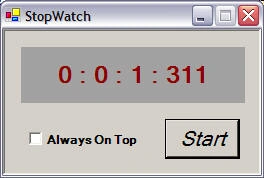
See the attached source code for more details. The attached source code is a stop watch written using C# and GDI+.
Ahmed AbdelqaderPosted Jul 3, 2012, 8:13 AM
Thanks.
Samantha SmithPosted Oct 14, 2010, 3:52 AM
Thanks for this, it is a huge help!
crismar tiongcoPosted May 30, 2010, 7:47 PM
how will i pause the timer...not reseting it after pressing the start button .I mean I would like to have a new button that functions to be a 'pause' button and a 'continue' button..thanks..
intri gantPosted Mar 24, 2009, 8:26 AM
Thanx
Gregg PittseditedPosted Oct 30, 2007, 7:28 PMEdited Oct 30, 2007, 7:35 PM
I've tried deleting this post, but it doesn't delete it...? It posted my original post twice! Good tutorial by the way!
Gregg PittseditedPosted Oct 30, 2007, 7:09 PMEdited Oct 30, 2007, 7:31 PM
I tried to add a Rest button but I can't get it to reset? Also, I want to make the Start/Stop button just pause the counter & not reset it. Any suggestions? Thanks :)