


In the rapidly changing world of software development, one thing remains constant: the perpetual challenge of managing the complexity that naturally arises as applications grow in size and complexity. As our projects expand to encompass more features, functionalities, and interconnected parts, the need for maintainable, testable, and adaptable code becomes more critical than ever before.
Consider it this way: picture a sprawling metropolis, a city that started as a small village but has grown into a vast and intricate network of roads, buildings, and infrastructure. This city represents a software application, with each road and building symbolizing a component or piece of code.
In the early stages of the city’s development, it was relatively straightforward to navigate and manage. The roads were simple, and the buildings were few and far between. However, as time passed, the city grew in size and complexity. New roads were built, buildings sprouted up, and the once-simple layout became a labyrinth of interconnected streets and structures.
Similarly, in software development, a project that begins as a small, manageable codebase can quickly evolve into a sprawling application with many interconnected components, modules, and libraries.
Dependency Injection (DI) is a fundamental concept in modern software development that helps manage the complexity of large applications by promoting loose coupling between components. It’s widely used in .NET applications, including WinForms, to improve maintainability, testability, and code reuse. In this article, we’ll explore how to implement Dependency Injection in a .NET 6 Windows Forms application with real-world examples.
In this article, we explore dependency injection and how to implement it into Windows Forms Applications. The following topics will be covered in this article.
- What is Dependency Injection?
- Why Use Dependency Injection in Windows Forms?
- Setting Up a .NET 6 Windows Forms Project
- Implementing Dependency Injection
- Registering Services
- Resolving Dependencies
- Constructor Injection
- Property Injection
- Conclusion
What is Dependency Injection?
Dependency Injection is a design pattern that enables the separation of concerns in an application by providing a way to inject dependencies (such as services, objects, or configurations) into a component rather than letting the component create them. This promotes modularity, testability, and code maintainability.
Why to Use Dependency Injection?
In Windows Forms applications, using Dependency Injection offers several advantages:
- Testability: Components can be tested in isolation by injecting mock or fake dependencies, allowing for unit testing.
- Loose Coupling: Dependencies are not hard-coded, making it easier to change or extend functionality without modifying existing code.
- Readability and Maintainability: The code becomes more readable and maintainable as dependencies are explicitly defined and injected.
- Code Reuse: Dependencies can be reused across multiple components.
- Scalability: The application can scale by adding new services without affecting existing code.
Setting Up a .NET 6 Windows Forms Project
Before implementing Dependency Injection, create a .NET 6 Windows Forms project using Visual Studio or the .NET CLI. Ensure you have the necessary tools and SDK installed.
- Visual Studio 2022
- .NET 6 SDK
- Windows Development Workload in Visual Studio
We will commence by creating a Windows Forms Project from Visual Studio.
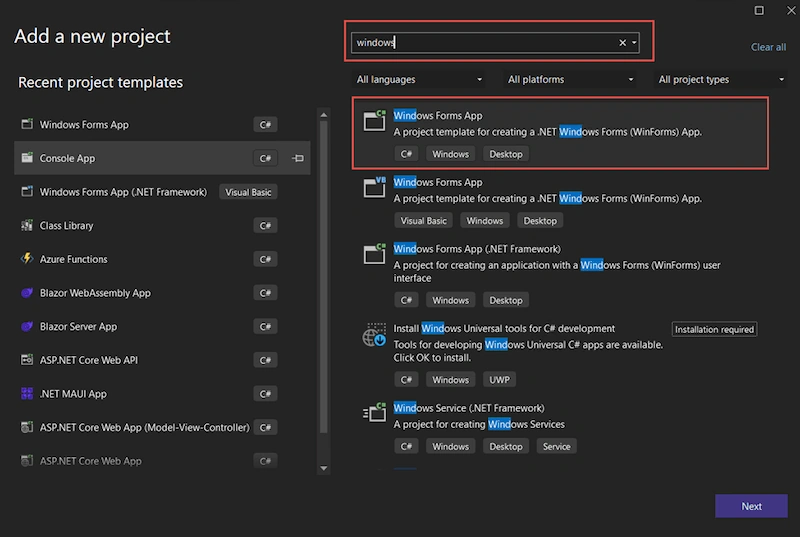
Give a name to the project. I have named as DIWinFormsSample. Choose .Net Framework, .NET 6.
Now our Windows Forms application is created.
Implementing Dependency Injection
To implement DI in the above Windows Forms application, follow these steps:
- Add Required NuGet Packages
In the WinForms project, add the following NuGet packages:
- Microsoft.Extensions.DependencyInjection
- Microsoft.Extensions.Hosting
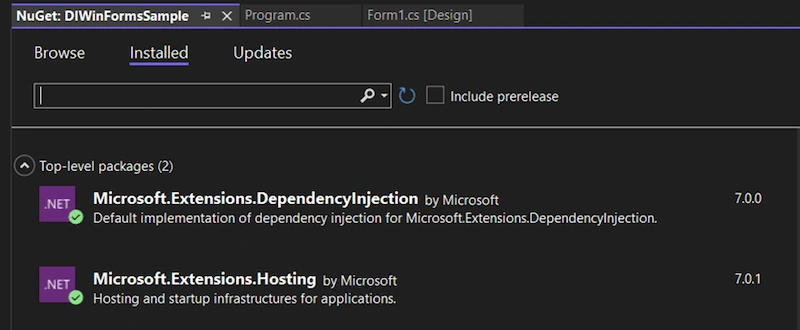
Tips: better to get the latest version of NuGet Packages.
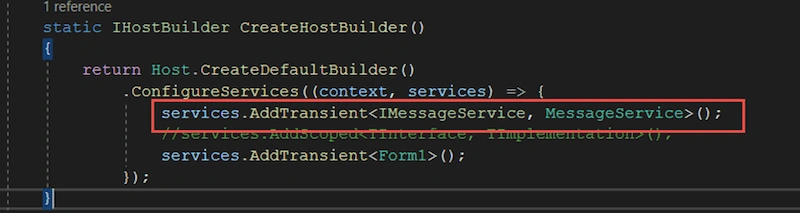
We will navigate program.cs file and add a function CreateHostBuilder, as shown below.
Create a host builder to build the service provider.
public static IServiceProvider ServiceProvider { get; private set; }
static IHostBuilder CreateHostBuilder()
{
    return Host.CreateDefaultBuilder()
        .ConfigureServices((context, services) => {
            services.AddTransient<IBlobStorageService, BlobStorageService>();
            services.AddTransient<IErrorMessageLog, ErrorMessageLog>();
            services.AddTransient<IFileMigrationService, FileMigrationService>();
            services.AddTransient<IAttachmentDataAccess, AttachmentDataAccess>();
            services.AddTransient<MainForm>();
        });
}
Join the conversation! Your thoughts help the community grow.